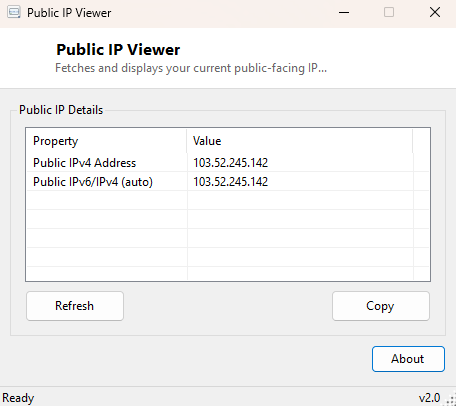
Overview
Public IP Viewer answers the other half of the "what's my IP" question that Local IP Viewer deliberately does not — the address the rest of the internet actually sees when your traffic leaves your router. Your PC's local network address (usually something like 192.168.x.x) means nothing outside your own home or office network; everything beyond your router is routed using a single public address assigned by your internet service provider, and that is the number this tool retrieves.
Key Features
- Fetches your current public IPv4 address from an external lookup service
- Attempts a secondary lookup that returns IPv6 where your connection supports it
- Simple one-click Refresh to re-check after a router reconnect or ISP-assigned change
- No local network scanning or configuration required
- Clear "Unavailable" status shown if the request cannot complete, rather than a stale or fake value
- One-click copy of the address to the clipboard
Why You Might Need This Tool
Setting up remote access to a home server, configuring dynamic DNS, whitelisting your own connection on a firewall rule, or simply confirming whether your ISP has changed your assigned address all require knowing your current public IP first. Most home internet connections use dynamic addressing, meaning this value can change after a router reboot or an ISP-side reassignment — this tool gives you an instant, reliable way to check the current value rather than relying on a stale note from months ago.
How It Works
The tool makes a simple HTTPS request using System.Net.Http.HttpClient
to a public IP-echo endpoint, which reflects back the address the request appeared to
originate from — this is the standard, well-established technique every "what's my
IP" web page and utility uses, since there is no other reliable way for a program
running behind a router to learn its own externally-visible address without asking
something outside that router to report it back. A short six-second timeout is applied
to each request so the tool fails clearly and quickly rather than hanging if the
network is unavailable, and a separate IPv6-capable endpoint is queried afterward for
connections that support it.
How to Use It
Open the tool and it queries automatically, displaying your current public address within a few seconds. Click Refresh any time you suspect your address may have changed — after a router restart, a modem power cycle, or simply reconnecting after being offline for a while. Use Copy to place the address on the clipboard for a firewall rule, a dynamic DNS entry, or sharing with someone who needs to reach a service you are hosting.
System Requirements & Notes
Requires an active internet connection to function, since the address can only be learned by asking an external server. Runs on 64-bit Windows 10 and Windows 11 and needs no administrator rights.
Frequently Asked Questions
Why is this different from the address shown in Local IP Viewer?
They answer two different questions on purpose — your local address identifies your
PC only within your own network, while your public address is what identifies your
entire network to the outside internet, typically shared across every device behind
the same router.
Does my public IP change often?
It depends entirely on your ISP's policy — many residential connections reassign
addresses periodically or after any router restart, while some business connections
use a fixed static address that never changes.
Is checking my public IP a privacy risk?
No more than any other website visit — the lookup service only ever sees what any
website you visit already sees, and this tool does not log, store or transmit the
result anywhere beyond displaying it to you.