Overview
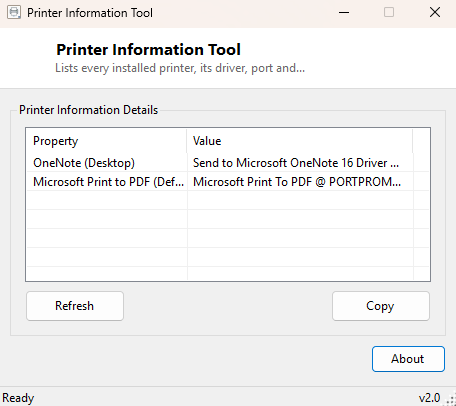
Printer Information Tool gives you a single, scrollable list of every printer Windows currently knows about — local, network, and virtual "print to PDF" style printers alike — along with the driver each one uses, the port it is bound to, and which one Windows currently treats as the default. It is the kind of information the Devices and Printers control panel technically contains, but scattered across icons, right-click menus and property dialogs that take several clicks each to open. This tool puts the same facts in one flat, readable table.
It does not manage print queues, does not install or remove printers, and does not touch driver files — it reads what Windows already has configured and presents it clearly, nothing more.
Key Features
- Lists every installed printer, virtual and physical alike
- Shows the exact driver name bound to each printer
- Reports the port each printer is configured to use
- Clearly flags which printer is currently set as Windows default
- One-click Refresh after adding, removing or changing a default printer
- Copy-to-clipboard for pasting the full list into a support message
Why You Might Need This Tool
Printer troubleshooting almost always starts with a version of the same question: "is the right printer actually set as default, and is it using the driver I think it is?" A document silently printing to the wrong device, or printing garbled output because Windows quietly picked up a generic driver instead of the manufacturer's correct one, are both immediately visible once you can see driver-to-port bindings laid out plainly. IT support staff walking a remote user through a printing problem over the phone benefit the most — instead of asking someone to describe several property dialogs verbally, you can ask them to run this tool once and read back one short table.
How It Works
The tool runs a single WMI query against the Win32_Printer class,
requesting the Name, DriverName, PortName and
Default properties for every instance. Each returned printer is added as
a row, with the one whose Default property evaluates true visibly marked
"(Default)" next to its name in the list. If no printers are installed at all — a
genuinely common state on fresh Windows installs before any driver has ever been
added — the tool reports that plainly rather than showing an empty, unexplained table.
How to Use It
Launch the tool and the printer list populates immediately, no configuration needed. After installing a new printer, changing the default, or removing one, click Refresh to re-query Windows rather than restarting the tool, since Windows does not push live change notifications for printer configuration to already-open applications.
System Requirements & Notes
Runs on 64-bit Windows 10 and Windows 11 without requiring administrator rights — reading printer configuration through WMI is a standard-user operation. The tool makes no changes to printer settings, drivers, or the default printer selection.
Frequently Asked Questions
Does it show printers that are offline or disconnected?
Yes — Windows keeps a printer's configuration entry even when the physical device is
powered off or unreachable, and this tool reports whatever Windows has on record
regardless of live connectivity.
Can I change the default printer from here?
No, this tool is read-only. Use Windows Settings → Printers & scanners to change
the default; this tool will reflect the change immediately after a refresh.
Does it work with network and shared printers?
Yes — any printer Windows has installed, regardless of whether it connects locally,
over a network, or through a print server, appears in the same list.