Overview
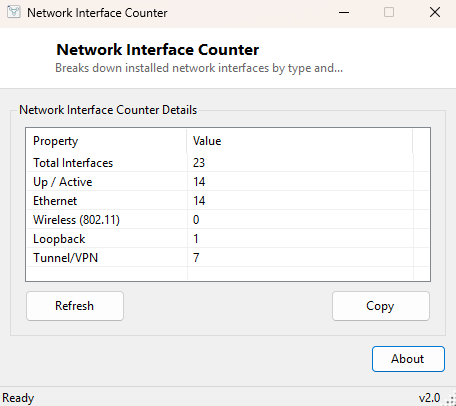
Modern Windows PCs quietly accumulate far more network interfaces than most people realize — a physical Ethernet port, a Wi-Fi card, a Bluetooth PAN adapter, a loopback interface, and often several virtual adapters created by VPN software, Hyper-V, Docker or a VPN client, each showing up as its own interface even though only one or two are ever actually carrying real traffic. Network Interface Counter cuts through that clutter with a simple breakdown: how many interfaces exist in total, how many are actually up and active, and how many fall into each type category.
It does not attempt to be a full adapter management tool — for enabling, disabling or configuring a specific adapter, Network Adapter Switcher and Network Adapter Information are the better fit. This tool answers one narrower question: what does the overall interface landscape on this machine look like right now.
Key Features
- Total interface count across the entire system
- Count of interfaces currently Up / active versus inactive
- Breakdown by type: Ethernet, Wireless 802.11, Loopback, Tunnel/VPN
- Single-window, no-configuration display
- Useful cross-check when adapter counts look wrong in Device Manager
- Instant results — no scanning or waiting required
Why You Might Need This Tool
The most common reason to reach for this tool is confusion caused by virtual adapters — after installing a VPN client, virtualization software, or certain security tools, it is easy to lose track of how many "network adapters" actually exist on a machine and which of them matter. Getting a quick tally by type helps separate the handful of physical, meaningful interfaces from the growing pile of virtual ones that only exist to support specific software. It is also a useful first step in network troubleshooting — confirming, for instance, that a Tunnel interface exists and is counted correctly after setting up a VPN, or that a Wireless 802.11 interface is present at all on a machine where Wi-Fi seems to have disappeared from settings entirely, which sometimes indicates a driver failure serious enough that Windows is not even creating the adapter object.
How It Works
The tool calls NetworkInterface.GetAllNetworkInterfaces() once to
retrieve the complete list of network interfaces Windows currently recognizes,
then uses LINQ counting queries against that list to build each statistic: the
total count, a count filtered by OperationalStatus.Up for active
interfaces, and separate counts filtered by
NetworkInterfaceType.Ethernet,
NetworkInterfaceType.Wireless80211,
NetworkInterfaceType.Loopback and
NetworkInterfaceType.Tunnel respectively. This is the same
enumeration .NET itself uses internally and the same one several other tools in
this catalog (Local IP Viewer, MAC Address Viewer, Network Adapter Information)
build on — Network Interface Counter simply aggregates it into summary statistics
rather than listing every interface individually.
How to Use It
Launch the tool; all counts populate immediately with no interaction required. There are no settings to adjust and no scan to wait for — every figure reflects the interface list exactly as Windows reports it at the moment the tool opened. Close and reopen it (or use any refresh control if present) to recheck after changing network configuration.
System Requirements & Notes
Runs on 64-bit Windows 10 and Windows 11 and requires no administrator rights —
enumerating network interfaces is a standard-user operation available to any
application. The type categories reported reflect .NET's own
NetworkInterfaceType classification, which occasionally differs
slightly from how Device Manager labels the same hardware, since the two use
different underlying Windows networking APIs.
Frequently Asked Questions
Why does my interface count seem higher than the physical adapters I have?
Virtual adapters created by VPN clients, virtualization platforms, and some
security software each count as separate interfaces, along with the always-present
loopback interface — a machine with one Wi-Fi card can easily show four or five
interfaces once these are included.
Does this tool show interface names, or only counts?
Only aggregate counts by status and type — for the full list of individual
interfaces with names and details, see Network Adapter Information instead.
Will disabling a virtual adapter reduce the count shown here?
Yes — a disabled or removed adapter no longer appears in Windows' interface list
and will not be counted on the next check.