Overview
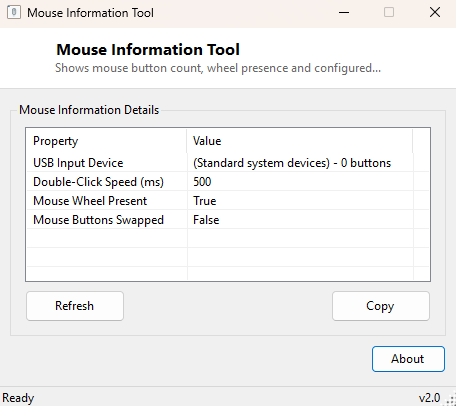
Mouse Information Tool reports the pointing-device details and click behavior settings Windows is currently using — device name, manufacturer, button count, wheel presence, double-click timing and whether buttons are swapped for left-hand use. It combines hardware identification with the active Windows mouse settings in one small window, rather than making you check Device Manager and Control Panel's Mouse settings separately.
Key Features
- Identifies the detected pointing device and its manufacturer
- Reports the number of buttons Windows recognizes on the device
- Confirms whether a scroll wheel is present
- Shows the configured double-click speed in milliseconds
- Reports whether left/right buttons are currently swapped
- Instant, read-only results
Why You Might Need This Tool
When a mouse's extra buttons are not responding as expected, confirming how many buttons Windows actually detects is a useful first step before assuming a driver or software mapping problem. It is equally useful for quickly verifying double-click timing after adjusting it, or confirming button-swap settings after handing a PC to a left-handed user — all without opening the full Control Panel Mouse Properties dialog.
How It Works
The tool queries WMI's Win32_PointingDevice class for the device's
Name, Manufacturer, NumberOfButtons and
PointingType. It then reads three properties directly from
System.Windows.Forms.SystemInformation — DoubleClickTime
(the configured maximum interval between clicks for them to register as a double-
click, in milliseconds), MouseWheelPresent, and
MouseButtonsSwapped — giving a combined hardware-plus-configuration
picture from two different but complementary sources.
How to Use It
Open the tool and every value appears immediately. Change a setting in Windows' Mouse Properties (such as double-click speed or button swap) and click Refresh to confirm the new value took effect.
System Requirements & Notes
Runs on Windows 10 and 11 x64 without administrator rights. As with the keyboard equivalent, some mice — particularly budget or generic USB models — report only generic identification data rather than a specific brand and model name.
Frequently Asked Questions
Why does it show fewer buttons than my mouse actually has?
Windows' built-in pointing-device reporting often only recognizes the standard
buttons; extra side buttons on gaming mice are frequently handled entirely by
manufacturer-specific driver software rather than being reported through this
standard WMI class.
Can this tool change my double-click speed?
No — it is read-only. Adjust it in Windows Settings' Mouse properties, then use
this tool to confirm the change.