Overview
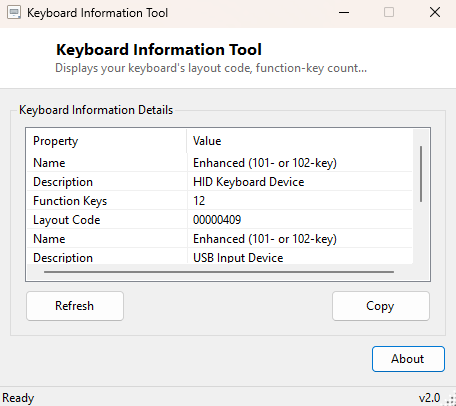
Keyboard Information Tool reports what Windows itself knows about the keyboard hardware currently attached and configured — device name, description, function-key count and the active keyboard layout — in one compact window. It is a small companion to the input-device side of this catalog, useful whenever a keyboard is behaving unexpectedly and you want to confirm exactly what Windows thinks is connected before digging further.
Key Features
- Shows the detected keyboard device name and description
- Reports the number of function keys Windows believes the keyboard has
- Shows the manufacturer string where one is reported
- Displays the currently active keyboard input layout identifier
- Instant, read-only results
Why You Might Need This Tool
A keyboard that types the wrong characters, has non-functional media keys, or seems to be recognized as a completely different model than expected is often easier to diagnose once you can confirm exactly what Windows detected in the first place. It is also a fast way to confirm the active keyboard layout matches what you expect, especially after switching between language input profiles.
How It Works
The tool queries WMI's Win32_Keyboard class, which exposes the
Name, Description, NumberOfFunctionKeys
and Layout properties for the detected keyboard device. Alongside
that, it reads System.Globalization.CultureInfo.CurrentCulture
.KeyboardLayoutId to report the currently active input layout identifier
directly from the .NET globalization API, which reflects the layout actually in
effect for the current session rather than just what is listed as installed.
How to Use It
Run the tool and the detected keyboard's details and current layout ID appear immediately. If you switch input languages, re-run the tool or click Refresh to confirm the layout ID updated accordingly.
System Requirements & Notes
Runs on Windows 10 and 11 x64 without administrator rights. On some systems, particularly laptops with built-in keyboards, Windows may report generic HID device information rather than a specific model name — this reflects how the device identifies itself to Windows, not a limitation of the tool.
Frequently Asked Questions
Why does it show a generic name instead of my keyboard's brand?
Many keyboards, especially built-in laptop keyboards and inexpensive USB models,
report only generic HID descriptor information to Windows rather than a
manufacturer-specific name string.
Can this tool change my keyboard layout?
No — it only reports the current state. Use Windows Settings → Time &
Language → Language & region to change input layouts.