Overview
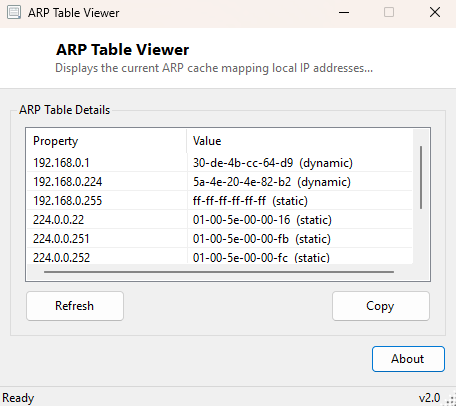
ARP Table Viewer displays the current ARP (Address Resolution Protocol) cache —
the local table Windows maintains mapping every IP address it has recently talked
to on your LAN to that device's physical MAC address. This is the exact same data
the classic arp -a command line has always shown, presented in a
readable window instead of scrolling console text, with no need to remember the
command or open a terminal at all.
ARP is one of the more invisible protocols on a home or office network — it runs constantly in the background every time one device on the LAN needs to send a packet to another, translating "I want to reach 192.168.1.5" into "which physical network card is that." This tool exists purely to make that normally hidden table visible on demand.
Key Features
- Lists every IP-to-MAC mapping currently held in the local ARP cache
- Groups entries by the interface each mapping was learned through
- Refresh button to capture the current cache state at any moment
- No command line required — reads the same data as
arp -adirectly - Copy-friendly list format for pasting into notes or a support ticket
- Read-only — this tool never modifies the ARP cache, only displays it
Why You Might Need This Tool
The most direct use is confirming which physical device actually owns a particular IP address on your local network — useful when troubleshooting an IP conflict, or when you need to identify which physical machine is generating unexpected traffic at a specific address. It is also a useful sanity check after connecting to an unfamiliar network: reviewing the ARP cache can reveal how many other devices your machine has already communicated with, which is informative context on a network you do not fully trust. Network administrators and hobbyists setting up new hardware — a router, a smart-home hub, a printer — often use the ARP table to confirm the device actually announced itself on the LAN and grab its MAC address for a DHCP reservation, without needing to dig through the device's own (frequently awkward) settings menu.
How It Works
The tool launches the built-in Windows arp.exe utility with the
-a argument via Diagnostics.Process, capturing its
standard output rather than reimplementing ARP cache parsing from scratch. It then
parses each line of that output, splitting on whitespace to separate the IP
address column from the MAC address and entry-type columns, and filters to lines
that actually contain a dotted IP address (skipping the header and interface-name
lines arp -a also prints). Each valid entry is added to the display
list as an IP address paired with its MAC address and entry type (dynamic entries
learned automatically versus static entries manually configured). Using the real
arp.exe binary underneath, rather than querying the cache through a
lower-level API, guarantees the data shown always exactly matches what the command
line tool itself would report.
How to Use It
Launch the tool and the current ARP cache populates automatically. Click Refresh at any point to recapture the cache's current state — useful after pinging a new device on the network, since a successful ping is one of the most common ways a new entry gets added to the cache in the first place.
System Requirements & Notes
Runs on 64-bit Windows 10 and Windows 11 and does not require administrator
rights — reading the ARP cache is available to any standard user, the same as
running arp -a from an unelevated command prompt. The ARP cache only
contains devices your machine has actually communicated with recently; it is not a
full scan of every device on the network. For that kind of active discovery, pair
this tool with MAC Address Scanner, which pings an entire subnet first specifically
to populate the cache before reading it.
Frequently Asked Questions
Why don't I see every device on my network in this list?
The ARP cache only contains devices your machine has recently exchanged traffic
with — it is not a network scanner. Devices you have never communicated with will
not appear until you do, for example by pinging them.
Do ARP cache entries expire?
Yes — Windows automatically ages out dynamic ARP entries after a period of
inactivity (typically a few minutes), so refreshing this tool later in the day may
show a different, shorter list than right after a burst of network activity.
Can this tool add or remove ARP entries?
No — it is strictly read-only and only displays the existing cache; it never
modifies it.