Overview
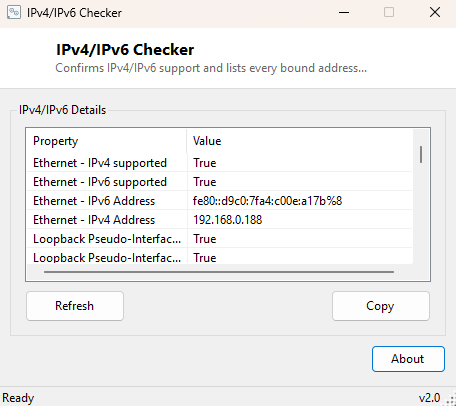
IPv6 has been technically "supported" on Windows for over two decades, yet whether it is genuinely active, correctly configured, and actually assigning working addresses on any given adapter remains surprisingly hard to confirm at a glance. IPv4/IPv6 Checker reports, per network adapter, whether each protocol is supported and enabled, and lists every actual bound address of both types — settling the "am I even using IPv6 right now" question definitively.
Key Features
- Reports IPv4 and IPv6 support status independently for every network adapter
- Lists every bound IPv4 and IPv6 address per adapter
- Distinguishes link-local IPv6 addresses from globally routable ones
Why You Might Need This Tool
Dual-stack networking issues have a specific, recognizable signature — a connection that intermittently fails, an application that behaves differently depending on which protocol it happens to negotiate, or a VPN that quietly leaks traffic over IPv6 while you believed everything was tunneled through IPv4 only. Confirming exactly which protocols are active and what addresses are actually assigned on each adapter is a necessary first step before diagnosing any of those scenarios, and is also simply useful general network hygiene when setting up a new connection or troubleshooting an unfamiliar network.
How It Works
The tool enumerates every network interface through .NET's
NetworkInterface.GetAllNetworkInterfaces(), checking each adapter's
Supports() method for both
NetworkInterfaceComponent.IPv4 and
NetworkInterfaceComponent.IPv6 to determine protocol support
independently of whether an address happens to be currently assigned. It then walks
each adapter's UnicastAddresses collection, classifying every bound
address by its AddressFamily to separate IPv4 and IPv6 results cleanly
rather than mixing them into a single ambiguous list.
How to Use It
Open the program and every active adapter's protocol support and bound addresses appear immediately, organized per adapter. Reconnect to a different network and hit Refresh to see the new configuration.
System Requirements & Notes
Runs on 64-bit Windows 10/11 with no administrator rights required.
Frequently Asked Questions
Why do I have an IPv6 address even though my ISP doesn't advertise IPv6?
Windows assigns a link-local IPv6 address (starting with fe80::) to every adapter
automatically as part of normal IPv6 auto-configuration, regardless of whether your
ISP provides globally routable IPv6 connectivity.
Should I disable IPv6 if I'm not using it?
Generally not recommended — many modern networking components and some applications
assume IPv6 is present even on IPv4-only networks, and disabling it entirely can
cause unexpected side effects rather than solving problems.
How can I tell if my public IPv6 address is actually routable?
Pair this tool with Public IP Viewer to confirm
what address the outside world actually sees for your connection.