Overview
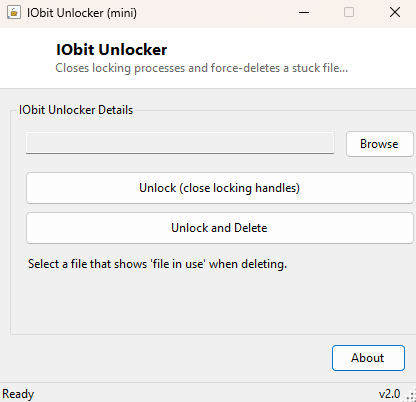
"This action can't be completed because the file is open in another program" is one of the most quietly infuriating dialogs Windows can show you, especially when the program in question has already closed, crashed, or is something you cannot even identify. IObit Unlocker streamlines the fix into two buttons: Unlock, which closes whatever is holding the file open, and Unlock and Delete, which does the same thing and then immediately removes the file in one motion. It is a faster, more direct companion to the standalone Handle tool in this catalog, built for the moment you already know what you want to happen and just need it done.
Key Features
- Two dedicated actions: Unlock only, or Unlock and Delete in one click
- Detects every process currently holding a chosen file open, not just the obvious one
- Uses the same Restart Manager mechanism Windows itself relies on internally
- Reports how many locking processes were found and closed after each run
- No need to manually open Task Manager and guess which process to end
- Works on files locked by crashed, hung, or simply forgotten background processes
Why You Might Need This Tool
The classic scenario is a video, log, or document file that stubbornly refuses to delete or move because "something" has it open — often a media player that crashed without releasing its file handle, a text editor left running in the background from hours ago, or an antivirus scan that briefly locked a file mid-scan. Rather than opening Task Manager, guessing which of dozens of running processes might be responsible, and ending them one at a time hoping you picked correctly, IObit Unlocker identifies the actual locking processes for that specific file and closes only those, then optionally deletes the file immediately afterward. It is particularly useful for software developers and testers who frequently need to delete build output or log files that a debugger or test runner is still quietly holding open.
How It Works
IObit Unlocker uses the Windows Restart Manager API — the same official mechanism
Windows Update and installers use to determine which running applications need to
close before a file can be replaced. It calls RmStartSession to open a
session, registers your chosen file with RmRegisterResources, then
calls RmGetList twice: once to learn how many processes are affected,
and again with a properly sized buffer to retrieve their process IDs and
application names. For each process ID returned, the tool resolves it to a live
System.Diagnostics.Process object and calls Kill(),
waiting briefly for it to exit before reporting the total count closed. If you chose
Unlock and Delete, IO.File.Delete runs immediately afterward, now that
nothing should still be holding the file open. Using Restart Manager rather than a
lower-level technique means the detection is exactly as accurate as what Windows'
own installers rely on — it correctly finds indirect locks (a process that opened
the file's containing folder, for example) that simpler handle-scanning approaches
can sometimes miss.
How to Use It
Click Browse and select the stuck file. Click Unlock if you just want the lock released so you can work with the file normally afterward, or Unlock and Delete if you already know you want it gone. The status line reports how many processes were found and closed. Because closing a process ends it immediately without saving any unsaved work it may have open, only use this on processes you are confident you can afford to lose — IObit Unlocker does not distinguish between a harmless background helper and something with genuinely unsaved data.
System Requirements & Notes
Runs on 64-bit Windows 10/11. Detecting locking processes works without elevation in most cases; forcibly closing processes owned by other users, or files locked by system services, may require running the tool as Administrator to succeed. This tool ends processes without prompting them to save first — use it deliberately, not reflexively.
Frequently Asked Questions
Is this the same as ending the process in Task Manager?
The end result is similar, but IObit Unlocker first identifies exactly which
process or processes are locking your specific file, saving you the guesswork of
picking the right one out of everything currently running.
Will it lose my unsaved work in the locking application?
Yes, potentially — closing a process this way does not give it a chance to prompt
"save changes before closing?" the way a normal Alt+F4 would. Save any work you care
about in the locking application first if you can identify and reach it.
What if no locking process is found but the file still won't delete?
Occasionally a file is locked by a kernel-mode driver or system component rather
than a user-mode process, which Restart Manager cannot always see. In that case, a
reboot remains the most reliable fallback.