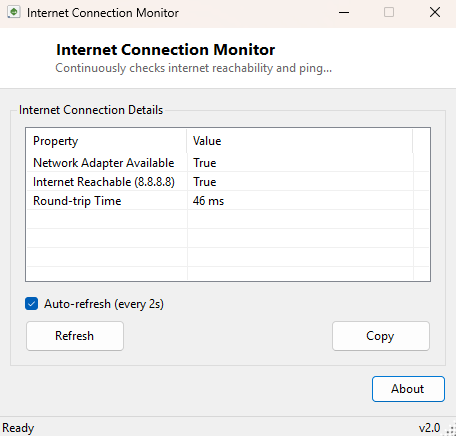
Overview
Internet Connection Monitor continuously checks whether your PC actually has working internet access — not just whether Windows shows a connected network icon, but whether a real destination on the public internet responds. The small "connected" or "no internet" icon Windows shows in the taskbar can be misleading: it is possible to be fully associated with a Wi-Fi network or plugged into an Ethernet cable while the actual path to the internet is broken somewhere upstream — a router that lost its WAN connection, a captive portal you have not authenticated through yet, or an ISP outage. This tool answers the more useful question directly and keeps re-checking it automatically.
It is deliberately simple: one background check, repeated on an interval, reporting reachability and round-trip latency. For deeper multi-host latency tracking, see Network Latency View in the same category.
Key Features
- Continuously verifies real internet reachability, not just local network association
- Reports round-trip ping time to a reliable public host on every successful check
- Runs quietly in the background with automatic periodic re-checking
- Clearly distinguishes "no network adapter available" from "adapter up but internet unreachable"
- No configuration required — works immediately on launch
Why You Might Need This Tool
This tool earns its place during the exact moment something feels wrong with your connection but you are not sure whether the problem is local or somewhere further upstream. Leaving it running in a corner of the screen while you troubleshoot gives you an immediate, objective signal the moment connectivity returns — useful during a router reboot, an ISP outage, or after switching between Wi-Fi networks when you want confirmation the new network actually has a working path out rather than just a local link. It is also a handy sanity check before blaming a specific application for connection problems that are actually happening at the network level.
How It Works
Each check cycle calls System.Net.NetworkInformation.NetworkInterface.GetIsNetworkAvailable()
first, a lightweight local check confirming at least one network adapter is up. It
then sends an ICMP echo request (a standard ping) to a well-known public DNS resolver
address using System.Net.NetworkInformation.Ping, which is a reliable,
highly-available target that responds from almost anywhere in the world with a
reasonable IP allocation. A successful reply confirms genuine end-to-end internet
reachability and reports the measured round-trip time in milliseconds; a timeout or
unreachable result is reported honestly rather than papered over. This whole check
repeats automatically on a timer, so the displayed status always reflects the most
recent few seconds of connectivity rather than a one-time snapshot.
How to Use It
Launch the tool and it begins checking immediately, showing network adapter availability alongside internet reachability and the last measured ping time. Leave it running in the background during any troubleshooting session; the status updates on its own without any interaction needed. A string of consistent "unreachable" results despite an adapter reporting available strongly suggests the problem lies upstream of your PC — in the router, modem, or ISP — rather than in the machine itself.
System Requirements & Notes
Runs on 64-bit Windows 10 and Windows 11 and does not require administrator privileges. Note that some corporate or public networks block outbound ICMP echo requests as a security policy even when general internet access works fine — if this tool consistently reports "unreachable" on a network you know has working internet (a browser loads pages normally, for instance), that network's firewall is likely filtering ping traffic specifically rather than blocking connectivity as a whole.
Frequently Asked Questions
Does this send continuous ping traffic that could look suspicious to my network admin?
It sends a single ICMP echo request per check cycle at a modest interval — comparable
to occasionally running the ping command by hand, not a flood or stress
test.
Can I change which host it checks against?
This build checks a fixed, reliable public DNS host by design, to keep the tool
simple and avoid false negatives from checking an unreliable or slow target.
Why does it say the network is "available" but the internet is "unreachable"?
That combination means your network adapter is up and associated with a local network,
but the path beyond your router or modem to the wider internet is not currently
working — the classic symptom of an ISP-side or WAN-side outage.