Overview
Icaros exists for one specific, oddly common annoyance: Windows Explorer suddenly stops showing real thumbnail previews for video and image files, falling back to generic file-type icons instead. This usually happens after a corrupted cache entry, an interrupted shutdown, or certain third-party media software leaves the thumbnail cache in an inconsistent state. Windows keeps generated thumbnails in a cache so it does not have to regenerate a preview every single time you open a folder, but that cache can and does get corrupted, and Windows has no built-in "repair thumbnails" button to fix it — the fix is deleting the cache files and letting Explorer rebuild them from scratch, which Icaros automates in one click.
The tool also exposes the related Explorer setting that controls whether thumbnail previews are generated at all for video files, since that setting (Always show icons, never thumbnails in Folder Options) is sometimes toggled by accident or by another piece of software and quietly disables previews for the entire user profile, not just one folder.
Key Features
- One-click thumbnail cache rebuild for the current user profile
- Toggle for enabling or disabling video/image thumbnail generation in Explorer
- Automatically restarts Explorer so the fix takes effect immediately
- Detects the current thumbnail setting on load rather than assuming a default
- No manual navigation to hidden AppData folders required
- Safe to run repeatedly — cache files are simply regenerated as needed
Why You Might Need This Tool
The most common trigger is a folder full of videos or photos that suddenly all
show the same generic icon instead of a preview frame, even though they clearly
worked before. This is almost always a thumbnail cache problem rather than
anything wrong with the media files themselves, and manually finding and deleting
the cache files means navigating to a hidden AppData subfolder, closing Explorer
first, deleting several oddly-named thumbcache_*.db files, and
restarting Explorer — a sequence most people either don't know or don't want to
repeat from memory. Icaros exists to turn that multi-step manual fix into a single
button.
How It Works
On startup, the tool reads the IconsOnly value from
HKCU\Software\Microsoft\Windows\CurrentVersion\Explorer\Advanced to
show the current thumbnail setting. When you click Rebuild, it writes your chosen
setting back to that same registry value, then terminates every running
explorer.exe process, waits briefly for the shell to fully unload,
and deletes every thumbcache_*.db file found in
%LocalAppData%\Microsoft\Windows\Explorer — the actual on-disk cache
database Windows uses to store generated thumbnail bitmaps. Because these files
are locked while Explorer is running, closing the shell first is a required step,
not an optional one. Once the cache files are removed, the tool relaunches
explorer.exe, which rebuilds a fresh, empty cache and regenerates
thumbnails on demand as you browse folders again.
How to Use It
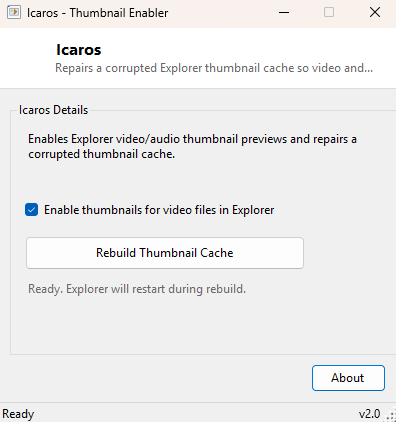
Tick or untick Enable thumbnails for video files in Explorer according to what you want, then click Rebuild Thumbnail Cache. Your taskbar and open Explorer windows will briefly disappear while Explorer restarts — this is expected and normal, and everything reappears within a second or two. Browse back to the folder that was showing broken previews; thumbnails should now regenerate correctly as you scroll through it.
System Requirements & Notes
Runs on 64-bit Windows 10 and Windows 11 and does not require administrator rights — the thumbnail cache and its controlling registry key both live entirely within the current user's profile. Because Explorer is restarted as part of the process, save any unsaved work in other applications before running the rebuild, even though the restart itself only affects the shell, not other running programs.
Frequently Asked Questions
Will this delete my actual photos or videos?
No — it only deletes the cached preview database Windows generates automatically.
Your original media files are never touched.
Why does my taskbar flicker when I click Rebuild?
That's Explorer restarting, which is a required part of releasing the lock on the
cache files so they can be deleted. It resolves itself within a couple of seconds.
Does this fix thumbnails for every user on a shared PC?
No, the thumbnail cache is per-user, so this repairs previews only for the
currently signed-in profile. Each user account would need to run it separately if
affected.