Overview
Every Windows installation carries one plain-text file that quietly outranks your
DNS server for any domain name it mentions: hosts, tucked away in
C:\Windows\System32\drivers\etc\. Before Windows ever asks a DNS
server to resolve a name like example.com, it checks this file first
— if there is a matching line, that answer wins, no network lookup required. That
makes the hosts file genuinely useful for local development, ad and tracker
blocking, and testing how a site behaves before its real DNS record changes, but
editing it the normal way means opening Notepad as Administrator, remembering the
exact folder path, and manually flushing the DNS cache afterward for the change to
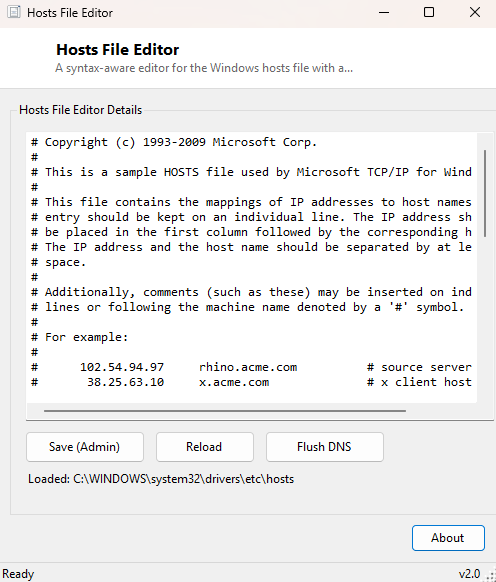
actually take effect. Hosts File Editor removes all three of those friction points
with one dedicated, purpose-built window.
Key Features
- Loads the real hosts file directly from its system location on startup
- Full plain-text editing with a monospaced font and horizontal scrolling for long lines
- One-click Save that writes straight back to the protected system file
- Built-in Reload button to discard unsaved changes and re-read the file from disk
- Integrated Flush DNS button so a saved change takes effect immediately
- Status bar confirms exactly which file path was loaded, saved, or failed
Why You Might Need This Tool
Developers reach for the hosts file constantly to point a real production domain
name at a local development server, so a site can be tested under its actual
hostname without touching live DNS. Others use it defensively, adding entries that
redirect known ad, tracker or telemetry domains to 0.0.0.0 so those
requests fail locally before they ever leave the machine. It is also a standard
first troubleshooting step when a specific website mysteriously will not load
correctly — malware and some overzealous "optimizer" tools have been known to
quietly add hijacking entries here, and being able to open the file in one click
makes checking for that far less of a chore than the normal Notepad-as-admin
routine.
How It Works
On launch, the tool resolves the hosts file's real path using
Environment.GetFolderPath(Environment.SpecialFolder.System) combined
with the fixed drivers\etc\hosts subpath, then reads its full text
with IO.File.ReadAllText into the editor box. Saving simply writes
the edited text back with IO.File.WriteAllText — because the hosts
file is a normal plain-text file with no special binary format, no parsing or
validation layer sits in between, which keeps the tool honest about exactly what
you are writing. If the save fails, it is almost always because the process was
not launched with administrator rights, since the file lives in a
write-protected system folder; the status bar reports that failure directly rather
than silently discarding your edit. The Flush DNS button calls the Windows
DnsFlushResolverCache function from dnsapi.dll directly
through P/Invoke — the identical underlying call behind the familiar
ipconfig /flushdns command — clearing any previously cached
resolutions so a freshly saved hosts entry takes effect on the very next lookup
instead of waiting for a stale cache entry to expire.
How to Use It
Launch the tool — ideally by right-clicking and choosing "Run as administrator" if
you know you intend to save changes — and the current hosts file content appears
immediately. Edit it directly in the text box using the standard hosts file syntax
(IP_ADDRESS whitespace HOSTNAME, one per line, with #
starting a comment), click Save (Admin), then click
Flush DNS so the change is picked up right away rather than after
whatever cache timeout would otherwise apply.
System Requirements & Notes
Reading the hosts file works without elevation, but saving changes requires
administrator rights because the file sits under the protected
System32 tree — if Save fails, relaunch the tool elevated and try
again. No external network access is required for editing or flushing.
Frequently Asked Questions
Why didn't my change take effect immediately?
Some browsers keep their own separate DNS cache independent of the Windows
resolver cache this tool flushes — if a page still resolves the old way after
using Flush DNS, try a hard refresh or briefly restarting the browser.
Can this tool detect malicious entries automatically?
No — it shows you the raw file content honestly but does not flag or judge any
line for you; reviewing entries for anything unexpected is up to you.
Does this replace ipconfig /flushdns?
The Flush DNS button calls the exact same underlying Windows API that command
uses, so functionally, yes — you never need to open a command prompt separately.