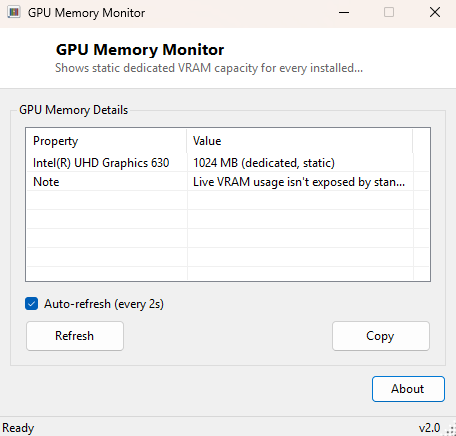
Overview
GPU Memory Monitor reports the dedicated video memory capacity installed on every graphics adapter in your system — the raw VRAM number manufacturers print on the box and that games and creative applications check before deciding how aggressively to load textures. Despite the word "Monitor" in its name, this is intentionally a static-capacity reader rather than a live usage graph, and the tool is upfront about that distinction rather than implying it tracks moment-to-moment VRAM consumption it cannot actually see.
It exists as the deliberately narrow, reliable counterpart to GPU Temperature Viewer and GPU Clock Monitor elsewhere in this catalog — three tools that together show exactly where the line falls between what standard Windows APIs will hand over honestly and what genuinely requires a vendor SDK to read.
Key Features
- Lists dedicated VRAM capacity for every installed graphics adapter
- Converts the raw byte count into a readable megabyte figure automatically
- Covers integrated and discrete GPUs alike
- Auto-refresh option for re-scanning after a hardware change
- One-click Copy to clipboard for support tickets
- No installation, no background service
Why You Might Need This Tool
VRAM capacity matters more than most people realize when deciding whether a PC can comfortably run a particular game at a particular resolution, whether a video editor will fall back to slower system RAM for GPU-accelerated effects, or whether a laptop's integrated graphics chip is sharing memory from the system pool rather than having any dedicated VRAM of its own. This tool answers that specific question in seconds, without needing to open a game's settings menu or dig through Device Manager's Resources tab.
How It Works
The tool queries Win32_VideoController via WMI and reads the
AdapterRAM property, dividing the raw byte value by 1,048,576 to present
it in megabytes. This field reflects the amount of dedicated memory the driver
reported to Windows at driver-load time — a static figure, not a live reading — which
is exactly why the tool is framed around capacity rather than usage. Notably, on
some modern high-VRAM cards (8GB and above) this WMI property can occasionally
under-report due to a known 32-bit field-size limitation in the underlying driver
model on certain driver versions; where that happens, the tool still displays
whatever value the driver actually supplied, rather than silently correcting or
guessing at the real figure.
How to Use It
Open the program and every detected adapter appears immediately with its VRAM capacity. Click Refresh after adding or removing a graphics card, or leave auto-refresh enabled if you are keeping the window open during a hardware troubleshooting session.
System Requirements & Notes
Works on 64-bit Windows 10 and 11, requires no administrator rights, and reads only standard WMI data already exposed to any user account on the machine.
Frequently Asked Questions
Does this show live VRAM usage while gaming?
No — it reports total installed capacity only. Live usage requires the same
vendor-specific SDKs that live GPU temperature monitoring needs.
Why does my high-end card show less VRAM than advertised?
This is a known limitation of the AdapterRAM WMI field on some driver
versions with cards above roughly 4GB; the tool reports exactly what the driver
supplies rather than correcting it.