Overview
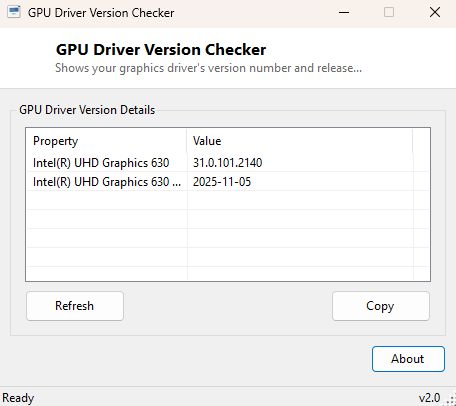
"What driver version am I on" is one of the first questions any GPU troubleshooting guide, forum thread or bug report asks, and normally answering it means opening the vendor's control panel, waiting for it to load, and hunting through a settings submenu that seems to move to a different location with every major update. GPU Driver Version Checker skips all of that entirely and reports the installed driver version and release date for every graphics adapter in the system the instant it opens, with no vendor software required to be installed at all.
Key Features
- Lists every installed graphics adapter, integrated and discrete
- Shows the exact driver version string for each one
- Reports the driver's release date alongside its version
- Works identically for NVIDIA, AMD and Intel graphics drivers
- Requires no vendor control panel or companion software to be installed
Why You Might Need This Tool
Driver version mismatches are behind a huge share of GPU-related bug reports — "is this a game bug or do I just need to update my driver" is the very first diagnostic question any competent support thread will ask, and having the exact version and date ready to paste in immediately saves several rounds of tedious back-and-forth with a support technician or forum moderator. It is equally useful right after installing a new driver, to confirm the update actually took effect rather than silently failing partway through — a surprisingly common occurrence with large driver packages that Windows Update or a vendor installer interrupts.
How It Works
The tool queries Win32_VideoController through WMI for every graphics
adapter present in the system, reading the DriverVersion string
directly and parsing the DriverDate field — which WMI returns in a
compact, sortable YYYYMMDD-prefixed format — into a plain, readable date. No
vendor-specific API, DLL, or companion service is used anywhere in this process,
which is exactly why the same tool works identically regardless of whether the
underlying hardware is NVIDIA, AMD or Intel; all three report through the same
standard WMI class that Windows itself maintains as part of the driver
installation process.
How to Use It
Launch the program and every adapter's driver version and date populate immediately with no options to configure. Use the Refresh button after installing a new driver to confirm the update registered correctly with Windows before you reboot and start testing.
System Requirements & Notes
Runs on 64-bit Windows 10/11 without administrator rights — reading driver metadata through WMI is a standard-user operation regardless of which GPU vendor supplied the driver.
Frequently Asked Questions
Does this tell me if a newer driver is available?
No — it reports what is currently installed only. Checking for updates still
requires visiting the vendor's site or using their dedicated update utility such as
GeForce Experience, AMD Software, or Intel Driver & Support Assistant.
Will it show my integrated and discrete GPU separately on a laptop?
Yes, both adapters are listed independently with their own driver version and date,
which is useful for confirming a hybrid-graphics laptop has current drivers on both
the integrated and discrete side.
Can I use this to confirm a driver rollback worked?
Yes — run it before and after using Windows' "roll back driver" option to confirm
the version string actually changed to the older release.