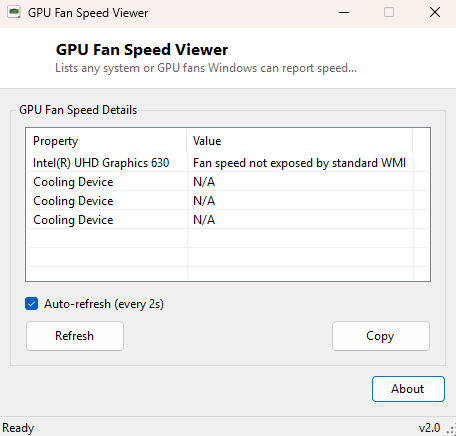
Overview
GPU Fan Speed Viewer checks what Windows Management Instrumentation can tell you about system and graphics-card cooling fans, listing every fan device the operating system is aware of along with whatever speed data it reports. Like its companion tools GPU Temperature Viewer and GPU Clock Monitor, it is built around a simple, honest premise: query the standard WMI class that exists specifically for fan devices, and show exactly what comes back rather than inventing a number when the underlying hardware or driver does not report one.
On most desktop and laptop systems, GPU cooling fans are controlled entirely by the
graphics card's own onboard firmware and are invisible to the motherboard's sensor
hub, which is what Windows' Win32_Fan class actually queries. This tool
makes that distinction clear rather than leaving you guessing why "0 fans detected"
appears on a machine that is audibly cooling itself.
Key Features
- Lists every fan device exposed through the standard Windows fan WMI class
- Shows desired/reported speed data where the system provides it
- Also lists installed GPU adapters for cross-reference
- Auto-refresh toggle for ongoing monitoring
- One-click Copy to clipboard
- No vendor SDK or background service required
Why You Might Need This Tool
Fan-speed questions usually come up during a thermal troubleshooting session — a fan that sounds like it is running at full speed constantly, or one that seems to never spin up under load. Before assuming a monitoring tool is missing a feature, it helps to confirm what Windows itself actually has visibility into at the OS level, since many fan controllers (especially on graphics cards and some laptop chassis) are managed entirely below the operating system and were never designed to report back to Windows in the first place.
How It Works
The tool queries Win32_Fan via WMI for Name and
DesiredSpeed, the standard class Windows exposes for cooling devices it
can see — in practice this is populated almost exclusively by motherboard-managed
system fans on boards whose firmware exposes ACPI fan objects, not by GPU-attached
fans, which are governed independently by the graphics card's own firmware and VBIOS.
Alongside this, the tool separately lists installed adapters from
Win32_VideoController so you can see which GPUs are present even when no
matching fan entry exists for them, making the gap between "detected GPU" and
"detected GPU fan" visually obvious rather than a silent empty list.
How to Use It
Run the tool and review whatever fan entries appear alongside the installed adapter list. An empty or partial fan list on a system you can hear running its fans is expected behavior, not a bug — it means those fans are managed outside what Windows' standard sensor APIs can see. Use Refresh after a driver update in case a newer driver begins exposing additional sensor data.
System Requirements & Notes
Runs on 64-bit Windows 10 and 11, requires no administrator rights, and only reads data already exposed to any standard user account through WMI.
Frequently Asked Questions
Why does this show no fans even though my PC clearly has fans?
Most GPU fans and many case fans are controlled by hardware that never registers with
Windows' Win32_Fan class. This is a limitation of what the OS can see,
not of this tool.
Is there any way to see real GPU fan RPM?
Only through your GPU vendor's own control software (NVIDIA App, AMD Software) or a
motherboard vendor's fan-control utility that talks directly to the embedded
controller — both fall outside what a small, dependency-free WMI-based tool can
safely access.