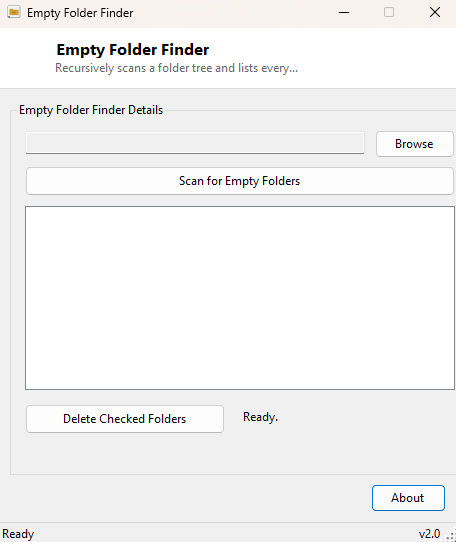
Overview
Uninstalled programs, half-finished reorganizing sessions, and years of moving files between folders all leave behind the same quiet residue: empty folders that serve no purpose but never quite get cleaned up, because Windows Explorer gives you no easy way to find them without opening every subfolder by hand. Empty Folder Finder solves exactly that one problem — point it at a folder tree, and it recursively walks every subfolder, checking each one for both files and further subfolders, and lists only the ones that are genuinely, completely empty.
This is a tidying tool, not a space-recovery tool — empty folders take up essentially no disk space on modern filesystems — but the clutter itself has real cost. A project folder littered with forty empty leftover subdirectories from old versions makes it measurably harder to find anything, and backup and sync tools sometimes stumble over enormous trees of pointless empty directories when calculating what needs to be copied.
Key Features
- Recursively scans an entire folder tree in one pass
- Checks each candidate folder for both files and subfolders before flagging it empty
- Results appear in a checked list, all pre-selected by default
- Uncheck anything you want to keep before deleting
- One-click delete of every checked empty folder
- Live count of how many empty folders were found
Why You Might Need This Tool
Software uninstallers are notoriously inconsistent about cleaning up after themselves — many remove the files they installed but leave the containing folder structure behind under Program Files or AppData. Long-running project folders that have been reorganized many times over the years accumulate the same kind of debris from old category or version folders that were emptied out but never deleted. Photographers and video editors who sort files into date- or event-based folder hierarchies often end up with dozens of now-empty date folders after archiving or deleting a shoot. In every one of these cases, manually hunting down each empty folder by opening every subdirectory is tedious enough that most people simply never do it — which is exactly the gap this tool closes.
How It Works
The scan uses IO.Directory.GetDirectories with the
AllDirectories search option to enumerate every folder anywhere under
the chosen root in a single recursive call, then checks each one individually with
IO.Directory.GetFiles(path).Length = 0 AndAlso
                    IO.Directory.GetDirectories(path).Length = 0
— a folder only qualifies as
empty if it contains neither files nor further subfolders, so a folder that itself
only contains other empty folders is correctly still flagged once its children are
cleared first. Matching folders populate a checked list box with every entry
checked by default, and clicking Delete iterates the checked items calling
IO.Directory.Delete on each one, silently skipping any that fail
(for example, a folder that gained a hidden system file between the scan and the
delete step) rather than aborting the whole batch.
How to Use It
Click Browse and choose the folder tree you want to check, then click Scan for Empty Folders. Review the results — every entry starts checked — uncheck anything you would rather leave in place, and click Delete Checked Folders. A confirmation prompt appears before anything is actually removed.
System Requirements & Notes
No administrator rights are required for folders you own; scanning or deleting inside system-protected locations may prompt for elevation or silently skip folders your account cannot modify. Very large trees (hundreds of thousands of folders) may take a few seconds to enumerate fully before results appear.
Frequently Asked Questions
Will it delete a folder that only contains other empty folders?
Yes, over time — the initial scan lists every currently-empty folder, and deleting
the innermost ones can make their parents empty too; simply re-run the scan to
catch the next layer if you want a fully cleaned tree in one pass.
Does this scan network drives?
Yes, any path accessible through a mapped or UNC path works the same as a local
folder, though scanning may be slower over a network connection.
Can I undo a deletion?
Deleted folders go through the standard IO.Directory.Delete call,
which does not route through the Recycle Bin, so treat the delete step as
permanent and review the checked list carefully first.