Overview
File Merger is the other half of a matched pair: it takes the numbered
.001, .002, .003 parts produced by
File Splitter — or any other tool using the same
simple numbering convention — and rejoins them back into a single file that is
byte-for-byte identical to the original. Once a large file has been split for
transfer across email, an old FAT32 drive, or a size-limited upload, this tool is
the step that turns the scattered parts back into something usable again.
Like its counterpart, File Merger deliberately avoids anything clever — no compression, no archive container format, no checksums baked into a proprietary header. It simply reads each numbered part in sequence and appends its raw bytes onto the output file, which keeps the whole process fast, transparent, and free of any dependency on a specific archive library that might not be available on another machine.
Key Features
- Rejoins numbered
.001,.002, ... parts into the original file - Automatically detects the base filename from the first selected part
- Walks the sequence automatically — no need to manually select every part
- Live status updates showing which part is currently being merged
- Writes to a new file, avoiding an accidental overwrite if the original still exists
- No external dependencies — works completely offline
Why You Might Need This Tool
The most direct use is finishing what File Splitter started — after transferring a
set of numbered parts by email, USB drive or upload, merging them back into the
original file on the receiving end. It is equally useful for reassembling parts you
did not create yourself, since many download mirrors and older FTP archives still
distribute large files as numbered segments for exactly the same historical
reasons File Splitter exists today (upload limits, unreliable connections,
filesystem restrictions). Anyone who has ever downloaded a .zip.001,
.zip.002 style archive set and wondered how to put it back together
will recognize the problem this tool solves.
How It Works
You select the first part of a set (recognized by its .001
extension), and the tool strips that extension to determine the base filename and
output location. It then opens a new output file and, starting from part 1, checks
for the existence of each subsequent numbered part in turn — .001,
.002, and so on — copying each one's full contents onto the end of the
output file using a streamed CopyTo operation rather than loading
entire parts into memory at once, keeping memory usage flat regardless of how
large the parts or the final file are. The moment the next expected part number is
not found in the folder, the tool considers the sequence complete and finalizes the
output file, having reconstructed the byte order exactly as File Splitter originally
wrote it.
How to Use It
Make sure every numbered part is in the same folder — the tool needs the complete
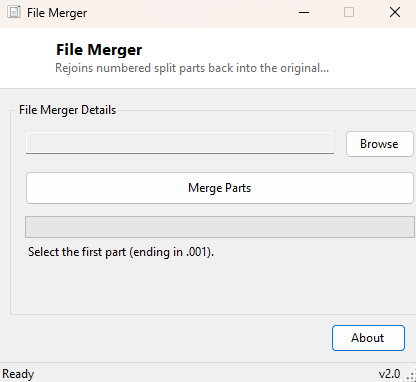
set to reconstruct the file correctly. Click Browse, select the
.001 file specifically, then click Merge Parts. The
tool walks the sequence automatically and writes the reassembled file into the
same folder, using the original base filename (or a .merged suffix if
a file with that name already exists, to avoid silently overwriting anything).
System Requirements & Notes
Runs on 64-bit Windows 10 and Windows 11 and requires no administrator rights. Free disk space equal to roughly the size of the final merged file is needed, since the numbered parts are not deleted automatically after merging — you can remove them yourself once you've confirmed the reassembled file is correct.
Frequently Asked Questions
What happens if a part is missing?
The merge stops at the last part it can find in sequence, producing an incomplete
file. Always confirm you have every part before merging, especially after a
multi-message email transfer.
Does it delete the numbered parts after merging?
No — the original parts are left untouched in case you need to re-merge or verify
them again. Delete them manually once you've confirmed the result is correct.
Can it merge parts that weren't created by File Splitter?
Yes, as long as they follow the same plain sequential .001,
.002 numbering convention with no compression or extra headers
applied — this is a widely used convention, not something proprietary to this
tool.