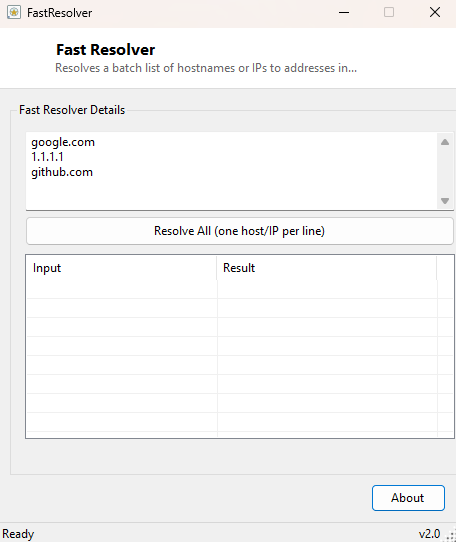
Overview
FastResolver takes a plain list of hostnames or IP addresses — one per line — and resolves every one of them in parallel, returning results as fast as the slowest single lookup in the batch rather than waiting for each entry sequentially. It exists for the specific scenario of needing to check many hosts at once, where running a lookup tool once per line would simply take too long.
Key Features
- Resolves an entire multi-line batch of hosts or IPs simultaneously
- Displays results in a two-column table alongside the original input
- Supports both forward lookups (hostname → IP) in one unified interface
- Clearly marks any entry that failed to resolve, with the underlying error
- No per-lookup delay — a batch of dozens of hosts resolves about as fast as one
Why You Might Need This Tool
Anyone maintaining a list of servers, checking a batch of domains after a bulk DNS migration, or validating a spreadsheet of hostnames pulled from an inventory system benefits from resolving them all in one pass rather than one at a time. It is also a quick way to sanity-check a list of IPs pasted from a firewall log or access log, letting you eyeball whether they resolve to expected internal ranges or unfamiliar external addresses worth investigating further.
How It Works
The tool splits the multi-line input textbox into individual entries, then for each one
creates a task via LINQ's Select projected into
Task.Run(Function() ResolveOne(entry)), building an array of independent
background tasks — one per line — rather than resolving sequentially in a loop. It then
Awaits Task.WhenAll on that entire array, which lets the .NET
thread pool run every lookup concurrently and only returns once every single one has
either succeeded or failed. Each individual resolution itself calls the standard
Net.Dns.GetHostAddresses(entry) API, which transparently handles both
directions — a hostname resolves to its IP addresses, and a literal IP address string
resolves trivially back to itself — so the same input box accepts either kind of entry
without needing a separate mode switch. Results are matched back to their original input
line by array index once all tasks complete, and populated into a ListView row by row.
How to Use It
Paste or type one hostname or IP address per line into the input box — the sample text shows the expected format — then click Resolve All. A results table appears below showing each input alongside its resolved address(es), or "Failed:" plus the specific error if that particular entry could not be resolved.
System Requirements & Notes
Requires network connectivity capable of reaching a DNS resolver; no administrator rights are needed. Very large batches (hundreds of entries) will briefly spike outbound DNS query volume since all lookups fire close to simultaneously — for typical use of a few dozen hosts this is not a concern.
Frequently Asked Questions
Can it resolve reverse DNS (IP to hostname) as well?
Not in this tool — Dns.GetHostAddresses only performs forward resolution.
For reverse lookups, a dedicated PTR-record query would be needed; that use case is
covered instead by tools like IPNetInfo for ownership
context on an IP.
Why did one entry fail while the rest succeeded?
A failed entry usually means the hostname is misspelled, doesn't exist, or the DNS server
returned no record for it — the specific exception message shown next to that entry
explains which case applies.