Overview
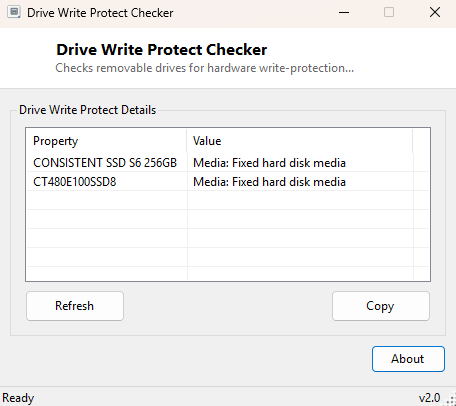
Removable media has a long history of physical write-protection — the small sliding tab on an SD card, the write-protect notch on older media formats — and Windows does not always surface a clear message when that protection is the actual reason a copy operation just failed. Drive Write-Protect Checker specifically targets removable drives, checking both the media type Windows reports and performing a real write test, so a locked SD card or USB stick is identified as exactly that rather than leaving you to guess at a vague error message.
Key Features
- Reports each physical disk's media type as seen by Windows
- Performs a real write test specifically on removable drives
- Distinguishes hardware write-protection from other access problems
Why You Might Need This Tool
A physically-switched write-protect tab is one of the most overlooked causes of "why won't this SD card let me copy files" support requests, precisely because the switch itself is tiny, easy to bump accidentally, and easy to forget exists at all on a card that has been in a camera bag for months. Running this check before spending time troubleshooting permissions, filesystem corruption, or a supposedly faulty card reader rules the simplest and most common explanation in or out in a few seconds.
How It Works
The tool first queries Win32_DiskDrive through WMI for the
MediaType field of every attached disk, which gives a general
classification of the media. It then performs the same direct write-and-delete test
used by Drive Read-Only Detector, but scoped specifically to drives .NET reports as
DriveType.Removable — attempting to create and immediately remove a
tiny test file in the drive's root. A failure on this specific test, combined with
a removable media type, is the clearest available signal that hardware
write-protection, rather than a permissions or filesystem issue, is the actual
cause.
How to Use It
Open the program and every removable drive's media type and write test result appear within a second or two. If a card shows as write-protected, check for a physical lock switch on the card or its adapter before assuming a software problem.
System Requirements & Notes
Runs on 64-bit Windows 10/11 with no administrator rights required.
Frequently Asked Questions
My SD card has no visible lock switch — can it still be write-protected?
Yes — some cards and many USB flash drives implement write-protection purely in
firmware with no physical switch at all, sometimes toggled by a dedicated vendor
utility or triggered by the device's own firmware after detecting an error.
Does this affect internal drives too?
The write test specifically targets removable media; internal fixed drives are
covered instead by Drive Read-Only
Detector, which tests every drive letter regardless of type.
Can I remove write-protection using this tool?
No — this tool only detects and reports the state; removing hardware
write-protection requires physically toggling the card's lock switch or using the
manufacturer's own unlock utility for firmware-level protection.