Overview
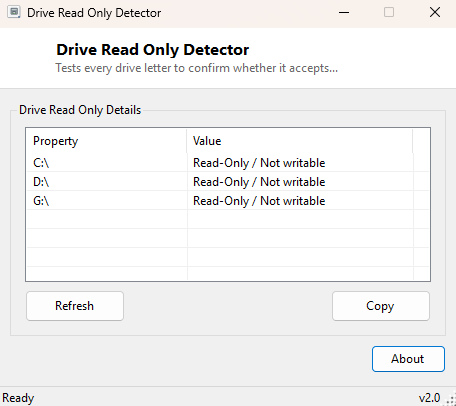
A drive letter that silently refuses writes is one of the more disorienting problems in Windows, because the symptoms rarely explain themselves clearly — sometimes it is a clean "access denied" error, sometimes a copy operation simply hangs, and sometimes a save dialog fails with a vague message that gives no hint the drive itself is the cause rather than the specific application. Drive Read-Only Detector tests every drive letter on the system directly and reports plainly whether it currently accepts writes or is locked read-only.
Key Features
- Tests every ready drive letter with an actual, real write attempt
- Reports a clear Writable or Read-Only / Not Writable result per drive
- Automatically cleans up its own tiny test file after each check
- Covers internal, external and removable drives in a single pass
Why You Might Need This Tool
Read-only drive states can come from several genuinely different causes — a physical write-protect switch on an SD card, a BitLocker-protected volume in a locked state, NTFS permissions restricting the current user, or occasionally Windows itself marking a drive read-only after detecting file-system corruption it considers unsafe to write to. Rather than guessing which of those applies, this tool answers the practical question directly with an actual write test, which is the same thing that will happen the moment you try to save a real file there.
How It Works
For every ready drive returned by .NET's DriveInfo.GetDrives(), the
tool attempts to create a tiny uniquely-named temporary file directly in the drive's
root directory and immediately deletes it again. If the write and delete both
succeed without throwing an exception, the drive is reported Writable; if the
attempt throws any exception — access denied, media write-protected, or a
filesystem-level rejection — the drive is reported Read-Only / Not Writable. This
direct-test approach is deliberately more reliable than checking file attributes or
permission flags alone, because it reproduces the exact operation that will actually
fail for a real file save.
How to Use It
Open the program and every ready drive letter is tested and reported within a second or two, with no configuration required. Re-run after removing a write-protect switch or unlocking a BitLocker volume to confirm the drive is writable again.
System Requirements & Notes
Runs on 64-bit Windows 10/11 with no administrator rights required for the test itself, though a drive locked specifically to non-administrator users will correctly report as read-only when run as a standard user.
Frequently Asked Questions
Does this tool leave any files behind on my drives?
No — the tiny test file it creates on writable drives is deleted immediately after
the check completes, and nothing is written at all to drives that reject the write.
Why does my BitLocker drive show as read-only?
A BitLocker-protected volume that has not been unlocked in the current session will
correctly report as not writable (and often not readable either) until you unlock it
with its password or recovery key.
Can this check network drives too?
Yes, as long as the network drive has a mapped letter and is currently connected; it
will be tested the same way as a local drive.