Overview
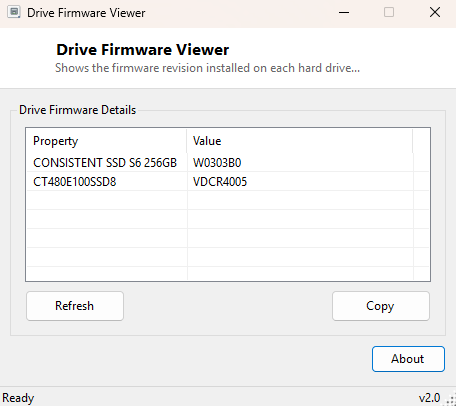
Firmware revision is one of the most consequential and most overlooked pieces of information about any storage drive — a specific firmware version can be the exact thing standing between a drive working flawlessly and a drive suffering from a known, documented bug that the manufacturer has already fixed in a later release. Drive Firmware Viewer reads the exact firmware revision string installed on every hard drive and SSD attached to the system, the same identifier you would need before checking a manufacturer's support page for an available update.
Key Features
- Shows the exact firmware revision string for every attached drive
- Displays the drive's model alongside its firmware for easy cross-referencing
- Covers internal and external drives without needing vendor-specific software
Why You Might Need This Tool
SSD manufacturers in particular release firmware updates regularly to fix performance regressions, correct reported-capacity bugs, and occasionally patch serious data-integrity issues that only surface under specific workloads — and every one of those update pages starts by asking you to confirm your current firmware version before it will tell you whether an update applies to your drive. Checking firmware before troubleshooting an unexplained slowdown, before requesting warranty support, or simply as routine maintenance on a critical drive, is exactly the kind of five-second check that can save hours of chasing the wrong problem.
How It Works
The tool queries Win32_DiskDrive through WMI for the
FirmwareRevision field, which Windows populates directly from the
identify-device response the drive itself returns during SATA, NVMe or USB
enumeration — the same low-level identification string manufacturer firmware-update
utilities check before allowing an update to proceed, ensuring the version you see
here is exactly what any official update tool would also detect.
How to Use It
Open the program and every attached drive's firmware revision appears immediately alongside its model name, with no configuration needed. Re-run it after applying a firmware update to confirm the new version registered correctly.
System Requirements & Notes
Runs on 64-bit Windows 10/11 with no administrator rights required for reading; actually applying a firmware update, if you find one is available, will require the manufacturer's own signed update utility and typically does require administrator rights on their end.
Frequently Asked Questions
Can this tool update my drive's firmware directly?
No — firmware updates must come from the drive manufacturer's own signed utility for
safety reasons; this tool only reads and reports the currently installed version.
Why does the firmware string look like a short cryptic code?
Most manufacturers use short internal revision codes rather than human-readable
version numbers; search the exact string alongside your drive's model on the
manufacturer's support site to decode what it corresponds to.
Will updating firmware erase my data?
It should not under normal circumstances, but firmware updates carry inherent risk —
always back up critical data before applying one, regardless of how routine the
update claims to be.