Overview
Knowing that an adapter is using DHCP is only half the picture — the other half is
when that lease was granted, which server granted it, and when it expires. DHCP
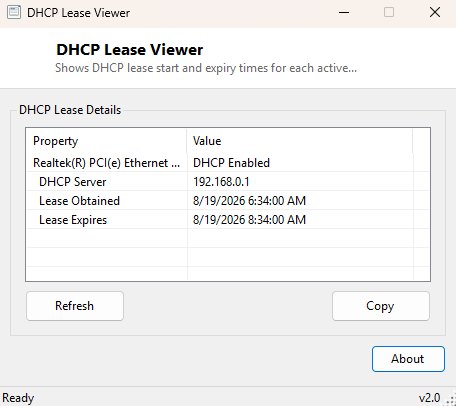
Lease Viewer goes one level deeper than a simple enabled/disabled check, pulling
the actual lease details Windows tracks for every DHCP-configured adapter: the
issuing DHCP server's address, the exact moment the current lease was obtained,
and the moment it is due to expire. This is the same information the classic
ipconfig /all command prints, but presented in a sortable window
instead of scrolling console text you have to read carefully line by line.
This detail matters more than it might seem at first, particularly on networks where address pools are tightly sized, or where a short lease duration set on the router can cause more frequent renegotiation — and, occasionally, more frequent disconnection symptoms — than users expect.
Key Features
- Shows the DHCP server address for every DHCP-configured adapter
- Displays exact lease-obtained and lease-expiry timestamps
- Skips static-IP adapters automatically, focusing only on relevant entries
- Refresh button to re-check after a lease renewal
- Copy button exports the full detail as plain text
- Read-only — never renews, releases, or modifies a lease itself
Why You Might Need This Tool
A common troubleshooting pattern on home and small-office networks is a device that loses connectivity at what feels like a random time each day, and the cause is frequently a short DHCP lease duration combined with a router that occasionally fails to renew it cleanly. Seeing exactly when the current lease was obtained and when it expires turns a vague "it disconnects sometimes" complaint into a concrete, checkable pattern — if the disconnect always happens close to the lease expiry time, that is a strong lead worth following. This tool is also genuinely useful for confirming which DHCP server actually handed out an address on networks running more than one DHCP service (a router and a separate server both configured to serve the same subnet is a classic, hard-to-diagnose network misconfiguration).
How It Works
The tool queries WMI directly with SELECT Description, DHCPEnabled,
DHCPServer, DHCPLeaseObtained, DHCPLeaseExpires FROM
Win32_NetworkAdapterConfiguration WHERE IPEnabled=True, which is the
authoritative WMI class Windows itself populates with DHCP client state for every
IP-enabled adapter. For adapters where DHCPEnabled is true, it reads
the DHCPServer address plus the DHCPLeaseObtained and
DHCPLeaseExpires fields, converting each from WMI's native CIM
datetime string format into a standard readable timestamp using
ManagementDateTimeConverter.ToDateTime. Static-IP adapters are
identified and skipped automatically since lease data does not apply to them,
keeping the results list focused on genuinely relevant entries.
How to Use It
Open the program and lease details for every DHCP-configured adapter appear
immediately. After a lease renewal (via ipconfig /renew or a router
reboot), click Refresh to see the updated timestamps. Use
Copy to export the full detail.
System Requirements & Notes
Runs on 64-bit Windows 10 and Windows 11 with no administrator rights required — reading DHCP lease state via WMI is a standard-user query.
Frequently Asked Questions
Can I release or renew a lease from this tool?
No, it is strictly a viewer. Use ipconfig /release and ipconfig
/renew at a command prompt, or your adapter's Windows settings, to change a
lease.
Why don't I see any entries for my Wi-Fi adapter?
That adapter is likely configured with a static IP rather than DHCP — check with
DHCP Status Viewer to confirm.