Overview
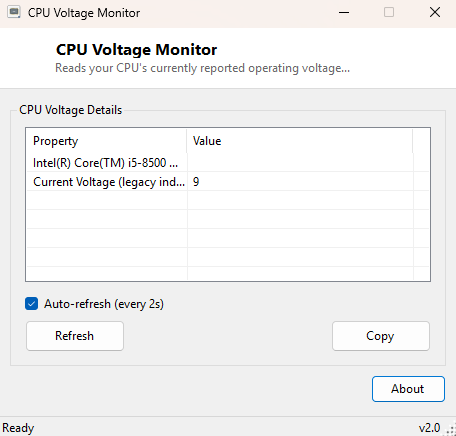
CPU voltage is one of those numbers overclockers and troubleshooters care about a lot and most everyday users never see anywhere at all. CPU Voltage Monitor reads whatever voltage figure your processor's firmware is willing to report to Windows, decodes it according to the standard SMBIOS convention, and displays it in plain volts alongside your CPU's model name. It is a small, honest tool: on systems where the firmware genuinely does not expose a usable voltage reading — which is common on some OEM boards and virtual machines — it says so directly instead of showing a fabricated number.
This tool complements rather than replaces vendor overclocking utilities like Intel XTU or a motherboard's own software, which typically read voltage directly from onboard sensors via a proprietary embedded controller interface. What this tool reads instead is the value reported through Windows' standard hardware inventory layer, which is universally accessible without installing any vendor-specific software but is correspondingly less detailed.
Key Features
- Decodes the CPU's reported voltage using the standard SMBIOS encoding convention
- Falls back gracefully to a legacy voltage index when a direct decimal voltage is unavailable
- Clearly reports "Not reported by firmware/WMI" rather than guessing when no data exists
- Auto-refresh with live-updating timer
- One-click Copy for pasting the reading elsewhere
- Zero configuration, instant startup, no installation required
Why You Might Need This Tool
People reach for this tool most often while researching undervolting or verifying that a BIOS setting related to CPU voltage actually took effect after a reboot. It is also handy as a quick sanity check when troubleshooting instability — while it will not catch fine-grained voltage droop under transient load the way a dedicated sensor-polling tool would, a wildly unexpected reported voltage (or the complete absence of one where a previous BIOS version reported it) is itself a useful data point when comparing notes with other users of the same motherboard.
How It Works
The tool queries Win32_Processor via WMI for the
CurrentVoltage property. Per the SMBIOS specification this value is
encoded as a single byte: if the high bit (bit 7, mask 0x80) is set, the
remaining seven bits represent the voltage in tenths of a volt, so the tool masks
with 0x7F and divides by 10 to produce a value like "1.2 V". If the high
bit is not set, the byte instead represents a legacy index into a fixed voltage table
from the original SMBIOS spec rather than a literal value, and the tool reports that
raw index rather than guessing at a conversion. If the property is entirely absent —
which happens on many consumer boards where the firmware simply never populated this
optional field — the tool reports that plainly instead of inventing a plausible-looking
number.
How to Use It
Launch the tool and the current voltage reading (or the honest "not reported" message) appears immediately. Enable auto-refresh if you want to watch the value while adjusting a BIOS voltage offset and rebooting between changes, or use the manual Refresh button for one-off checks.
System Requirements & Notes
Runs on 64-bit Windows 10 and Windows 11 and requires no administrator privileges. Because this reads a firmware-reported field rather than a live sensor, the value will often stay static even under changing load — that is a limitation of what the firmware exposes, not a bug in the tool.
Frequently Asked Questions
Why does my CPU show "Not reported by firmware/WMI"?
Many OEM motherboards simply never populate this optional SMBIOS field. This is a
firmware limitation, not something the tool can work around without a
vendor-specific sensor driver.
Can I use this to set or change my CPU's voltage?
No — this tool is strictly read-only. Voltage changes need to be made in your
motherboard's BIOS/UEFI setup or a vendor overclocking utility.
Why does the reading never seem to change even under heavy load?
The SMBIOS voltage field reflects a firmware-reported baseline rather than a live,
continuously polled hardware sensor, so it will typically stay static regardless of
load. For genuinely dynamic, load-responsive voltage readings you would need a
vendor-specific embedded-controller sensor driver, which this lightweight tool
intentionally avoids installing.
Is this as accurate as a dedicated hardware monitoring tool?
It reads the same field Windows itself exposes through standard inventory, which is
less granular than a live embedded-controller sensor poll, but it requires no extra
drivers or vendor software to access.
Should I be worried if my CPU shows no voltage at all?
Not necessarily — a completely absent reading simply means the firmware never
populated the optional field, which is common on budget and mainstream boards
regardless of how healthy the CPU actually is. Absence of a reading here says nothing
about the CPU's actual stability or condition.