Overview
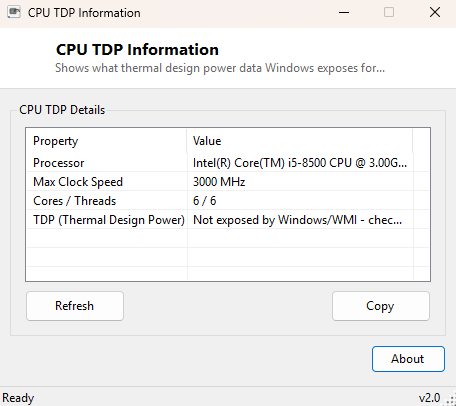
CPU TDP Information sets out to answer a question that turns out to be surprisingly hard to answer from inside Windows itself: what is this processor's thermal design power? TDP is one of the most commonly quoted CPU specifications in reviews, cooler compatibility charts and power supply sizing guides, yet it is not a value Windows' standard hardware APIs actually expose anywhere. This tool is built around being honest about that gap rather than pretending otherwise — it shows every closely related figure Windows genuinely can report, and clearly states that TDP itself is not one of them.
Key Features
- Shows the full processor name for manual cross-reference against manufacturer specs
- Reports the maximum clock speed WMI exposes for the processor
- Shows physical core count and thread count alongside clock information
- Displays a clear, explicit note that TDP is not available through standard Windows APIs
- No scanning delay — reads instantly on launch
- One-click copy of the full report to the clipboard
Why You Might Need This Tool
Sizing a CPU cooler, checking power supply headroom, or comparing efficiency between two processors all typically start with a TDP figure. Since Windows genuinely does not expose that number through any standard API, this tool's real job is to save you a step in the process that actually works: giving you your processor's exact name, clock speed and core count in one copyable block, ready to paste into a search for "[exact processor name] TDP" on the manufacturer's own specification page, which remains the only fully reliable source for that figure.
How It Works
The tool queries Win32_Processor through WMI for Name,
MaxClockSpeed, NumberOfCores and ThreadCount.
None of these WMI properties, nor any other standard Windows management interface,
expose a thermal design power figure — TDP is a manufacturer-published specification
that lives in datasheets and marketing material, not in firmware tables the operating
system reads at boot. Rather than approximate or fabricate a number, the tool
explicitly states this limitation as its final line of output, so nothing is presented
that could be mistaken for real data.
How to Use It
Open the tool to see your processor's exact name, max clock speed and core/thread count immediately. Copy the report, then search for your exact processor name plus "TDP" on Intel's ARK database or AMD's product pages, both of which publish precise, authoritative TDP figures for every retail processor they sell.
System Requirements & Notes
Runs on 64-bit Windows 10 and Windows 11 and needs no administrator rights — every value shown is a standard WMI processor property available to any user account.
Frequently Asked Questions
Why can't Windows just report TDP directly?
TDP is a manufacturer specification tied to cooling and power delivery design, not a
value stored in a standardized firmware table the way clock speed or core count are —
there is simply no OS-level API that exposes it.
Do some third-party monitoring tools show a TDP-like number?
Some tools estimate a "package power" figure using vendor-specific low-level sensor
access, which is a live power-draw measurement rather than the fixed design
specification called TDP, and typically requires a driver-level monitoring component
this catalog intentionally avoids for safety reasons.
Where is the single most reliable place to find my exact TDP?
The processor manufacturer's own specification page — Intel ARK for Intel processors,
or AMD's product specification pages for AMD processors — searched using the exact
processor name this tool reports.