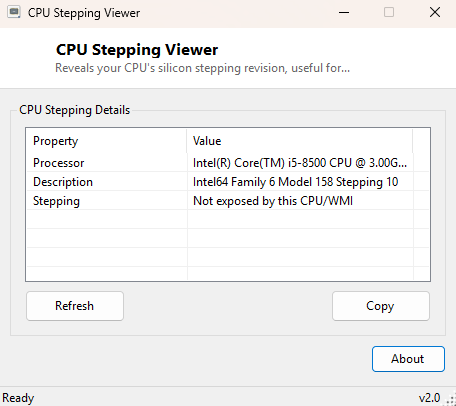
Overview
CPU Stepping Viewer reveals the silicon stepping revision of your processor — a small number that identifies exactly which manufacturing revision of a given chip design you have. Two processors sold under the identical model name can still carry different steppings if they were manufactured months apart, and that difference occasionally matters for microcode updates, known errata lists, and certain low-level compatibility checks that a marketing model name alone cannot answer.
Key Features
- Shows the full processor name and description alongside the stepping value
- Reads the dedicated Stepping field where WMI exposes it directly
- Falls back to decoding the stepping from the low byte of the processor's Revision field on systems that don't expose Stepping directly
- Clearly labels which source the value came from
- No scanning delay — reads instantly on launch
- One-click copy of the full report to the clipboard
Why You Might Need This Tool
Processor errata documents — the manufacturer-published lists of known hardware quirks and their workarounds — are almost always organized by stepping, not by model name alone, so identifying your exact stepping is the first step in checking whether a specific known issue applies to your chip. Microcode and BIOS update changelogs also frequently reference specific steppings, and low-level virtualization or overclocking software occasionally behaves differently across steppings of the same model. This tool exists to answer that specific, narrow but occasionally important question quickly.
How It Works
The tool queries Win32_Processor through WMI for the Name,
Description, Revision and Stepping properties.
Not every system and every Windows version populates the Stepping field
directly, so the tool checks it first and, if empty, falls back to decoding the
stepping from the low byte of the Revision field using a bitmask
(revision And &HFF) — this is the standard technique for extracting
stepping from the combined family/model/stepping revision value CPUID exposes when a
dedicated field is not separately reported. If neither source yields a usable value,
the tool says so plainly rather than guessing.
How to Use It
Open the tool and the stepping value appears immediately alongside your processor's full name and description. Use Copy to place the report on the clipboard when cross-referencing against a manufacturer's errata document or microcode changelog.
System Requirements & Notes
Runs on 64-bit Windows 10 and Windows 11 and needs no administrator rights — all values read here are standard WMI processor properties available to any user account.
Frequently Asked Questions
What does "Stepping (from Revision low byte)" mean?
It means your specific system did not expose a dedicated Stepping value directly, so
the tool decoded it from the combined Revision field instead — the result is
equally accurate, just sourced differently.
Is a higher stepping number always better?
Generally yes in the sense that later steppings usually incorporate manufacturing
refinements and bug fixes discovered after the initial silicon revision, but stepping
number alone should not be treated as a general performance indicator.
Where do I find my processor's official errata list?
Search your CPU manufacturer's developer or support site for "specification update" or
"errata" alongside your exact processor family name — these documents are typically
organized by stepping.