Overview
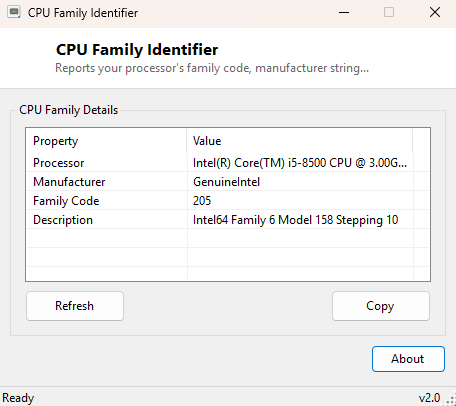
CPU Family Identifier reports your processor's exact model name, manufacturer string and internal family code in one clean window. The full processor name Windows reports — something like "12th Gen Intel(R) Core(TM) i7-12700K" — is usually enough for everyday purposes, but the internal family code and manufacturer string underneath that name are what compatibility databases, driver installers and low-level system tools actually key off, and this tool surfaces both together.
Key Features
- Shows the complete processor name string exactly as firmware reports it
- Displays the manufacturer identification string (Intel, AMD, and so on)
- Reports the numeric CPU family code used internally by Windows and driver tooling
- Shows the extended processor description string alongside the family code
- No scanning delay — reads instantly on launch
- One-click copy of the full identification report to the clipboard
Why You Might Need This Tool
Certain driver packages, virtualization compatibility tools and hardware databases identify processors by family code rather than by the full marketing name, and translating between the two by hand is genuinely tedious. This tool is also useful simply for confirming exactly what processor is installed in a system you did not build yourself — a refurbished PC, a hand-me-down laptop, or a machine whose case sticker has long since worn off — without needing to open the case or dig through a BIOS screen.
How It Works
The tool queries Win32_Processor through WMI via a
System.Management.ManagementObjectSearcher, reading four properties:
Name (the full marketing-facing processor string), Manufacturer
(the vendor identification string, such as "GenuineIntel" or "AuthenticAMD"),
Family (a numeric code identifying the processor's architectural family
as reported by CPUID and surfaced through WMI), and Description (an
extended identification string that sometimes includes additional detail not present
in the primary Name field). All four are sourced from the same SMBIOS/CPUID data the
operating system itself relies on for hardware identification, so the values shown
here are authoritative rather than approximated.
How to Use It
Open the tool and the full identification report appears immediately. Use Copy to place the report on the clipboard when cross-referencing against a driver compatibility list, a hardware database, or a support ticket that asks for exact processor identification.
System Requirements & Notes
Runs on 64-bit Windows 10 and Windows 11 and needs no administrator rights — processor identity fields are available through WMI to any standard user account.
Frequently Asked Questions
What does the Family code number actually mean?
It is a numeric identifier tied to the processor's underlying architecture generation
as reported by the CPUID instruction — the exact meaning of a given number is
vendor-specific and generally only relevant when cross-referencing against a
manufacturer's own compatibility documentation.
Why does the Description field sometimes differ slightly from the Name field?
Description is a separate, more technically-formatted string some systems populate
with additional stepping or family detail beyond the friendlier marketing name in
Name — on many systems the two are effectively identical.
Does this tool identify laptop processors as accurately as desktop ones?
Yes — the same WMI data source and reporting mechanism applies equally regardless of
form factor.