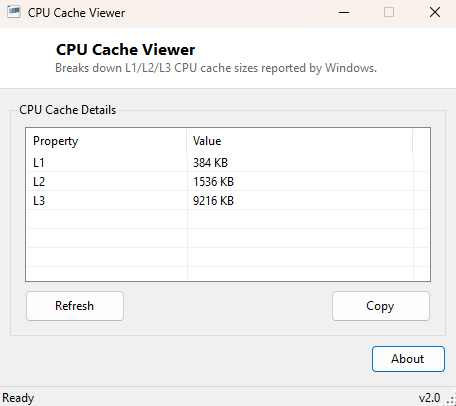
Overview
CPU Cache Viewer breaks down your processor's L1, L2 and L3 cache sizes — the small, extremely fast memory tiers sitting between the CPU cores and main system RAM that heavily influence real-world performance in ways clock speed alone does not capture. Cache size is one of the more commonly compared CPU specifications when researching a new processor, and this tool reads it directly from what Windows itself has already detected rather than requiring a lookup on a manufacturer's spec page.
Key Features
- Reports L1, L2 and L3 cache sizes where Windows exposes them individually
- Falls back to aggregate L2/L3 figures when per-level detail is unavailable
- Labels each cache level clearly rather than showing raw WMI level codes
- Instant results with no configuration
- Completely read-only
Why You Might Need This Tool
When comparing a currently-owned CPU against a potential upgrade, cache size is one of the specifications that matters for workloads like gaming and compilation but is easy to lose track of amid clock speed and core count numbers. This tool gives you your current system's exact cache configuration in one place, which is useful both for upgrade research and for satisfying curiosity about exactly how a particular CPU model is configured.
How It Works
The tool first queries WMI's Win32_CacheMemory class, which can
expose each cache level as a separate instance with a Level code
(3 for L1, 4 for L2, 5 for L3 in the CIM specification) and a
MaxCacheSize in kilobytes. Not every system's firmware populates this
class with full per-level detail, so when no rows are returned the tool falls back
to Win32_Processor's L2CacheSize and
L3CacheSize properties, which report aggregate cache size across all
cores rather than broken out individually — the tool labels this fallback clearly
so the two data sources are never confused with each other.
How to Use It
Open the tool and cache sizes for each available level appear immediately, labeled L1/L2/L3 where individually reported. There is nothing further to configure.
System Requirements & Notes
Runs on Windows 10 and 11 x64 without administrator rights. Reporting completeness depends entirely on what the specific CPU and motherboard firmware expose through WMI — most modern Intel and AMD systems report at least aggregate L2/L3 figures reliably.
Frequently Asked Questions
Why don't I see an L1 cache figure?
Many systems' firmware does not populate Win32_CacheMemory with a
separate L1 entry even though the CPU obviously has L1 cache; this is a
firmware-reporting limitation rather than something the tool can work around.
Is the L2/L3 figure per-core or total?
The fallback figures from Win32_Processor represent the aggregate
across all cores as reported by the CPU, matching how manufacturers typically list
total cache in their own spec sheets.