Overview
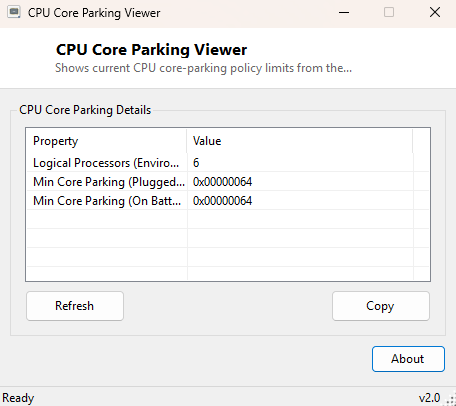
CPU Core Parking Viewer reports the current core-parking thresholds set by your active Windows power plan — the minimum and maximum percentage of logical processors Windows is allowed to put into a low-power "parked" state under light load. Core parking is one of the more obscure power-management features baked into Windows, and this tool surfaces its current configuration without requiring a trip through several layers of Power Options' advanced settings.
Key Features
- Reports the current AC (plugged-in) core-parking minimum-core threshold
- Reads the same setting for DC (on-battery) power where applicable
- Shows the environment's total logical processor count for context
- Reads directly from the active power scheme via powercfg
- Completely read-only, unlike its companion tool CoreParkingManager
Why You Might Need This Tool
Aggressive core parking can occasionally show up as inconsistent short-burst performance — cores taking a moment to "wake up" under sudden load — and checking the current threshold is often the first step before deciding whether to adjust it. This viewer is the safe, read-only companion to CoreParkingManager, which is the tool that actually lets you change these thresholds.
How It Works
The tool launches powercfg.exe /qh SCHEME_CURRENT SUB_PROCESSOR
CPMINCORES as a hidden background process and parses its text output for
the "Current AC Power Setting Index" and "Current DC Power Setting Index" lines,
which report the configured minimum-unparked-core percentage for plugged-in and
battery power respectively. This mirrors exactly what the command-line
powercfg utility itself reports, just extracted and displayed without
requiring you to open a console window or remember the specific GUID-based
command syntax powercfg normally requires.
How to Use It
Open the tool and the current core-parking threshold appears immediately for both power states where available. To change these values rather than just view them, use CoreParkingManager's slider-based interface instead.
System Requirements & Notes
Runs on Windows 10 and 11 x64. Reading the current power scheme setting does not require administrator rights, unlike changing it.
Frequently Asked Questions
Can I change the core-parking threshold with this tool?
No — this is the read-only viewer. Use
CoreParkingManager to adjust the minimum
and maximum unparked-core thresholds directly.
Is core parking bad for performance?
Not inherently — it exists specifically to save power during light workloads by
idling unused cores, and modern Windows scheduling generally handles the
transition quickly enough not to be noticeable in most everyday use.