RAM Cleaner Pro
Free up RAM instantly and keep your Windows PC running smoothly
RAM Cleaner Pro monitors your Windows memory usage in real time and frees RAM on demand — flushing the standby cache, releasing working set memory from idle processes and collecting garbage from managed runtimes — to give your active applications more breathing room. The circular gauge on the dashboard shows current RAM usage at a glance, with used and available gigabytes updated every two seconds. Game Boost mode cleans RAM then elevates the priority of your foreground application for maximum responsiveness during gaming sessions. The auto-clean feature triggers a RAM flush automatically when usage crosses a configurable threshold. RAM Cleaner Pro also includes a startup monitor, disk cleaner and full system performance overview.
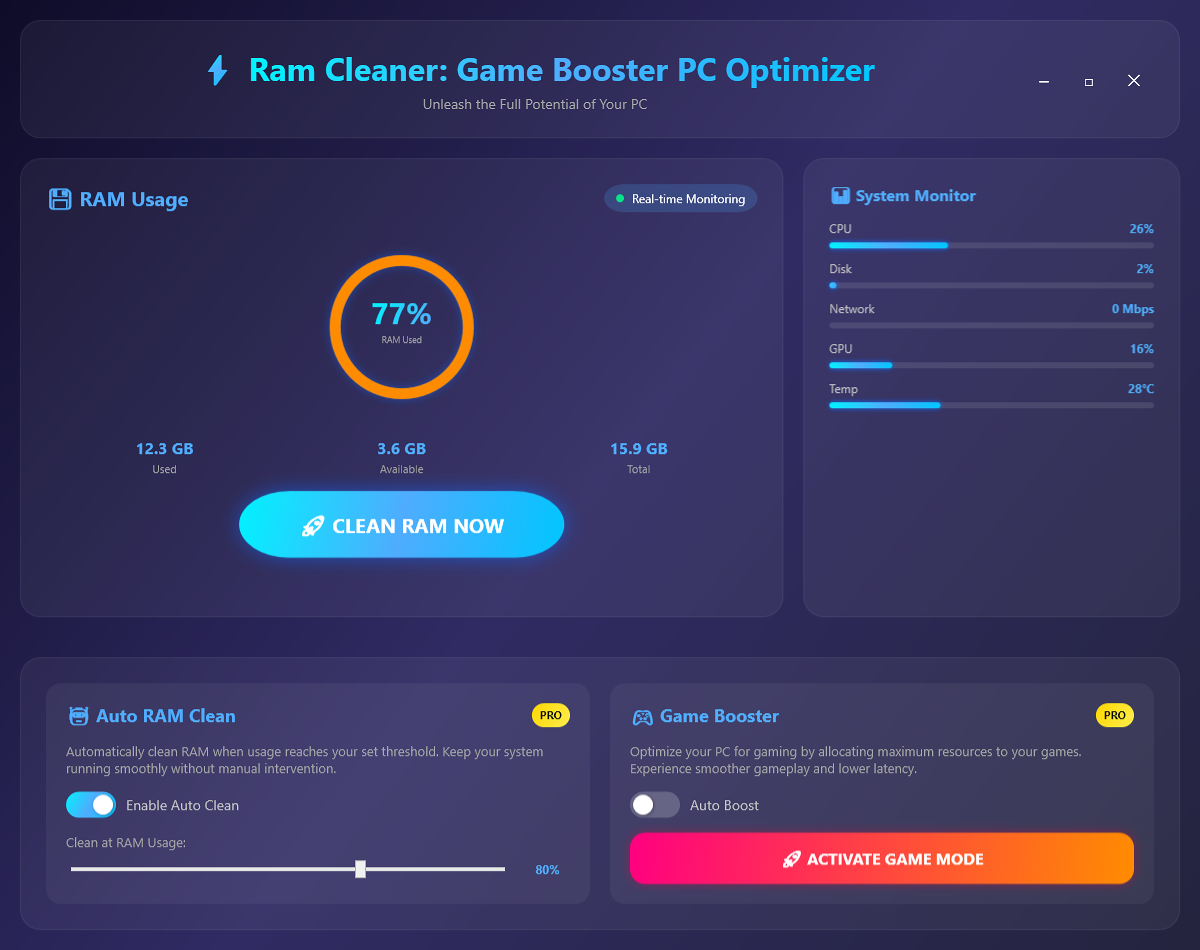
See RAM Cleaner Pro in Action
A clean, modern interface designed for real-world use.
Ramcleaner auto ram clean screenshot
What Is RAM Cleaner Pro?
RAM Cleaner Pro is a Windows memory optimisation tool that recovers unused RAM from your system and makes it available for active applications. Over time, background processes, closed applications and the Windows memory manager accumulate stale cache data that occupies physical RAM without providing any active benefit. RAM Cleaner Pro clears this accumulated overhead in seconds, returning that memory to the available pool and noticeably improving performance on systems running near their memory capacity.
Beyond one-click manual cleaning, RAM Cleaner Pro includes automatic threshold-based cleaning (trigger a clean whenever RAM usage crosses a percentage you choose) and a dedicated Game Booster mode that aggressively reclaims memory to give demanding games the maximum available RAM before launching.
Screen-by-Screen Feature Walkthrough
1. Main Dashboard — Real-Time RAM Status
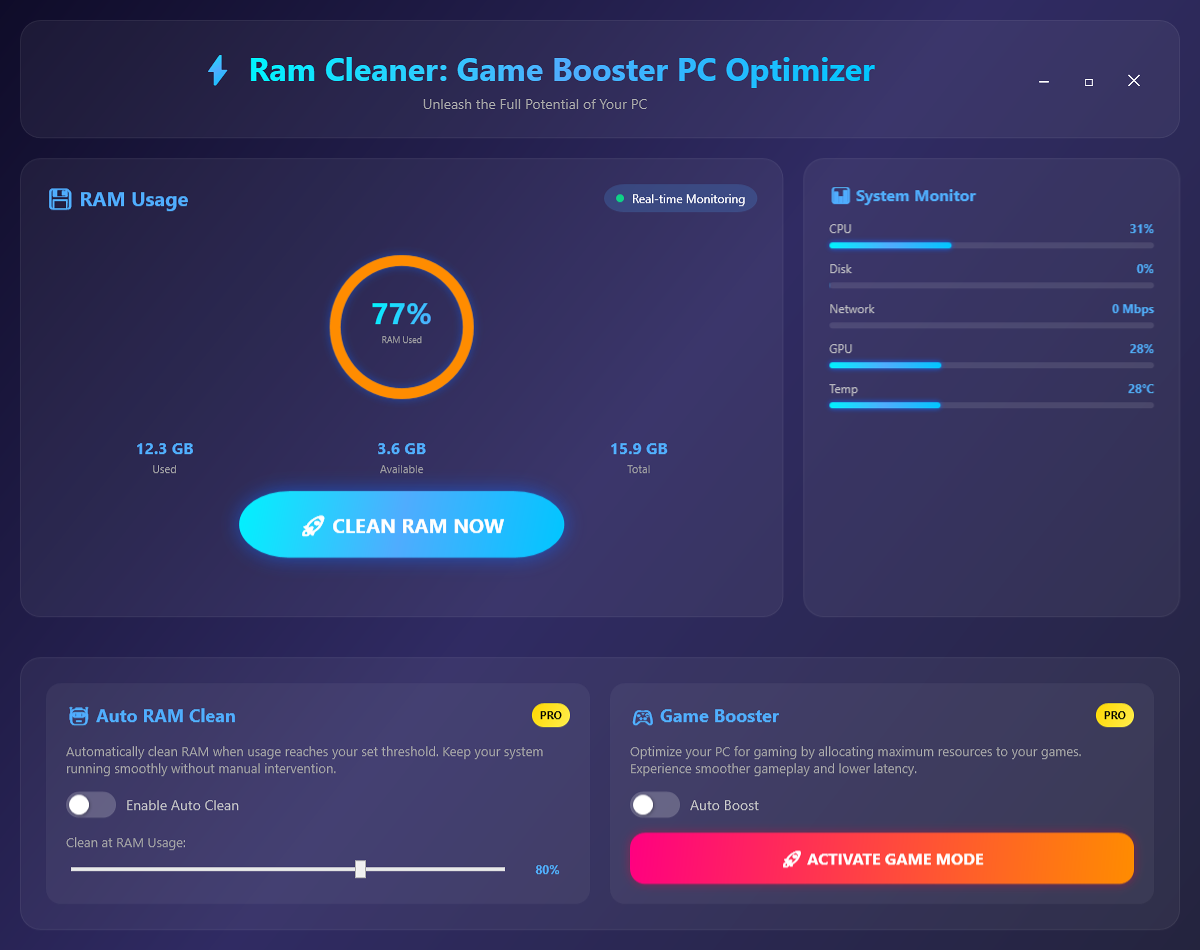
The main dashboard gives you an immediate picture of your system’s memory state. Total installed RAM, currently used memory, available free memory and the usage percentage are all displayed at a glance. A prominent clean button initiates a memory optimisation pass in seconds. The usage display updates in real time, so you can see the effect of a clean immediately as the available memory increases and the used percentage drops. Below the usage metrics, the dashboard provides context on what is consuming memory, helping you understand whether your system would benefit from a clean at any given moment.
2. Auto RAM Clean — Automated Threshold-Based Optimisation
The Auto RAM Clean screen lets you set rules for automatic memory maintenance without manual intervention. You define a RAM usage threshold — for example, 80% — and RAM Cleaner Pro monitors your system continuously in the background. Whenever RAM usage crosses that threshold, a clean is triggered automatically, keeping your system responsive during extended sessions. This is particularly useful for users who run many background applications, leave their PC running overnight, or work with memory-intensive software like video editors, virtual machines or large browser sessions. Configure it once and RAM Cleaner Pro handles memory management from that point forward.
3. Game Booster — Maximum RAM for Maximum Performance
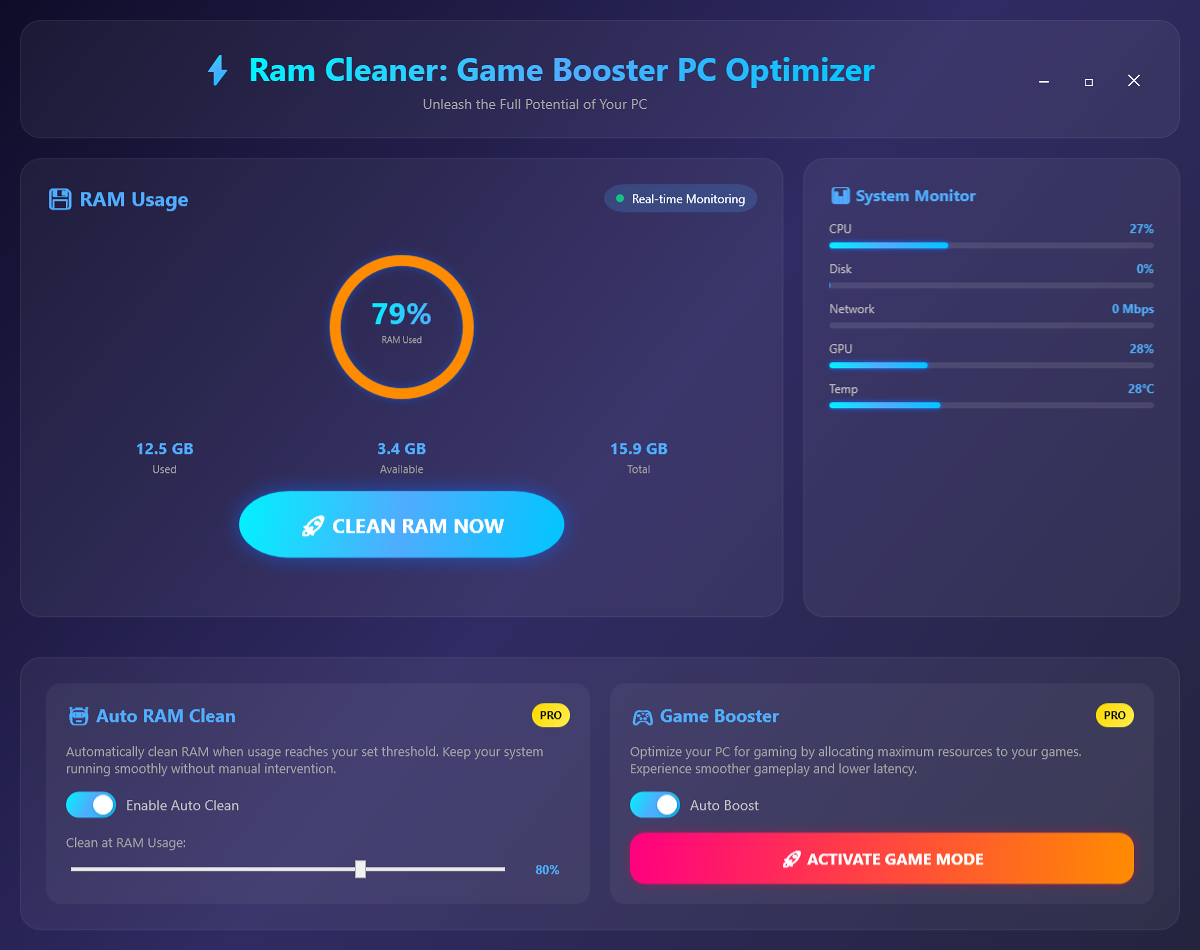
The Game Booster mode is a focused, pre-launch memory optimisation designed specifically for gaming. Before you start a demanding game, activate Game Booster and RAM Cleaner Pro performs an aggressive memory reclaim — clearing background process caches, freeing standby memory and closing unnecessary system overhead — to give the game the largest possible pool of available RAM from the moment it launches. Games that previously stuttered or loaded slowly due to memory pressure benefit immediately from this extra headroom. Game Booster is a single-click operation, making it easy to make it part of your pre-gaming routine.
Who Is RAM Cleaner Pro For?
- Gamers on systems with 8–16 GB RAM — Free up the maximum available memory before launching demanding titles to reduce loading times and prevent mid-session stuttering.
- Users running many background applications — Content creators, developers and office workers who keep dozens of tabs and applications open simultaneously benefit from regular automated cleaning.
- Older PCs with limited RAM — Systems with 4–8 GB of RAM feel noticeably faster after clearing accumulated memory overhead, extending the practical life of aging hardware.
- Users who notice slowdowns after extended use — If your PC feels sluggish after a few hours but a restart fixes it, Auto RAM Clean replicates that freshness automatically on a schedule.
- IT administrators and support technicians — Keep managed workstations running smoothly throughout the working day with scheduled automatic cleaning.
System Requirements
- Operating System: Windows 10 (64-bit) or Windows 11
- Processor: Any modern x64 processor
- RAM: 2 GB minimum (most useful on systems with 4–16 GB RAM)
- Storage: 60 MB for the application
- Permissions: Administrator rights recommended for full memory reclamation
- Internet: Not required — fully offline
Frequently Asked Questions
Is it safe to clean RAM while applications are running?
Yes. RAM Cleaner Pro only clears cached, standby and unused memory — it never touches memory actively used by running applications. Applications, open documents and unsaved work are completely unaffected by a cleaning pass.
How much RAM can I expect to recover after a clean?
The amount varies depending on how long the system has been running and what applications have been open. On a typical 16 GB system after a few hours of use, a clean typically recovers 1–4 GB. On 8 GB systems running many background apps, the recovery can be proportionally larger.
Does Auto RAM Clean slow down my PC while it is running in the background?
No. Auto RAM Clean monitors memory usage with negligible CPU overhead. The monitoring process itself uses only a small amount of memory and CPU, well below what you would notice in normal use.
Will RAM Cleaner Pro prevent my PC from needing more RAM?
RAM Cleaner Pro optimises how available RAM is used but cannot substitute for a RAM upgrade if your workload genuinely requires more physical memory. It is most effective on systems that are occasionally nudging their limits rather than consistently maxed out.
Does it work with all versions of Windows?
RAM Cleaner Pro supports Windows 10 (64-bit) and Windows 11. It is not compatible with 32-bit Windows installations or Windows 7/8.
More RAM Available, Right Now — No Upgrade Required
A RAM upgrade costs money and requires opening your PC. RAM Cleaner Pro costs a fraction of the price and installs in under a minute. On a system where available memory is the bottleneck, the effect of a clean is immediate and measurable — more headroom for the applications that matter, a more responsive desktop, and games that get every byte of available memory from the moment they launch.
Run the clean once and decide for yourself. Download RAM Cleaner Pro now — your first session is free.
Download RAM Cleaner Pro
Free up RAM instantly and keep your Windows PC running smoothly