JukeBox ++
Advanced music player with 9 professional audio enhancers and 10-band equalizer
JukeBox++ is a desktop music player for Windows with a built-in professional audio enhancement suite. It plays MP3, FLAC, WAV, AAC, OGG and virtually every audio format with a clean, fast interface for browsing your local music library by artist, album, genre or folder. What sets JukeBox++ apart is its nine built-in audio processors: a 10-band graphic equalizer, HyperBass bass booster, 3D Surround expander, Reverb room simulator, Vocal Remover, Pitch Shifter, Stereo Widener, Compressor and Limiter. Each processor can be independently enabled, disabled and fine-tuned. Whether you want concert-hall reverb, punchy bass, wide stereo or pure unprocessed audio, JukeBox++ gives you full sonic control.
See JukeBox++ in Action
A clean, modern interface designed for real-world use.
Jukeboxplusplus screen 01 screenshot
What Is JukeBox++?
JukeBox++ is a Windows music player built around a single premise: make every audio file sound as good as it possibly can. It achieves this through nine independent real-time audio enhancement processors — HyperBass, 3D Surround, Fidelity, Dynamic Boost, Harmonic Exciter, Psychoacoustic Bass, Algorithmic Reverb, Loudness Maximizer and a 10-band graphic equaliser — each with its own processing algorithm and intensity slider. The enhancements process the audio signal in real time during playback without modifying the source file, so you get a noticeably richer, more dimensional sound from the same files you have always had.
JukeBox++ runs on a neon-on-dark interface inspired by classic hifi equipment, with a live spectrum analyser that visualises the frequency output of the active enhancement stack as you listen.
Screen-by-Screen Feature Walkthrough
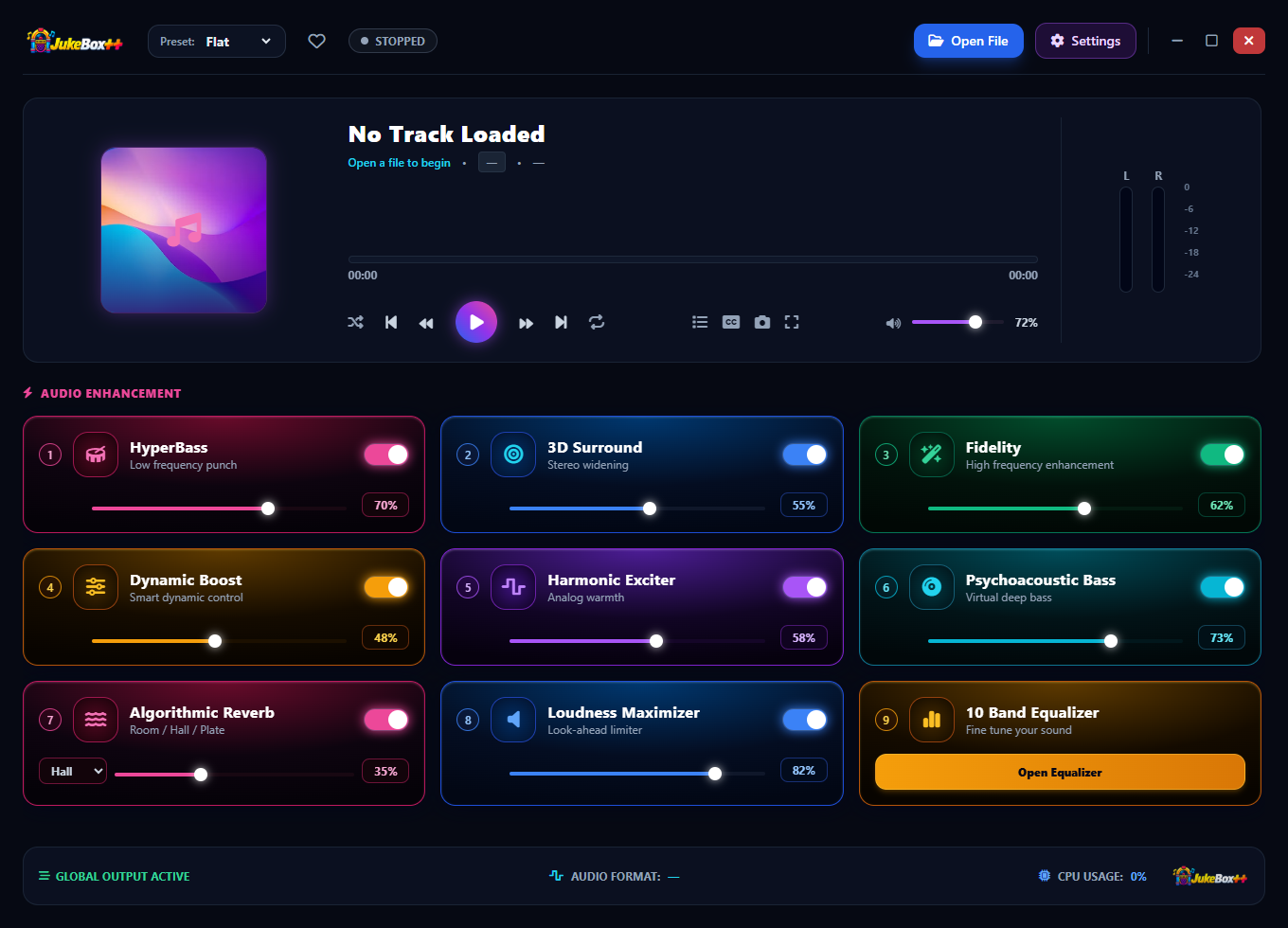
1. The Enhancement Engine — Ready to Play
Before any track is loaded, the nine enhancement processors are already configured and ready. Each processor is displayed as a card with its name, a percentage indicating its current processing intensity, and individual controls. HyperBass is set to 80%, giving maximum low-frequency extension. 3D Surround is at 70%, widening the stereo image. Fidelity at 54% restores high-frequency detail. Dynamic Boost at 43% compresses and expands the dynamic range for more punch. Harmonic Exciter at 34% adds harmonic overtones for brightness. Psychoacoustic Bass at 28% reinforces low-end perception. Algorithmic Reverb at 32% adds spatial depth. Loudness Maximizer at 43% brings up the overall perceived volume. The 10 Band Equalizer has its own Open Equalizer button for fine-tuned frequency adjustment. The bottom status bar shows GLOBAL OUTPUT ACTIVE confirming the enhancement stack is live.
2. Audio Enhancement Stack — A Second Look at Every Control
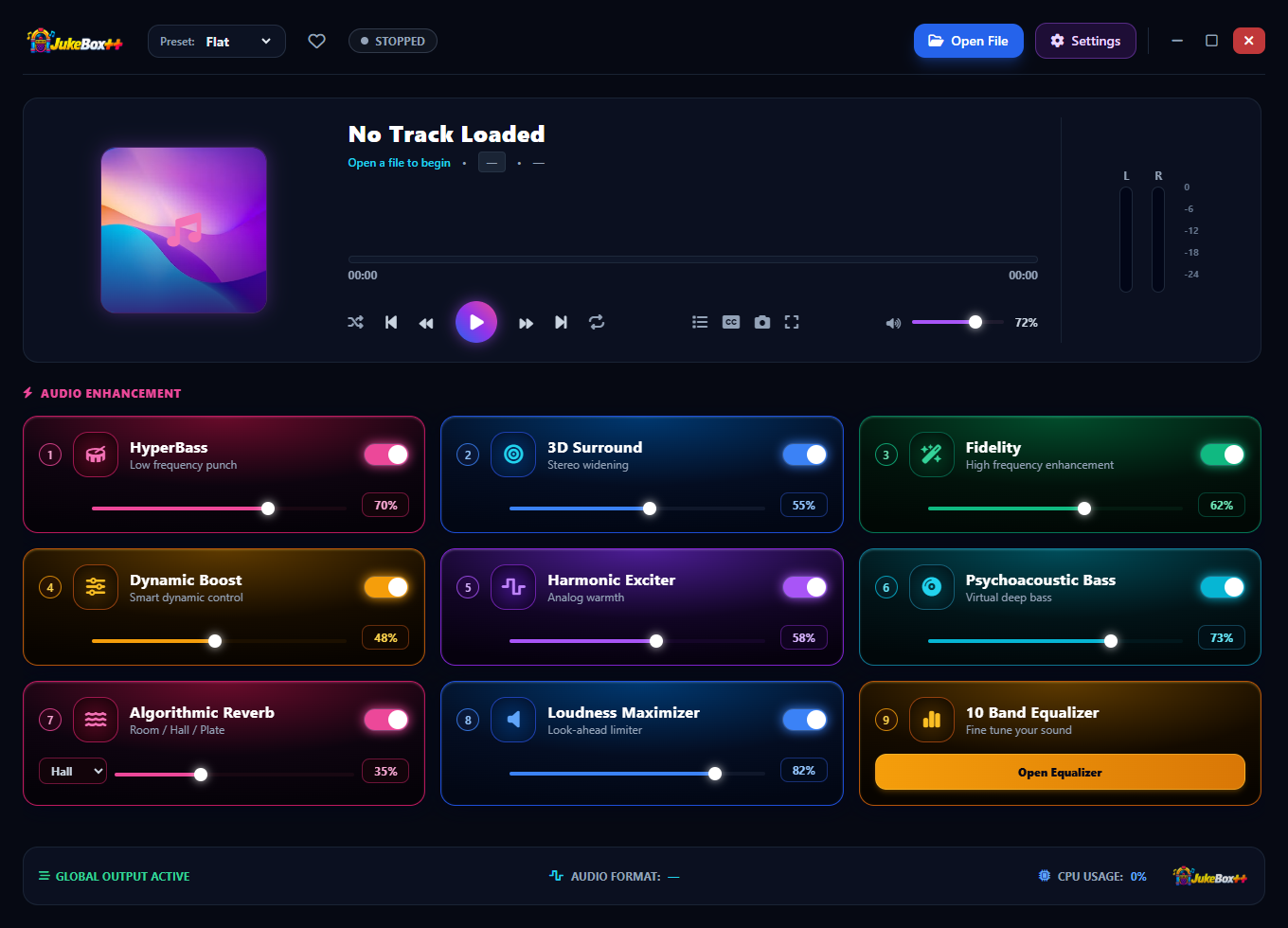
The enhancement card layout makes it easy to understand the full processing chain at a single glance. Every processor shows its current state — intensity percentage and active/inactive status — so you always know exactly what is applied to the signal. You can adjust any processor’s intensity in real time while music is playing, hearing the effect immediately without any latency. Turning a processor’s intensity to zero effectively removes it from the chain, letting you A/B the enhancement by quickly zeroing and restoring a slider. The JUKEBOX branding in the bottom status bar and CPU usage display confirm the processing overhead of the active chain.
3. Live Playback with Spectrum Analyser Active
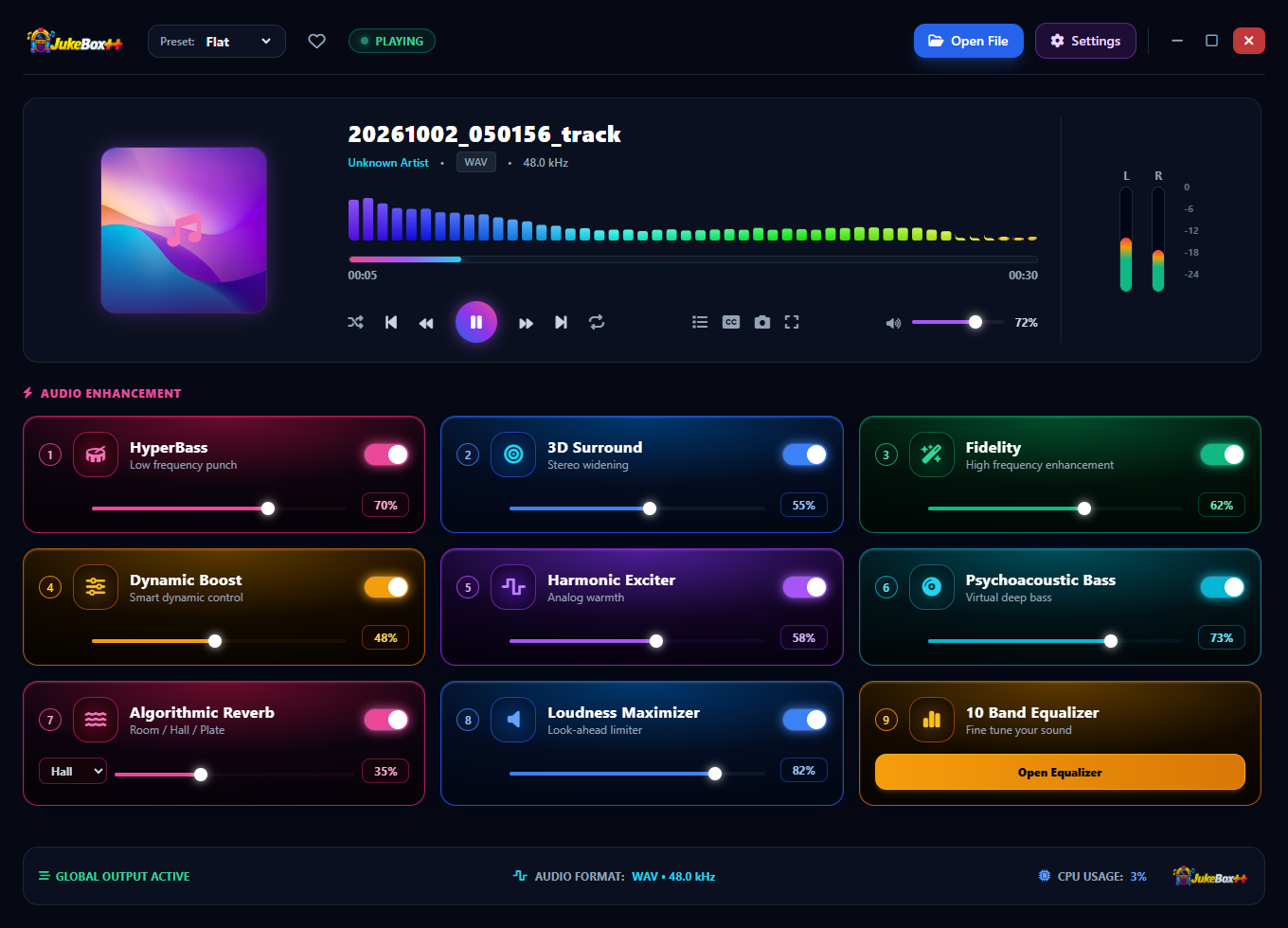
With a track playing, the spectrum analyser at the top of the interface activates, displaying the frequency content of the processed audio output as a live bar graph. The bars respond in real time to the music, showing bass frequencies on the left, midrange in the centre and high frequencies on the right. The track name — “20261002_05015G_track” — appears at the top, and the bottom status bar confirms the file format: WAV – 44.8 kHz, a high-resolution audio source. The entire enhancement stack processes this signal before it reaches your speakers or headphones, with the spectrum analyser showing the effect of the combined processors on the output signal’s energy distribution.
4. 10-Band Equaliser — Flat Preset

The 10-Band Equaliser is accessible via the Open Equaliser button in the enhancement cards section. In Flat mode, all ten frequency bands are set to 0 dB — the audio passes through with no frequency-specific boost or cut, giving a neutral reference point. The ten bands span the audible range from 60 Hz (deep bass) through 170 Hz, 310 Hz, 600 Hz, 1 kHz, 3 kHz, 6 kHz, 12 kHz and up to 16 kHz (air/presence). A Reset to Flat button returns all sliders to zero from any preset. The Flat preset is useful when you want the enhancement processors to shape the sound without adding any additional EQ curve on top.
5. 10-Band Equaliser — Rock Preset

The Rock preset applies a frequency curve tuned for rock music: boosted bass for impact and weight, reduced lower-mids to avoid muddiness, and boosted upper-mids and presence frequencies to bring forward guitars and drums. The slider positions create a characteristic V-shaped curve with energy lifted at the frequency extremes and a slight dip through the middle of the range. Switching presets applies the new curve instantly while music is playing, so you can hear the effect of each preset in real time and choose the one that suits the track.
6. 10-Band Equaliser — Pop Preset

The Pop preset shapes the frequency response for pop music production: controlled bass for clarity, a slight upper-bass warmth boost, flat through the midrange to preserve the mix balance, and lifted highs for brightness and air. Pop recordings are typically mastered with strong high-frequency content, and the Pop EQ preset complements this by reinforcing that brightness while ensuring the bass stays tight rather than boomy. The result is a clean, forward-sounding presentation well-suited to vocals and electronic production elements.
7. 10-Band Equaliser — Jazz Preset

The Jazz preset applies a warm, mid-forward curve that suits the acoustic instruments, upright bass, piano and brushed drums characteristic of jazz recordings. Bass is present but not overpowering, the midrange is gently boosted to bring forward the tonal body of acoustic instruments, and the highs are slightly rolled off to avoid harshness from older recordings or hot high-hat transients. Jazz recordings often benefit from an EQ approach that prioritises natural instrument timbre over excitement or impact, and this preset is calibrated accordingly.
8. 10-Band Equaliser — Classical Preset

Classical music calls for restraint in EQ — orchestral recordings are already balanced by the recording engineer and acoustician, and heavy EQ processing disrupts the carefully preserved dynamics and spatial cues. The Classical preset makes gentle adjustments: a subtle low-frequency lift to reinforce bass and cello depth, a flat midrange to preserve string and woodwind tonal accuracy, and a slight high-frequency boost to add presence to violins and brass. The curve is the most conservative of all the presets, designed to enhance rather than transform.
9. 10-Band Equaliser — Electronic Preset

Electronic music is made for playback on large speaker systems with powerful bass reinforcement. The Electronic preset mirrors that target: maximum low-frequency boost for synthesised bass and kick drum impact, a scooped midrange to prevent the sound from becoming congested at high volumes, and a sharp high-frequency rise for synth leads and hi-hats to cut through. This is the most aggressive preset in the collection, designed to make electronic music feel physical and energetic even on standard computer speakers.
10. Settings, Keyboard Shortcuts and About

The Settings and About dialog combines configuration options with application identity information. The keyboard shortcuts section documents the available hotkeys — including the Double-click video toggles fullscreen toggle — for users who prefer keyboard control. Three utility buttons provide maintenance functions: Clear Recent Files removes the playback history list, and Reset All Settings to Default returns JukeBox++ to its factory configuration, useful if a series of experimental EQ and enhancement changes has produced an undesirable sound. The About section confirms JukeBox++ is developed and published by Debmedia Technologies LLP, with developer Debasis Bhattacharjee and the official website listed for support and updates.
Who Is JukeBox++ For?
- Music listeners who want better sound without buying new speakers — The enhancement stack improves the perceived quality of music through any output device, from laptop speakers to high-end headphones.
- Audiophiles and hi-fi enthusiasts — Customise the 10-band EQ to compensate for the frequency response of their specific headphones or speaker system.
- Genre-specific listeners — Apply a preset tuned specifically for rock, pop, jazz, classical or electronic music and hear an immediately noticeable improvement over a flat player.
- Users with large local music libraries — JukeBox++ plays all common audio formats from local files, and the enhancement stack makes older, poorly mastered recordings sound significantly better.
- Casual music fans replacing Windows Media Player — A modern, visually engaging music player that sounds better than any built-in Windows playback option.
System Requirements
- Operating System: Windows 10 (64-bit) or Windows 11
- Processor: Any modern x64 processor
- RAM: 4 GB minimum
- Audio: Any Windows-compatible audio output
- Storage: 100 MB for the application
- Display: 1280 × 720 minimum
- Internet: Not required — fully offline
Frequently Asked Questions
Does JukeBox++ modify my audio files?
No. All enhancement processing happens in real time during playback only. Your original audio files are never modified, re-encoded or altered in any way.
Can I use JukeBox++ with Bluetooth headphones or speakers?
Yes. JukeBox++ outputs through whatever audio device Windows has selected as the default playback device. Any Bluetooth, USB or analogue output device works automatically.
What audio formats does JukeBox++ support?
JukeBox++ supports MP3, WAV, FLAC, OGG, AAC and WMA files. Drag-and-drop a file directly onto the player window to open it immediately.
Can I turn off all enhancements for reference playback?
Yes. Set the Flat EQ preset and reduce each enhancement card’s intensity to zero. This passes the audio through with no processing, equivalent to any standard media player.
Will the enhancement processing affect battery life on a laptop?
The processing overhead is minimal — CPU usage of the enhancement stack is shown in the status bar and typically remains below 5% on any modern processor. Battery impact is negligible.
Your Music, Enhanced
Nine audio processors, six EQ presets, a live spectrum analyser, and a clean dark interface that looks as good as it sounds. JukeBox++ is not just a player — it is an upgrade to every listening session, regardless of what files you have or what speakers you are using.
Load a track. Hear the difference immediately. Download JukeBox++ now — free to try, no account required.
Download JukeBox++
Advanced music player with 9 professional audio enhancers and 10-band equalizer