
Let me ask you something honest. Have you ever recorded yourself singing along to your favorite song, played it back, and felt your stomach drop? Not because your voice was bad — but because the recording sounded absolutely terrible. The music and your voice were out of sync. Your vocals were thin and echoey. There was so much background noise it sounded like you were singing in a bathroom. And when you tried to fix it, you had to juggle three different apps, export files back and forth, apply effects manually, and still end up with something that sounded worse than a voice memo from 2009.
That experience is more common than people admit. And the frustrating part? It doesn’t have to be that way.
The Problem Nobody Talks About Enough
Karaoke is one of the most universally loved activities on the planet. It doesn’t matter if you’re a trained vocalist or someone who only sings in the shower — there’s something deeply satisfying about performing your favorite songs. Millions of people do it every week, at home, at events, at parties.
But when you try to record that experience? Everything falls apart.
The core problem is this: standard screen recorders and audio capture tools were never built for singing. They capture whatever is coming out of your speakers and your microphone — but they do it as a flat, combined mess. You get one audio track with your voice buried somewhere under the music. You can’t adjust the levels afterward. You can’t clean up your vocals. You can’t fix the timing if your voice sounds half a second behind the beat.
And the timing issue is a real one. Every computer introduces latency — a tiny delay between what you hear and what gets recorded. This delay varies depending on your audio drivers, your microphone, your system settings. If you’re not actively compensating for it, every single recording you make will sound slightly off. Not dramatically wrong, but just wrong enough to ruin it.
Then there’s the question of your voice quality. Raw microphone recordings almost never sound good. Your voice needs EQ work — the mud in the low-mids needs to be cut, the presence needs to be lifted, the sibilance needs to be controlled. Without that processing, your voice sounds flat, boxy, or harsh. Professional singers don’t just walk into a room, plug in a mic, and sound great. There’s processing happening behind the scenes — and until now, that was only available to people with a studio setup and the knowledge to use it.
Why Every Tool You’ve Tried Has Let You Down
You’ve probably already tried to solve this problem. Most people go through the same journey.
First, you try a basic screen recorder. It captures your screen and audio, but it mashes your voice and the music into one uneditable track. You can’t separate them later. You can’t adjust the mix. What you record is what you’re stuck with.
Then you try something like Audacity. It’s powerful, but it requires actual audio engineering knowledge to use effectively. Setting up separate input sources, managing latency compensation, applying EQ curves, adding reverb — each of these is its own rabbit hole. And after spending two hours figuring it all out, you still have to mix everything manually every single time.
Then there are the dedicated karaoke apps. Most of them are either locked to a specific platform, require a subscription to do basic things, charge you per song, or are so cluttered with social features that the actual recording functionality is buried. Many of them don’t let you export at all without paying. And almost none of them give you control over the audio processing.
The market is full of tools that either do too little or ask too much — too much money, too much technical knowledge, or too much of your time.
A Better Way to Record Your Voice With Music
This is the problem that Karaoke Voice Recorder Studio was built to solve.
The idea was simple: take every frustration from the existing workflow and eliminate it one by one. Separate the music and voice tracks automatically, so you always have full control. Build in voice processing that actually works, so you don’t need to be a sound engineer. Handle the latency compensation, so your recordings are always in sync. And make it clean and fast enough that you actually enjoy using it.
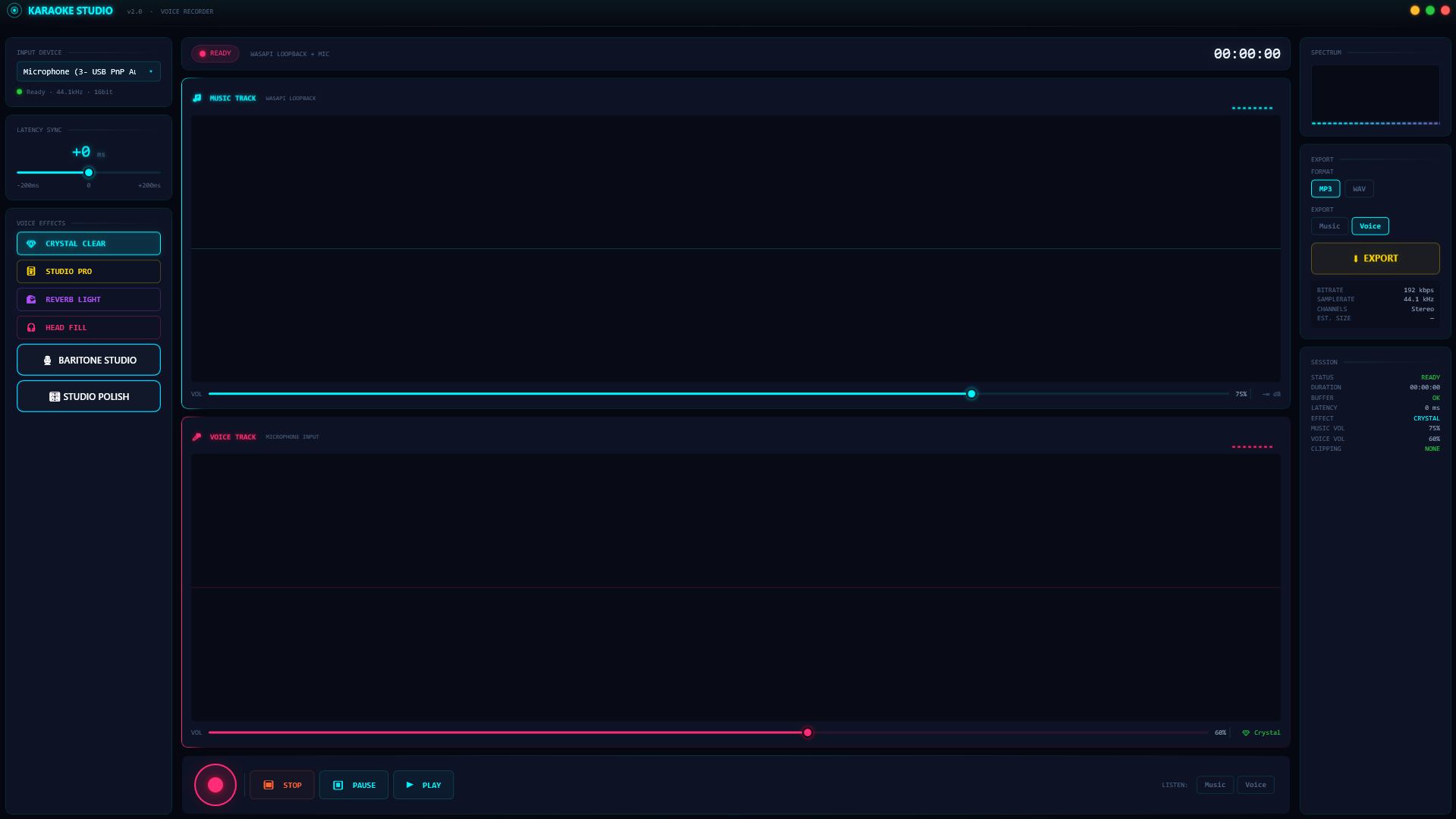
The result is a desktop application built on Windows using VB.NET and WPF, powered by NAudio — one of the most respected audio libraries in the .NET ecosystem. It captures your system audio and your microphone as two completely separate tracks simultaneously, processes your voice with professional-grade effects, lets you preview the mix, and exports the final result as WAV or MP3.
That’s the short version. Let’s go deeper.
What the Software Actually Does, Step by Step
Here’s the full picture of what happens when you use Karaoke Voice Recorder Studio.
You start playing music from anywhere. Spotify, YouTube, a local file, a karaoke backing track site — it doesn’t matter. The software captures whatever audio is playing through your Windows system using WASAPI loopback, which means it records the actual clean digital output before it even reaches your speakers. No mic-to-speaker bleed, no room noise mixed into the music track, just pure digital audio.
You sing into your microphone. At the same time, the software captures your voice through your selected microphone input as a completely separate stream. Music on one track. Voice on another. Both recorded simultaneously, both perfectly synchronized at the capture level.
Your voice gets processed in real time. Before export, the software runs your voice through a multi-stage processing chain that includes peak EQ at multiple frequency points (targeting the body at 160Hz, clearing mud around 300Hz, boosting presence at 3kHz, gentle de-essing at 6kHz, and adding air at 12.5kHz), dynamic compression for consistent volume and density, soft saturation for warmth, reverb for space, stereo widening, normalization, and a soft limiter to prevent clipping. This is the kind of signal chain a recording engineer would build in a professional DAW — and it runs automatically, invisibly, as part of the export process.
You can fix sync issues with a single slider. If your voice recording sounds even slightly ahead of or behind the music, you drag the latency compensation slider — ranging from -200ms to +200ms. The software applies this offset mathematically when mixing, so the final output lines up perfectly.
You choose what to export. Music only, voice only, or the full mix with both tracks blended. You choose the volume balance between music and vocals. You choose WAV for lossless quality or MP3 at 192kbps if you want a smaller file. Then you click export, pick a save location, and it’s done.
The Voice Preset System: Six Flavors of Great
One of the most thoughtful parts of the software is the voice preset system. Instead of making you manually dial in EQ and reverb settings every time, there are six named presets, each tuned for a different vocal character and situation.
Crystal Clear — This one lifts the high end, adds a touch of midrange presence, and applies gentle compression. It’s designed for voices that need clarity and brightness. Good for higher registers and pop-style singing.
Studio Pro — Balanced compression, slight low-mid reduction to cut boxy frequencies, moderate reverb with a longer tail. This is the most “produced” sounding preset — the one that makes your voice sound like it came out of a proper recording session.
Reverb Light — Minimal processing, just a gentle room reverb added. If you have a naturally good recording environment and just want a little space around your voice, this is the one.
Head Fill — A balanced preset with boosted highs, light compression, and a short subtle reverb. It creates the impression of a fuller, more three-dimensional vocal without adding too much obvious effect.
Baritone Studio — Built specifically for deeper, richer voices. It boosts the warmth zone around 160Hz, shapes the 1kHz midrange, retains clarity in the high end, applies compression for density, and keeps the reverb very subtle. If you have a lower voice and other presets make you sound thin or harsh, this is where you want to be.
Studio Polish — The most transparent preset. Tiny EQ touches, very light compression, a short, barely audible reverb tail. For recordings that just need to be finished and cleaned up without dramatically changing the character of your voice.
Who Should Be Using This
If any of the following describes you, this software was built for you.
Home karaoke enthusiasts who want recordings they can actually listen back to and share, not just embarrassing raw captures.
Content creators — especially those on YouTube or TikTok — who want to post singing covers without going through a full professional recording process.
Vocal practice users who want to record their rehearsals, listen back to improve, and track their progress over time.
Music teachers who want to demonstrate vocal technique or record student sessions for review.
Event hosts and party organizers who want to capture karaoke nights for the group to enjoy afterward.
Semi-professional singers who want a quick and accessible way to capture ideas, demos, or covers without booking studio time.
A Real Scenario: Before and After
Let’s walk through a real example.
Imagine you want to record a cover of a song you love. You open YouTube, find the official karaoke backing track, put on headphones, and start singing.
Before this software: You open OBS or a similar screen recorder, and it captures your voice and the music into a single mixed track. When you play it back, you notice your voice is half a second behind the beat — that classic microphone latency problem. Your voice sounds raw and thin against the professional backing track. You try to fix it in a video editor, dragging the audio clip around, guessing at the timing. You add some reverb in Audacity, but you can’t hear what effect it’s having until you export. The whole process takes 45 minutes and the result still sounds amateur.
After Karaoke Voice Recorder Studio: You hit record. You sing. You hit stop. You drag the latency slider until the sync feels right. You preview the mix using the built-in playback modes — music only, voice only, or both together. You select the Studio Pro preset because you want a polished sound. You click export, choose MP3, and in about 30 seconds you have a finished file that actually sounds like a recording, not an accident. Total extra time: under 5 minutes.
Why This Was Built
The person building this software isn’t a corporation trying to monetize a hobby. This came from the same frustration you’ve felt — the experience of trying to record singing at home and realizing how broken the existing tools are for this specific use case.
The technical architecture reflects that frustration being taken seriously. The audio engine separates capture streams using WASAPI loopback for system audio and WaveIn for microphone — the same approach professional audio software uses. The effects processing chain is not a gimmick; it’s a proper signal path with mathematically correct BiQuad filters, real dynamic range compression, comb-filter reverb, and proper normalization. The latency compensation doesn’t just nudge things around — it mathematically shifts the sample data by the exact number of samples corresponding to the requested millisecond offset.
This is software built by someone who actually understands audio, built to solve a problem they actually had.
Current Development Status
Karaoke Voice Recorder Studio is currently in active development. The core recording engine, voice effect processing pipeline, multi-preset system, latency compensation, and export system are all built and functional. The architecture is modular and already designed for the next set of features that are on the roadmap — including real-time waveform visualization, AI-powered noise removal, pitch correction, and multi-track support.
This means right now is the best time to get involved. Early users will have access to the software before public launch, at special early-access pricing, and will have direct input into which features get prioritized next.
We’re currently offering early access to a limited number of users. If you’re interested in being among the first to try it, fill in your email below and we’ll reach out within 24 hours with access details.
Early Access — Get It Before Public Launch
[Get Early Access — Enter Your Email]
Early access users get:
- The current build of Karaoke Voice Recorder Studio for Windows
- All six voice presets
- WAV and MP3 export
- Direct feedback channel to shape the feature roadmap
- Priority access to every new feature as it ships
We respond to every early access request within 24 hours, and delivery of the software happens the same day.
Future Pricing
Karaoke Voice Recorder Studio will launch publicly at $49 as a one-time purchase — no subscriptions, no per-feature paywalls, no platform lock-in. You buy it once and it’s yours.
Early access users will receive a significant discount from the launch price. The exact discount depends on how early you get in. The sooner you sign up, the better the price you lock in.
Frequently Asked Questions
Is it safe to install? Yes. The software is a standard Windows desktop application built with .NET 8 and WPF. It requires no admin privileges to run and does not access the internet. The only external dependencies are the NAudio and NAudio.Lame packages, which are widely used open-source audio libraries.
What operating systems does it support? Windows 10 and Windows 11, 64-bit. The software uses WASAPI loopback for system audio capture, which is a Windows-native API. A Mac or Linux version is not currently planned, but may be considered based on demand.
Does it record from Spotify, YouTube, or other streaming services? Yes. Because it captures the system audio output rather than a specific application, it records whatever is playing through your Windows audio system — including Spotify, YouTube in any browser, local media players, dedicated karaoke apps, or anything else.
Can I use any microphone? Any microphone that appears as a standard Windows audio input device will work. This includes USB microphones, XLR microphones connected via an audio interface, headset microphones, and built-in laptop microphones (though built-in microphones typically produce lower quality results).
How long does export take? For a typical 3–5 minute recording, export takes roughly 20–30 seconds. Longer recordings take proportionally longer. MP3 export is slightly slower than WAV due to the encoding step.
Can the software be customized for my specific use case? Yes. Custom version requests are welcome. If you need specific features, different presets tuned to your voice, or workflow adjustments for a particular use case, reach out and we can discuss what’s possible.
Will my recordings be stored anywhere? No. All recordings are stored locally on your machine in Windows’ standard temp folder during recording, and in whatever export destination you choose. Nothing is uploaded or transmitted.
The Bottom Line
Recording karaoke at home should not be this difficult. It has been difficult because the tools available were never actually designed for it — they were designed for other things and repurposed badly.
Karaoke Voice Recorder Studio is the tool that was actually designed for this. Separate tracks. Professional voice processing. Latency compensation. Clean export. It takes the complexity out of the workflow and puts the focus back on the part that actually matters: your performance.
If you’ve been settling for bad recordings, or giving up on capturing your karaoke sessions because the result is never worth the effort, this is what changes that.
Early access is open now, and we’re delivering within 24 hours of signup. Come be part of it from the beginning.
💬 0 Comments