Overview
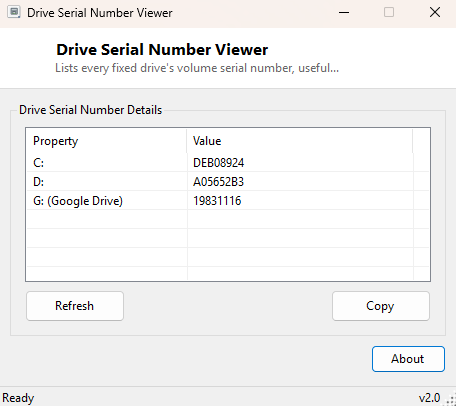
Drive Serial Number Viewer reads the volume serial number Windows assigns to every formatted drive and lists it alongside the drive's volume label, one row per fixed drive on the system. This is a small but genuinely useful number — it is not the same as the physical hardware serial number printed on a drive's manufacturer label, but a value Windows itself generates at format time and stores in the filesystem, and it shows up in licensing checks, asset tracking spreadsheets, and certain software activation schemes that tie themselves to a specific volume rather than a specific physical device.
Key Features
- Lists every ready fixed drive letter with its volume serial number
- Shows the volume label alongside the serial number when one is set
- Formats the serial number in the standard XXXX-XXXX hyphenated form Windows itself uses
- Refreshes instantly if a drive is added, removed or reformatted while the tool is open
- One-click copy of the full report to the clipboard
- No scanning delay — reads directly from WMI on demand
Why You Might Need This Tool
Some older software licensing systems, and a surprising number of internal corporate asset-tracking tools, use a drive's volume serial number as part of a hardware fingerprint to tie a license to a specific machine — when that license breaks after a reformat or a drive swap, being able to see the exact serial number before and after is the fastest way to understand why. IT teams also use volume serial numbers as a quick, no-tools-needed way to confirm two drives that look identical from the outside are not actually the same physical media, since a serial number regenerates every time a drive is reformatted.
How It Works
The tool queries Win32_LogicalDisk through WMI, filtering to
DriveType=3 (fixed, non-removable drives), and reads the
VolumeSerialNumber and VolumeName properties for each result
using a System.Management.ManagementObjectSearcher. This is the exact
same WMI class Windows' own vol command-line utility and File Explorer's
drive properties dialog draw from, so the numbers shown here will always match what
Windows itself considers the volume serial to be. Note that this is the filesystem
volume serial, generated at format time, and is completely different from a drive's
physical hardware serial number, which is covered instead by
Drive Serial Viewer.
How to Use It
Open the tool and every fixed drive's serial number populates immediately. Click Refresh after connecting or disconnecting a drive to update the list, and Copy to place the full report on the clipboard for a support ticket or asset record.
System Requirements & Notes
Runs on 64-bit Windows 10 and Windows 11 and needs no administrator rights, since volume serial numbers are readable by any standard user account through WMI.
Frequently Asked Questions
Is this the same as the physical drive's serial number printed on the label?
No — this is a filesystem-level volume serial number generated when the drive was
formatted, not the manufacturer's hardware serial. For the physical serial, see
Drive Serial Viewer.
Does reformatting a drive change this number?
Yes — every format operation generates a brand new volume serial number, even on the
exact same physical drive.
Why don't I see my USB drive in the list?
This tool intentionally lists only fixed, non-removable drives; USB and other
removable media are excluded by design to keep the report focused on permanent
storage.