Overview
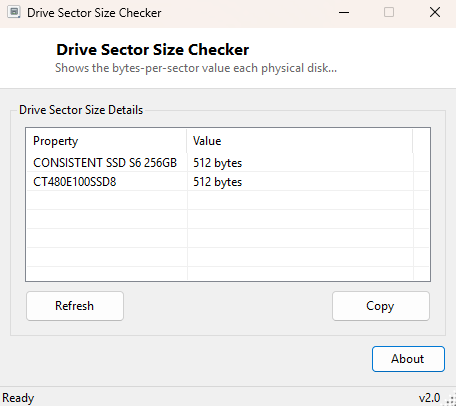
Sector size is one of the most invisible pieces of a drive's specification, quietly influencing performance and compatibility without ever showing up in a normal Explorer window. Most modern drives use 4096-byte "Advanced Format" sectors internally while still presenting a legacy 512-byte logical sector size for backward compatibility, and the mismatch between the two occasionally matters for imaging software, older operating systems, and certain RAID configurations. Drive Sector Size Checker reports exactly what each attached disk tells Windows its sector size is.
Key Features
- Reports bytes-per-sector for every physical disk attached to the system
- Shows the drive's model alongside its sector size for identification
- Useful for confirming Advanced Format (4K) vs. legacy 512-byte reporting
Why You Might Need This Tool
Sector size mismatches occasionally trip up disk-imaging software when cloning between drives with different reported sector sizes, and can matter when setting up certain RAID arrays or virtual machine storage where alignment assumptions baked into older tools expect a uniform 512-byte sector. Checking this value before a cloning or imaging operation, or when diagnosing an unexpectedly slow drive that might be suffering from sector misalignment, gives you the specific number those tools and troubleshooting guides actually ask for.
How It Works
The tool queries Win32_DiskDrive through WMI for the
BytesPerSector field, which Windows populates from the drive's own
reported logical sector size during enumeration — the same value low-level disk
utilities and partitioning tools read before performing any sector-aligned
operation. This reflects the logical sector size a drive presents to the operating
system, which on many modern "Advanced Format" drives can differ from the physical
sector size used internally by the drive's own firmware.
How to Use It
Open the program and every attached drive's bytes-per-sector value appears immediately alongside its model name, with no configuration required.
System Requirements & Notes
Runs on 64-bit Windows 10/11 with no administrator rights required.
Frequently Asked Questions
Is 512-byte or 4096-byte sector size better?
Neither is inherently better — 4096-byte (4K native) sectors are more efficient for
modern large-capacity drives, while 512-byte remains the legacy standard for maximum
compatibility with older software and operating systems.
Why does my drive show 512 bytes even though it's an Advanced Format drive?
Most Advanced Format drives use "512e" emulation, presenting a 512-byte logical
sector to the OS for compatibility while internally using 4096-byte physical
sectors — this is normal and expected behavior, not a misconfiguration.
Does sector size affect my drive's usable capacity?
Not meaningfully — sector size affects how data is organized and aligned on disk,
not the total usable capacity, which is governed by the drive's total sector count.