Base Platform  /  Code Snippet Archive

Code Snippet & Reference Library

Battle-tested, copy-pasteable snippets across PHP, Python, JavaScript, VB.NET, SQL and Bash — compiled from real SaaS engineering sessions.

469
Snippets Indexed
2
PHP
0
JavaScript
7
Python
✕ Clear

Showing 7 snippets · Tech

Clear filters
SNP-2025-0018 Tech 2024-01-19

Crafting Engaging CSS Animations step by step guide

THE PROBLEM

Before we dive into the world of CSS animations, ensure the following:

  1. Basic HTML and CSS Knowledge: Familiarize yourself with the fundamentals of HTML and CSS.
  2. Access to Your Blog's Stylesheet: Make sure you can modify your blog's CSS stylesheet.

Before writing any code, sketch out the type of animation you want. Consider the mood and tone of your blog, ensuring the animation complements your content.

In your blog post or webpage, identify the element you want to animate. Add a class to this element for easy targeting in your CSS.

<div class="animated-element">
  Your content here...
</div>

Open your blog's CSS stylesheet and add the following code:

body {
  margin: 0;
  font-family: "Helvetica Neue", Helvetica, Arial, sans-serif;
  font-size: 13px;
  line-height: 18px;
  color: #333333;
  background-color: #ffffff;
}

a {
  color: #0088cc;
  text-decoration: none;
}

This example creates a simple fade-in animation with a slight upward movement. Feel free to experiment with different properties like opacity, transform, and transition to achieve the desired effect.

If you want the animation to occur on a specific event, like when the user scrolls to the element, you can use JavaScript. Add the following script to your blog:

<script>
  document.addEventListener('DOMContentLoaded', function () {
    var animatedElement = document.querySelector('.animated-element');

    function isInViewport(element) {
      var rect = element.getBoundingClientRect();
      return rect.top < window.innerHeight;
    }

    function handleScroll() {
      if (isInViewport(animatedElement)) {
        animatedElement.classList.add('show');
        window.removeEventListener('scroll', handleScroll);
      }
    }

    window.addEventListener('scroll', handleScroll);
    handleScroll(); // Check on page load
  });
</script>

Preview your blog post to see the CSS animation in action. Tweak the animation properties as needed to achieve the desired look and feel. Once satisfied, publish your post and let your readers enjoy the visually enhanced content.

By incorporating CSS animations into your technology blog, you add a layer of engagement that captivates your audience. Experiment with different animations and effects to find the perfect fit for your blog's style. Elevate your content and make a lasting impression with the power of CSS animations.
Open Full Snippet Page ↗
SNP-2025-0019 Tech 2024-01-18

Understanding how Links and protocols works 🚀

THE PROBLEM

A link is essentially composed of two distinct segments. The first part determines the protocol and server address, which can be specified either through a domain name or an IP address. The second part represents the document path appended to the address. For instance, consider the following document address:

https://estudiopatagon.com/contact/

Breaking it down:

  • Protocol (https): Specifies the communication protocol to be used. In this case, it's HyperText Transfer Protocol Secure, denoted by "https."
  • Domain Name (estudiopatagon.com): Identifies the server's location using a human-readable domain name. It points to the server that hosts the website.
  • Document URL (/contact/): Represents the specific path of the document relative to the server's root path. It guides the server to the exact location of the requested content.

Once a link is clicked, the web browser sends a request to the specified server using the provided protocol, domain name, and document path. The web server, in turn, is responsible for interpreting this request.

Once identified, the server serves the file as the response, allowing the browser to render and display the content.

The server analyzes the request, extracts the document path, and searches its directory structure for the corresponding file.

computer screen displaying files
Photo by Ferenc Almasi / Unsplash

In essence, the web server acts as the interpreter and provider, ensuring that the correct response is delivered based on the user's request. This seamless interaction between the browser and the server is fundamental to the functionality of the World Wide Web.

As we continue our exploration, we'll delve deeper into the intricacies of web development, understanding how links, protocols, and servers collaborate to deliver the web content we interact with daily.

Stay tuned for a deeper dive into the mechanics of web navigation and document retrieval.

Open Full Snippet Page ↗
SNP-2025-0009 Tech 2024-01-18

HTTP, Web Browsers, and Web Servers

THE PROBLEM

Think of the internet as a vast phone network infrastructure, with numerous interconnected devices, each assigned a unique identifier, much like a phone number. But what makes the internet truly powerful is its applications, and over time, various attempts have been made to explore its potential.

Early internet endeavors, like email and Usenet newsgroups, made their mark, but it was the World Wide Web that truly revolutionized our online experiences.

The inception of the World Wide Web can be credited to Sir Tim Berners-Lee, a visionary based in Switzerland. Back in the early days, he conceptualized a utility to visualize and interlink research papers. Little did he know that this idea would evolve into the World Wide Web we know today.

Working at CERN in Geneva, Berners-Lee introduced the concept of "hyperlinks." This innovative idea involved linking documents together, allowing users to navigate seamlessly between them. His creation was initially an academic tool, but its impact was far-reaching.

At the heart of the web's functionality is HTTP, or Hyper Text Transfer Protocol. This protocol, operating on top of TCP (Transmission Control Protocol), dictates how web browsers communicate with web servers and vice versa. It sets the rules for the exchange of information between these entities.

In the web ecosystem, two primary players come into play: the Web Server and the Web Browser. The Web Server, typically hosted remotely, serves web pages to clients, which are the Web Browsers. The interaction between these components is governed by the rules established by HTTP.

Imagine the Web Server as a repository of web pages, and the Web Browser as the tool that fetches and displays these pages for users. The communication between them is akin to a conversation following the rules of the HTTP protocol.

Web pages, the visual entities we interact with, are essentially text files encoded in HTML, or Hyper Text Markup Language. HTML provides the structure and format for web content, defining elements like paragraphs, headings, images, and more.

As we journey further into understanding the web, we'll delve into HTML and explore how these text files become the immersive web pages we encounter daily. Stay tuned as we bridge the gap between theory and practical implementation in the realm of HTML.

Open Full Snippet Page ↗
SNP-2025-0010 Tech 2024-01-18

Unveiling the Web Browser: Gateway to the World Wide Web

THE PROBLEM

The intriguing aspect lies in the fact that despite having numerous browsers, they all operate on similar principles. Chrome, Firefox, and others may have distinct features and appearances, but their core functionality remains consistent. This uniformity is attributed to the foundational concept that the Web is built on standards.

The Web, with its HTTP protocol, HTML, and associated technologies, is an open ecosystem. This openness means that anyone can participate, contribute, and even create their own browser. It's comparable to the open nature of Linux, where enthusiasts can craft their own distributions.

  • While creating a browser might be a formidable task, the openness of the Web allows for such possibilities.
  • This stands in contrast to closed platforms, like the operating system running on an iPhone, where creating a custom operating system is not feasible.

Here is where the magic flows, let's detail the 2 most important aspects of every web browser:

Every browser, whether on your computer or phone, shares a familiar interface. They enable you to enter a URL, the address of a resource on the Web, initiating the journey to retrieve information. Despite the diversity of browsers, the commonality in their appearance and functionality stems from adhering to open standards.

In the upcoming lesson, we'll delve into one of the core building blocks of the Web: URLs (Uniform Resource Locators). Understanding how URLs function is essential, as they play a pivotal role in navigating and accessing resources on the Web.

As we continue our exploration, keep in mind the collaborative and open nature of the Web, fostering innovation and participation from individuals and communities worldwide. The browser, your virtual window to the digital realm, serves as a testament to the power of open standards in shaping our online experiences. Stay tuned for a deeper dive into the world of URLs in the next lesson.

Open Full Snippet Page ↗
SNP-2025-0007 Tech 2024-01-18

Text Tags: Blocks, headings and Inlines a quick start ✍

THE PROBLEM

Before delving into specific tags, it's essential to grasp the distinction between block and inline elements.

  • Block Elements: These include tags such as <p>, <div>, heading elements (<h1> to <h6>), lists, and list items. When positioned on a page, block elements do not permit other elements to be visualized next to them. They typically create a new "block" or section in the layout.
  • Inline Elements: On the other hand, inline elements, like the <span> tag, can sit next to other inline elements. Unlike block elements, inline elements allow content to flow alongside them. Moreover, inline elements can be contained within block elements, but the reverse is not true.

Let's explore the <p> tag, which defines a paragraph of text and is considered a block element:

<p>Some text</p>

The block aspect of the <p> tag becomes evident when the tag is placed on its own line. Within a <p> tag, you can include inline elements, such as the <span> tag:

<p>A part of the text <span>and here another part</span></p>

HTML provides six heading tags, ranging from <h1> (most important) to <h6> (least important). Typically, a page features one <h1> element, serving as the page title. Subsequent headings, like <h2> to <h6>, represent varying levels of importance. Browsers render <h1> larger by default, gradually decreasing the size as the heading level increases:

<h1>h1</h1>
<h2>h2</h2>
<h3>h3</h3>
<h4>h4</h4>
<h5>h5</h5>
<h6>h6</h6>
<p>Paragraph</p>

All heading tags are block elements and cannot contain other block elements. However, they can include inline elements, like <span> or <strong>.

Understanding the distinction between block and inline elements, as well as the specific attributes of tags like <p> and heading tags, is foundational to creating well-structured HTML documents. As you continue your journey in web development, these insights will prove invaluable.

Open Full Snippet Page ↗
SNP-2025-0005 Tech 2024-01-18

Introduction to HTML 📖

THE PROBLEM

Now I want to tell you something about HTML you should know.

HTML is not presentational. It’s not concerned with how things look.

Instead, it’s concerned with what things mean.

You don’t tell “make this paragraph red” in HTML.

That’s a presentational aspect.

HTML is just concerned with content.

It just adds some predefined styles here and there, like for example with the list. But that’s it. There’s no customization you can do on how it looks, in HTML.

This will be the job of CSS, but that’s a story for another lesson.

REAL-WORLD USAGE EXAMPLE
<p>A paragraph of text</p>

<ul>
  <li>First item</li>
  <li>Second item</li>
  <li>Third item</li>
</ul>

This HTML snippet says that A paragraph of text is a paragraph. And then we have a list of 3 items.

p stands for paragraphul stands for unordered list, and li stands for list item.

For each of them, we have an opening tag (like <p>), the content, and a closing tag (like </p>).

So <opening tag> …content … </closing tag>.

Open Full Snippet Page ↗
SNP-2025-0016 Tech 2024-01-10

Getting Started with Netlify Deployment

THE PROBLEM

Netlify is a powerful deployment platform known for its speed, reliability, and seamless integration with version control systems like GitHub. It supports hosting static files, static site generators, and serverless functions.

  1. Visit Netlify.
  2. Click on "Sign Up" to create a new account.
  3. You can sign up using your GitHub account or provide the required information to create a new Netlify account.
Import from GIT
  1. After creating an account, log in to your Netlify dashboard.
  2. Click on the "New site from Git" button.
  3. Choose GitHub as the continuous deployment source.
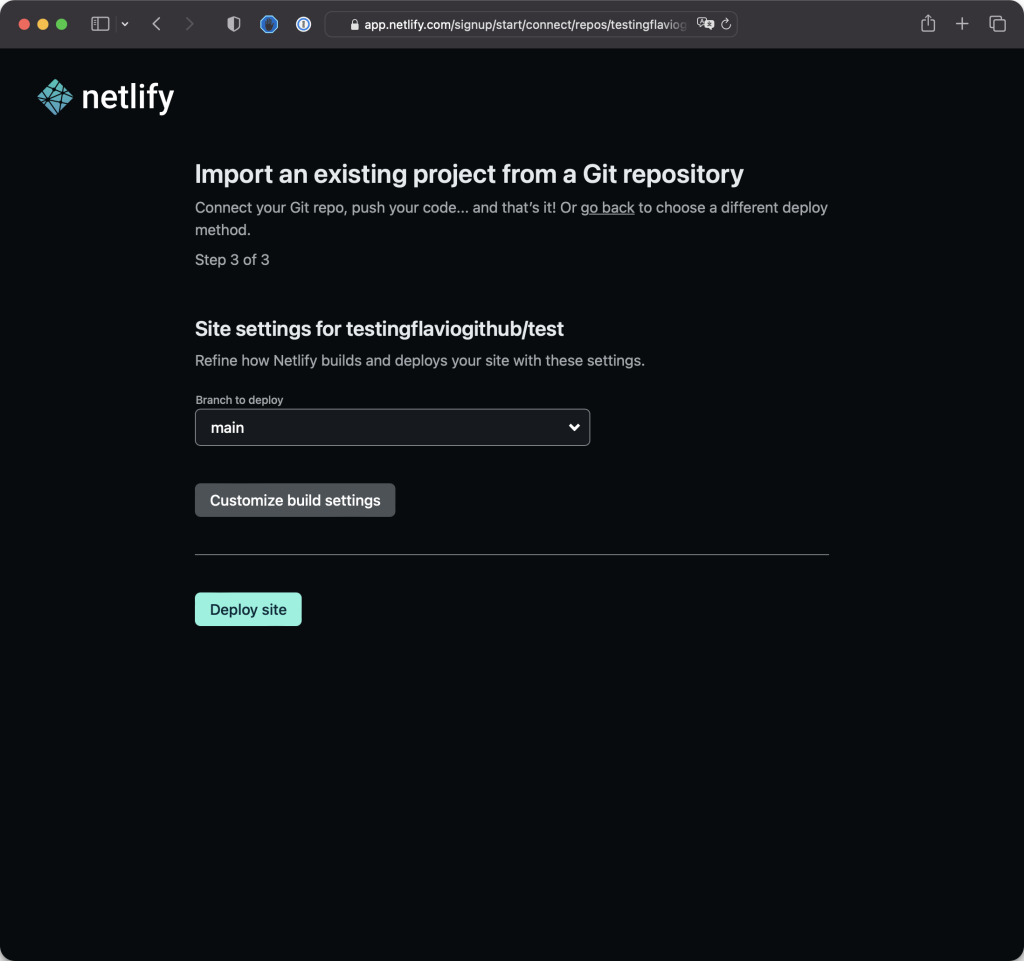
  1. Select the repository you want to deploy.
  2. Configure your build settings. For a simple HTML site, the default settings should work.
  3. Click on the "Deploy site" button.
  1. Clone your GitHub repository to your local machine.
  2. Make changes to your HTML files or any other assets.
  3. Commit and push the changes to your GitHub repository.
  4. Netlify will automatically detect the changes and redeploy your site.
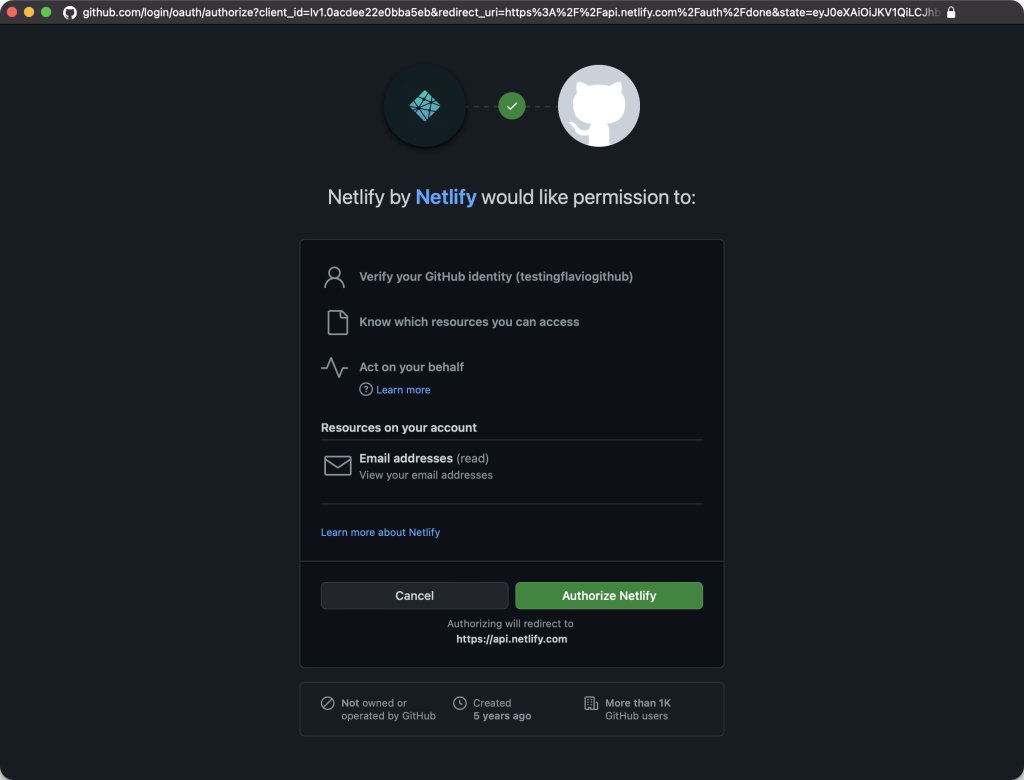
Allow Netlify Permissions
  1. Go back to your Netlify dashboard.
  2. You'll see a new deployment triggered by your recent push.
  3. Once the deployment is complete, you can visit the provided Netlify URL to view your live site.
  • Netlify provides features like custom domains, serverless functions, and more. Explore the settings in your Netlify dashboard to customize your deployment.
  • For advanced projects, you can explore static site generators like Hugo or Gatsby and leverage Netlify's features for a seamless deployment pipeline.

By following these steps, you'll be able to deploy and update your website with ease using Netlify. Feel free to explore more features offered by Netlify to enhance your web development workflow. Happy coding!

Open Full Snippet Page ↗