Why Workstations Lose Speed Over Time
Every single week you run your computer, invisible digital debris accumulates under the surface. Temporary caches bloat from normal daily usage, system pathways cross directions, and stealth background applications quietly attach themselves to your startup sequence.
The result? Your hardware isn't old—it's simply crowded. The utility safely unburdens your storage blocks to bring back original click responsiveness.
One-Click Simplicity. No Jargon.
Most operating toolkits on the market are intentionally confusing. They scare users with cryptic alerts or swamp you under endless, risky confirmation checklists. Our development blueprint focuses entirely on clean, background automation.
You do not need to be an administrator or understand complex software settings. Simply click the interface activation handle, let the automated sequence clean the targets, and return immediately to a light, responsive system environment.
Ram Cleaner: Game Booster PC Optimizer — Unleash the Full Potential of Your PC
More free RAM. Smoother gameplay. A faster PC. All from one clean, powerful application.
Why Your PC Slows Down — And What You Can Do About It
You bought a capable PC. It had plenty of RAM, ran programs smoothly, and handled everything you threw at it. But over time — or even just after a few hours of regular use — something changes. Applications feel sluggish. Games stutter. Switching between programs takes longer than it should. Your PC feels tired, even though nothing has technically gone wrong.
The culprit, more often than not, is memory. As you open and close programs throughout the day, your operating system accumulates memory that isn’t being actively used but hasn’t been properly released either. Background processes quietly consume resources. Services that started with Windows sit idle but still occupy RAM. By the time you notice the slowdown, a significant portion of your available memory is tied up doing essentially nothing.
Ram Cleaner: Game Booster PC Optimizer was built to solve this problem — simply, immediately, and without requiring you to understand anything technical about how memory management works.
Real-Time Awareness of Your System
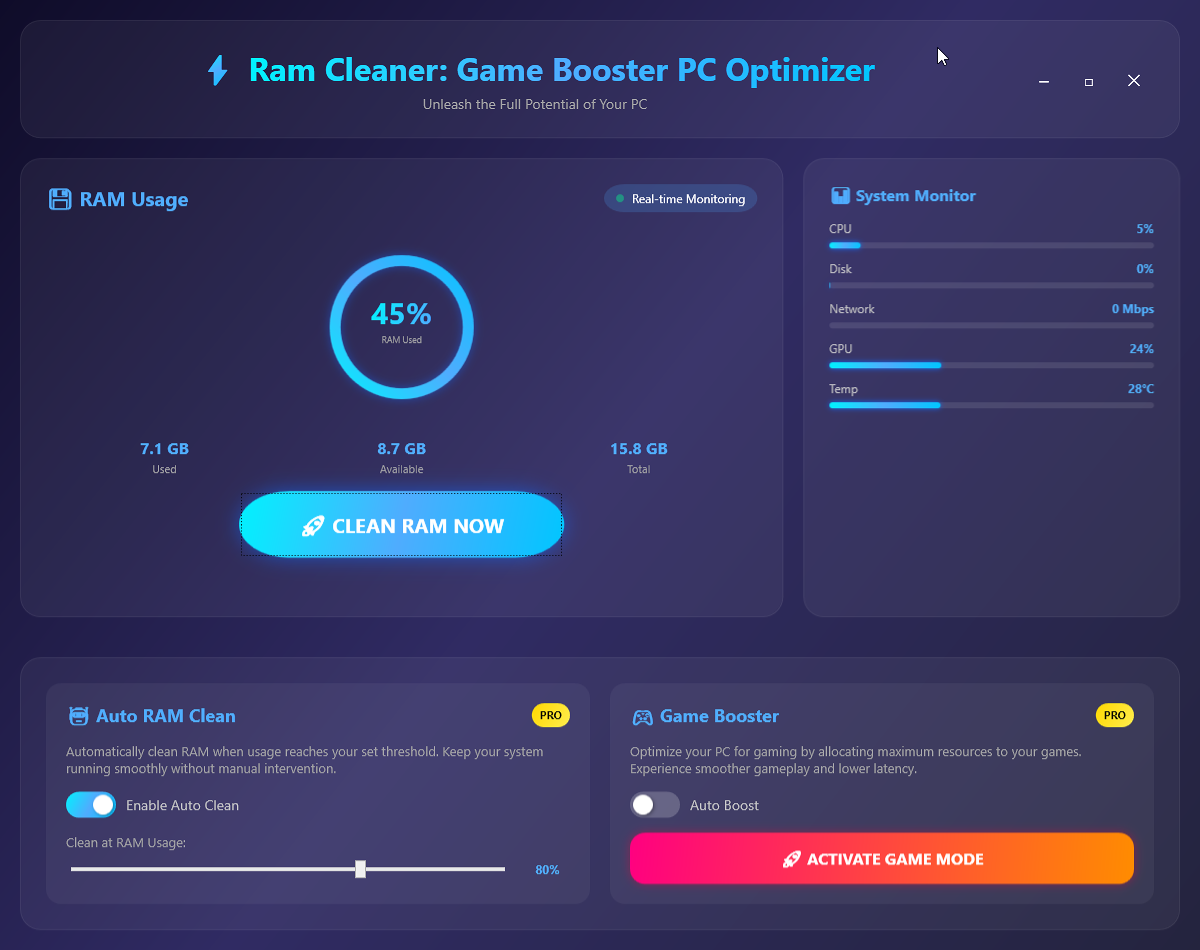
The moment you open Ram Cleaner, you have a complete picture of your system’s current state. The main dashboard presents your RAM usage as a clean, glanceable circular gauge — showing you at a glance what percentage of your memory is currently in use, how many gigabytes are actively occupied, how much is available, and your total installed RAM.
This isn’t a static snapshot. Ram Cleaner’s Real-time Monitoring keeps these figures updated continuously, so you always know exactly where your system stands. No need to open Task Manager, dig through performance panels, or try to interpret cryptic system statistics. The information you need is right there, presented clearly, the moment you need it.
Alongside your RAM figures, the System Monitor panel gives you a live dashboard of your other key hardware metrics — CPU load, disk activity, network speed, GPU utilization, and system temperature. All updated in real time, all in one place. It’s the kind of at-a-glance system health overview that used to require multiple separate tools.
One Click. More Free RAM. Right Now.
The centrepiece of Ram Cleaner is beautifully simple: the Clean RAM Now button. Press it, and Ram Cleaner immediately goes to work — recovering memory that has been held unnecessarily by background processes and inactive applications, and returning it to your system as usable free RAM.
The effect is immediate and tangible. Programs become more responsive. Switching between applications feels snappier. If you were experiencing slowdown before, you’ll notice the difference right away. There’s no wizard, no settings to configure, no technical knowledge required. One button, one click, instant results.
This is Ram Cleaner at its most accessible — a tool that anyone can use effectively from the very first time they open it.
Auto RAM Clean — Set It and Forget It
For users who want their system to stay optimized without any manual intervention, Auto RAM Clean takes the one-click experience a step further by making it fully automatic.
You set the threshold — the RAM usage percentage at which you want cleaning to trigger — and Ram Cleaner monitors your system continuously in the background. The moment your memory usage climbs to that level, it cleans automatically, bringing your available RAM back up without you having to do a thing.
This is particularly valuable during long work sessions, when RAM usage tends to creep upward gradually over the course of hours. Instead of noticing a slowdown and having to stop what you’re doing to address it, Auto RAM Clean handles it invisibly. Your system stays in good shape all day, automatically.
The threshold is fully adjustable with a simple slider — set it conservatively at a lower percentage if you want aggressive maintenance, or higher if you only want intervention when things are genuinely getting tight. Full control, zero effort.
Auto RAM Clean is a Pro feature.
Game Booster — Your PC, Optimized for Gaming
Gaming makes unique demands on a PC. When you’re in the middle of a match or an immersive open-world game, you want every available resource dedicated to that experience — maximum frame rates, minimum latency, and no background processes stealing CPU cycles or memory from your game.
Game Booster delivers exactly that. With one tap of the Activate Game Mode button, Ram Cleaner reshuffles your system’s priorities — freeing up memory, reallocating resources, and optimizing your PC’s configuration to give your game the maximum available headroom.
The result is smoother gameplay, more consistent frame rates, and reduced stuttering — especially noticeable on mid-range hardware where resource contention has a real impact on the gaming experience. For competitive players where latency matters, or for anyone who wants their games to run as well as their hardware is capable of, Game Booster is a meaningful upgrade.
The Auto Boost toggle takes this further, automatically activating game optimization whenever Ram Cleaner detects that you’ve launched a game — so you never have to remember to switch modes manually.
Game Booster is a Pro feature.
A Complete System Monitor in Your Pocket
Beyond memory management, Ram Cleaner serves as a lightweight but comprehensive window into your PC’s overall health. The System Monitor panel tracks five key metrics simultaneously:
CPU usage shows you how hard your processor is working at any given moment — useful for identifying runaway processes or understanding why your system feels slow even when RAM usage seems fine.
Disk activity tells you when your storage drive is under heavy load — important context when applications feel unresponsive, since disk bottlenecks are a common but often overlooked cause of system sluggishness.
Network speed gives you a real-time readout of your current bandwidth consumption — handy for understanding whether a background download or update is quietly consuming your connection.
GPU utilization shows how hard your graphics card is working — essential context for gamers and creative professionals who rely on GPU performance and want to keep an eye on load levels.
Temperature monitoring keeps you informed of your system’s thermal state — an important safety metric, particularly during gaming sessions or intensive workloads where heat buildup can cause throttling and reduced performance.
Together, these five metrics give you the situational awareness to understand your PC’s behaviour in real time and take action when something looks out of the ordinary.
Designed for Everyone
Ram Cleaner has been designed with clarity as a core principle. The interface is clean, modern, and immediately understandable — whether you’re a seasoned PC enthusiast who appreciates having detailed metrics at hand, or a casual user who just wants their computer to run better and doesn’t want to think about the technical details.
The dark, high-contrast visual design makes everything easy to read at any time of day. The large, clearly labelled controls remove any ambiguity about what does what. And the real-time feedback — watching your available RAM increase the moment you press Clean — makes the application’s value immediately tangible rather than abstract.
Free to Use — Pro Power When You Want It
Ram Cleaner’s core functionality — the real-time RAM monitor, the System Monitor dashboard, and the one-click Clean RAM Now feature — is available completely free. It’s a genuinely useful tool from the moment you install it, with no artificial limitations on the features that matter most for everyday use.
For users who want the full experience, the Pro upgrade unlocks Auto RAM Clean and Game Booster — the two features that transform Ram Cleaner from a useful utility into a hands-free system optimization solution. The upgrade is straightforward, fairly priced, and available directly within the application.
The Bottom Line
Your PC has more potential than it gets to show when background processes and accumulated memory overhead are holding it back. Ram Cleaner gives you the visibility to see exactly what’s happening, the tools to fix it instantly, and the automation to keep things running smoothly without any ongoing effort on your part.
Whether you’re a gamer chasing smoother frame rates, a professional who needs a responsive system throughout a long workday, or simply someone whose PC has been feeling sluggish and wants a fast, no-fuss solution — Ram Cleaner delivers.
Ram Cleaner: Game Booster PC Optimizer — Unleash the full potential of your PC.