
Font Previewer ++
Free font scanner with Bangla preview, Font DNA pairing, Font Doctor and duplicate finder
Font Previewer++ is a free Windows app that scans your font folders, previews every font with your own text, and shows what is inside each file: names, designer, licence, character coverage and variable axes. Font DNA suggests pairings from your own collection and explains why. Font Doctor shows which characters a font cannot display and checks the file for problems, with Bangla and Unicode support. It also finds duplicate fonts and exports contact sheets as PNG or PDF. No activation, no account, works offline.
See Font Previewer++ in Action
A clean, modern interface designed for real-world use.
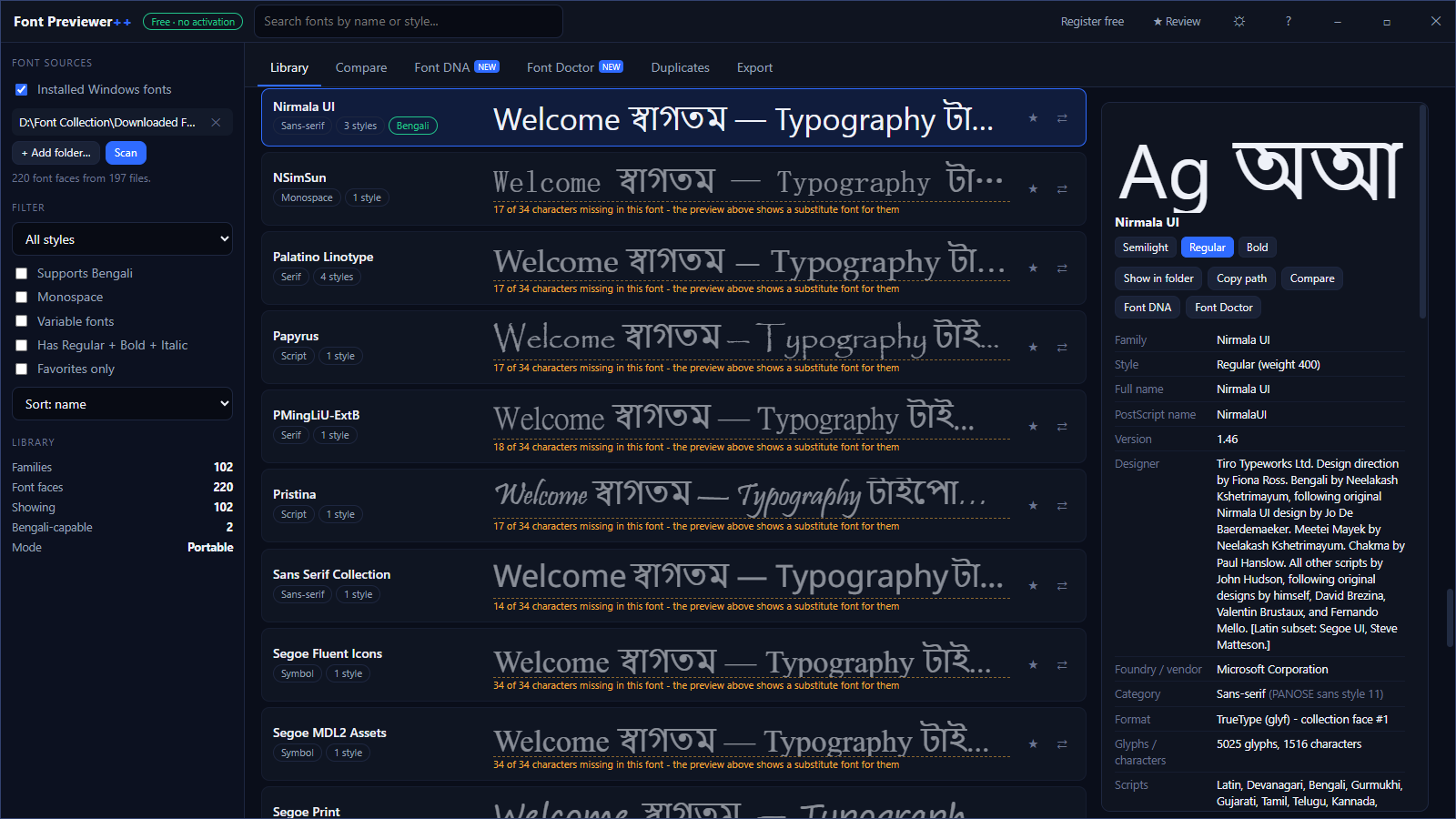
Font Previewer++ library showing installed Windows fonts previewed with English and Bengali text, with the font details panel
What Is Font Previewer++?
Font Previewer++ is a free Windows desktop application that puts your entire font library in one fast, searchable, visual workspace. Instead of opening a font dropdown in Word, Photoshop or Canva and guessing what each typeface looks like, you point Font Previewer++ at your installed fonts or at any folder on your disk. It reads every font file, shows each family with your own text, and tells you what is inside: names, styles, designer, licence, character coverage, variable axes and the health of the file.
It goes further than a viewer. Font DNA recommends font pairings from the fonts you already own and explains every suggestion. Font Doctor checks whether a font can really display the exact text you plan to use, which matters most for Bengali and other complex scripts. Duplicate detection, contact-sheet export and a portable mode complete the toolkit.
Font Previewer++ is free. There is no activation, no licence key, no time limit and no locked feature, and you do not need an account. It only reads your fonts: it never installs, edits, moves or deletes them. Everything runs on your PC and the app works fully offline.
Signature features
Two Tools Built Around Questions Other Font Viewers Leave You to Guess
Most font tools answer one question: “what does this font look like?” Font Previewer++ also answers the questions that decide whether a font is the right one for your job. Both signature tools work on your own fonts, on your own computer, and both show their working instead of giving you a bare score.
Font DNA: Pairings From the Fonts You Already Own
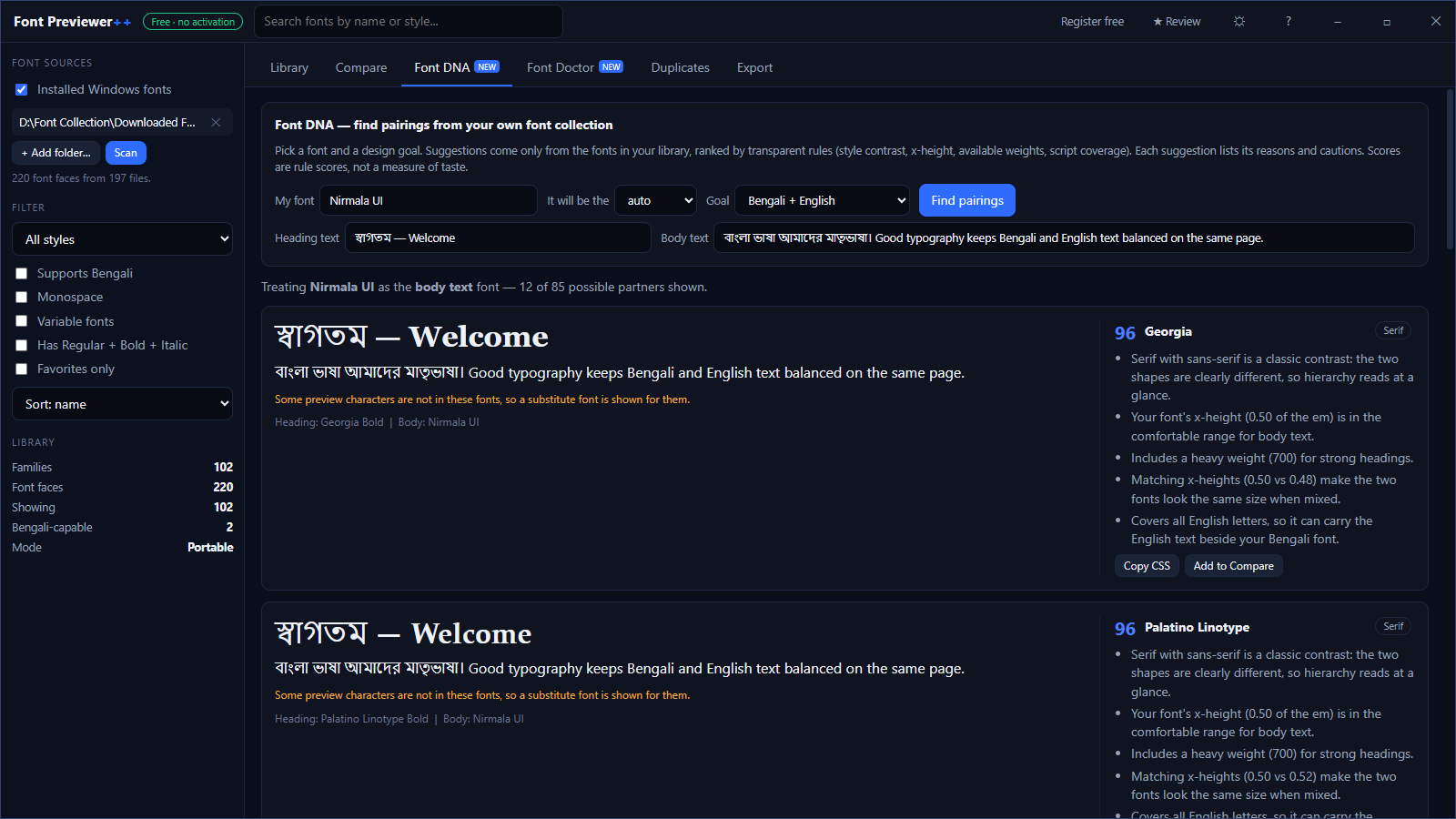
Choosing a second font usually means browsing an online catalogue of fonts you do not have, then buying or downloading them. Font DNA works the other way round. Pick a font from your library, say whether it will be the heading or the body font, choose a goal, and Font DNA ranks the best partners from your own collection.
- Five goals: General, Tech, Luxury, Editorial, and Bengali + English, which only suggests partners that can really display Bengali.
- Explained, not mysterious: every suggestion lists its reasons (for example contrast in style, a compatible x-height, enough weights for hierarchy, script coverage) and its cautions (for example two fonts that are too similar, or a missing bold).
- Transparent rules: the scores come from fixed, published-in-app rules rather than a hidden model, so the same inputs always give the same answer. They are a guide to good practice, not a verdict on taste.
- Sensible candidates only: symbol, maths and emoji fonts are left out so they are never recommended as body text.
- Live preview: type your own heading and body text and see the pair before you decide.
Font Doctor: Will This Font Really Show My Text?
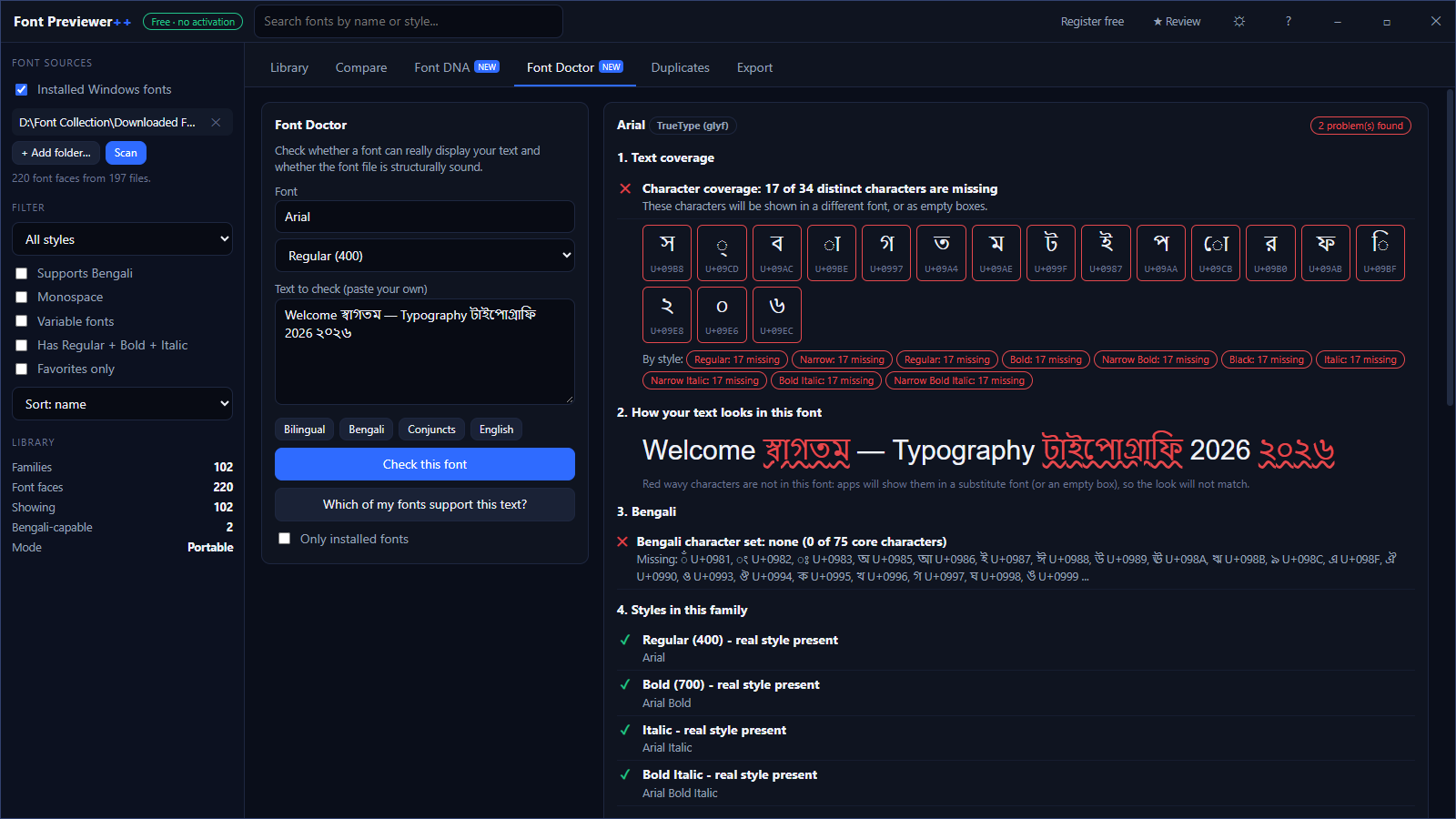
A font can look perfect in a specimen and still fail on your document: a missing character turns into an empty box or silently switches to another font. Font Doctor tests the font against the exact text you paste.
- Missing-character report: lists every character the font cannot display, and shows your text with the missing ones marked in red.
- Bengali-aware: includes ready-made Bengali, conjunct and bilingual samples, and checks Bengali coverage and the font’s declared Bengali layout features.
- File health check: about fifteen structural checks on the font file itself, with plain-language findings for anything that looks damaged or unusual.
- Find a font that works: one click searches your whole library for the fonts that support your text, optionally limited to the fonts installed in Windows.
Together: use Font Doctor to find the fonts that can carry your text, then use Font DNA to pair them. Bilingual Bengali and English documents are the case these two tools were designed for.
Everything Font Previewer++ Does
1. The Library: Scan Folders and Preview Every Font
The Library tab is where you start. Tick Installed Windows fonts, add one or more folders with Add folder, and press Scan. Sub-folders are included, TTF, OTF and TTC files are read directly, and scanning runs in parallel with a progress bar and a Stop button, so large collections do not freeze the window. The sidebar shows how many families and font faces were found, how many are shown after filtering, how many support Bengali, and whether the app is in normal or portable mode.
Type any text into the preview box and every family updates at once. Choose from sample texts (English, Bengali and mixed) or type your own, and move the size slider from 12 to 96 px to see how a font behaves at body size and at headline size.
2. Search, Filter and Sort
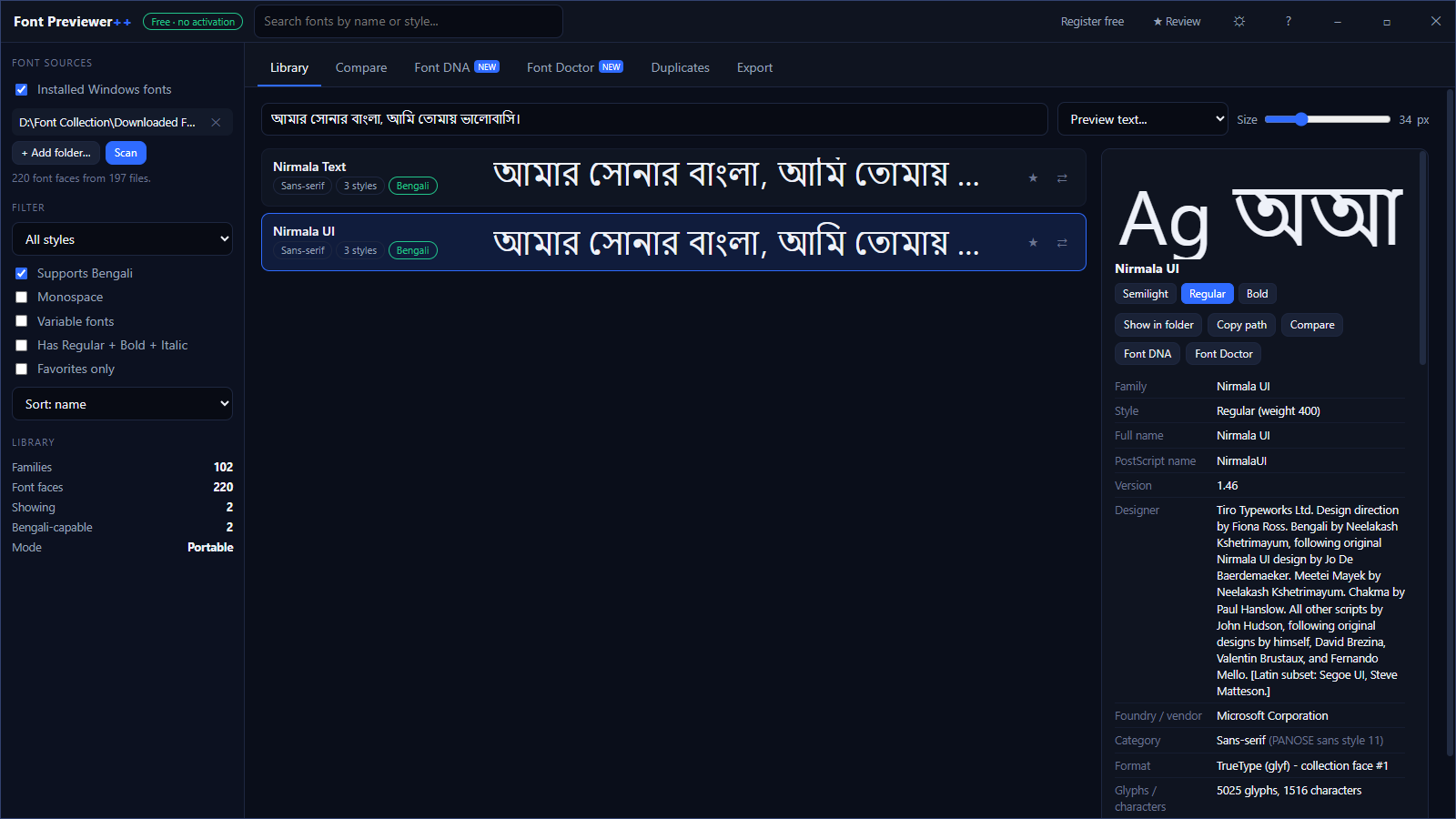
Search by font name or style as you type. Narrow the list by style: sans-serif, serif, monospace, script or handwriting, display or decorative, symbol, or unclassified. Tick Supports Bengali, Monospace, Variable fonts, or Has Regular + Bold + Italic to find complete families. Sort by name, category, most weights or most characters. Classification uses the font’s own PANOSE data together with name hints, so it works on fonts you have never seen before.
3. Font Details Read From the File
Select a family and the detail panel shows facts taken from the font file itself: family and style names, weight and width, version, designer, vendor, licence text, embedding permission (whether the font may be embedded in documents), glyph and character counts, file format, file size and the exact path on disk with a Show in folder button. Variable fonts are flagged and their axes are listed with their ranges. Fonts packed in .ttc collections are listed face by face. Every font in the family can be previewed in turn, with a specimen line that includes Bengali characters.
4. Bangla and Unicode Preview
Preview text is real Unicode, so Bengali, Hindi, Arabic and any other script you paste are drawn by the font itself, exactly as it will appear in your document. Font Previewer++ tests each font against a core set of 75 Bengali code points and grades it as full, partial, minimal or no support. It also reads the font’s layout tables so you can see whether the font declares Bengali shaping. The Supports Bengali filter then removes every font that would break your text.
5. Side-by-Side Comparison
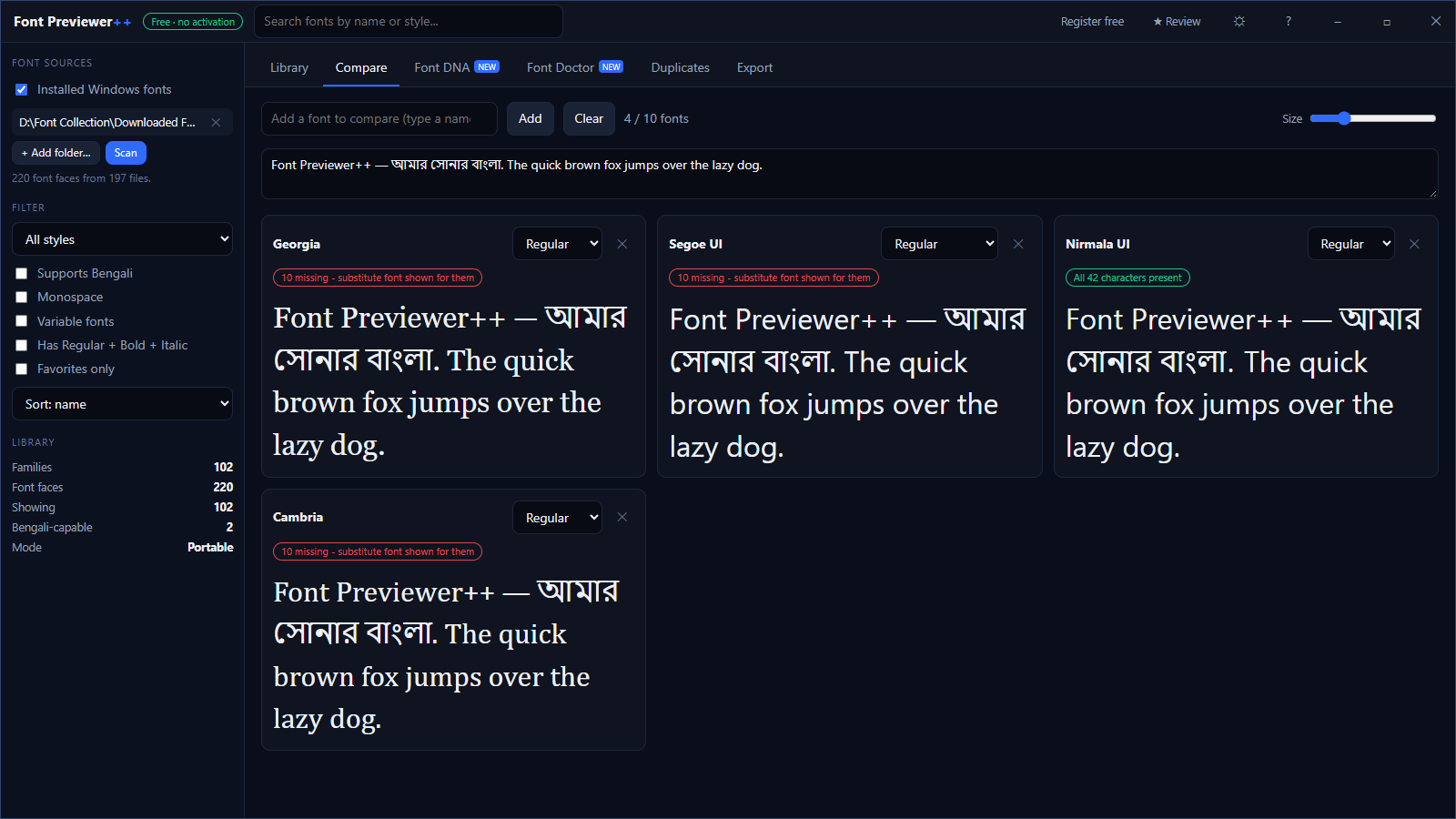
Add any fonts to the Compare tab and they appear next to each other, rendering the same text at the same size. Differences in x-height, stroke weight, letter spacing and numerals that are hard to notice when switching between fonts become obvious. Edit the comparison text, change the size, and clear the list when you are done. The compare list can also be exported as a contact sheet.
6. Duplicates
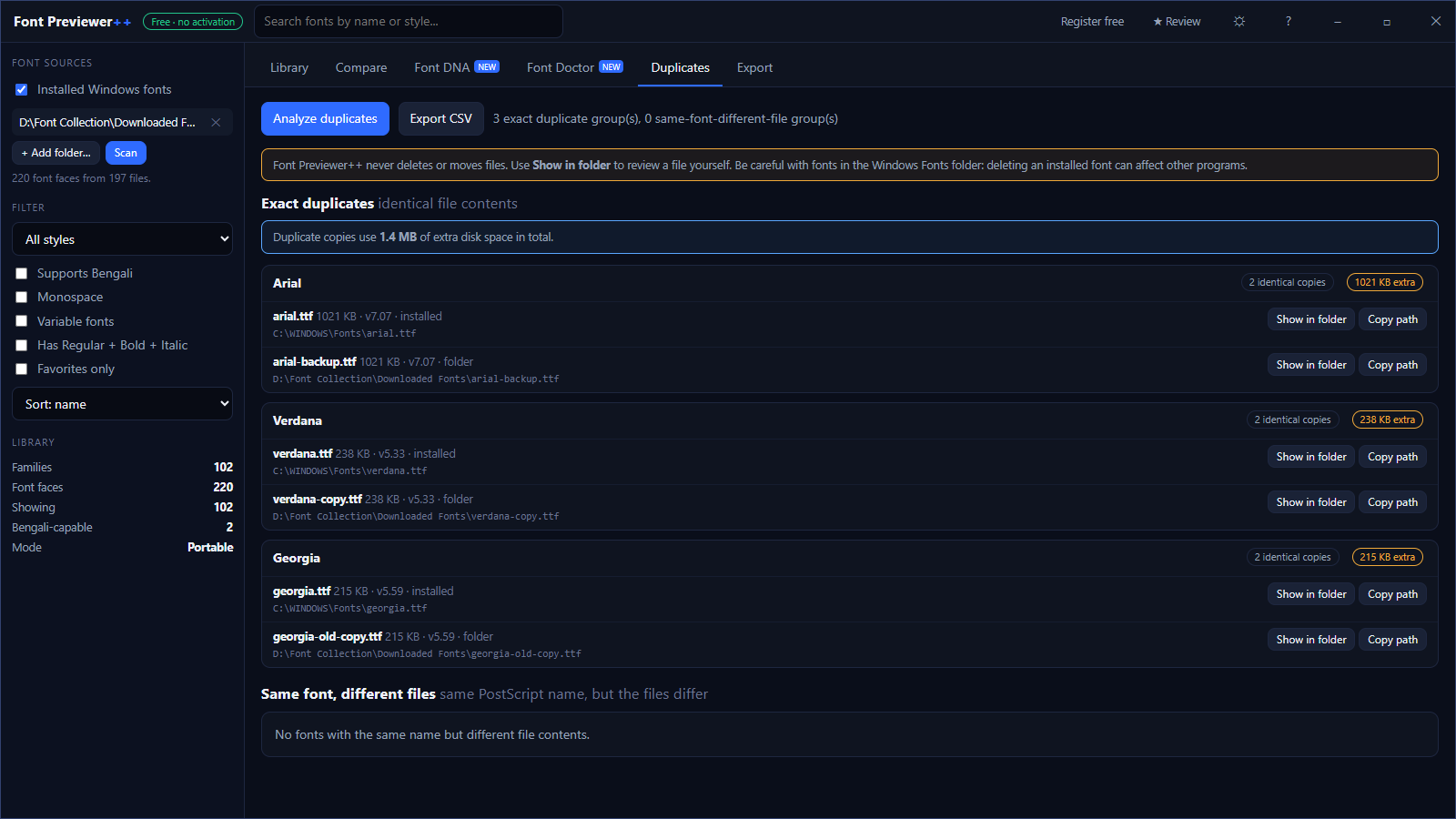
Font collections gather duplicates over the years. The Duplicates tab finds exact copies (identical file content, confirmed with a SHA-256 hash) and also different files that contain the same font face, flagging whether the versions differ. To stay fast, files are only hashed when another file has the same size. The results can be exported as CSV. Font Previewer++ never deletes or moves a file: it shows where each copy lives so you can decide, and it warns you that removing a font from the Windows Fonts folder can affect other programs.
7. Favourites
Star any family to add it to your favourites, and tick Favorites only to see just those. Favourites are saved with your settings and can be exported as a contact sheet.
8. Export: Contact Sheets and Library Data
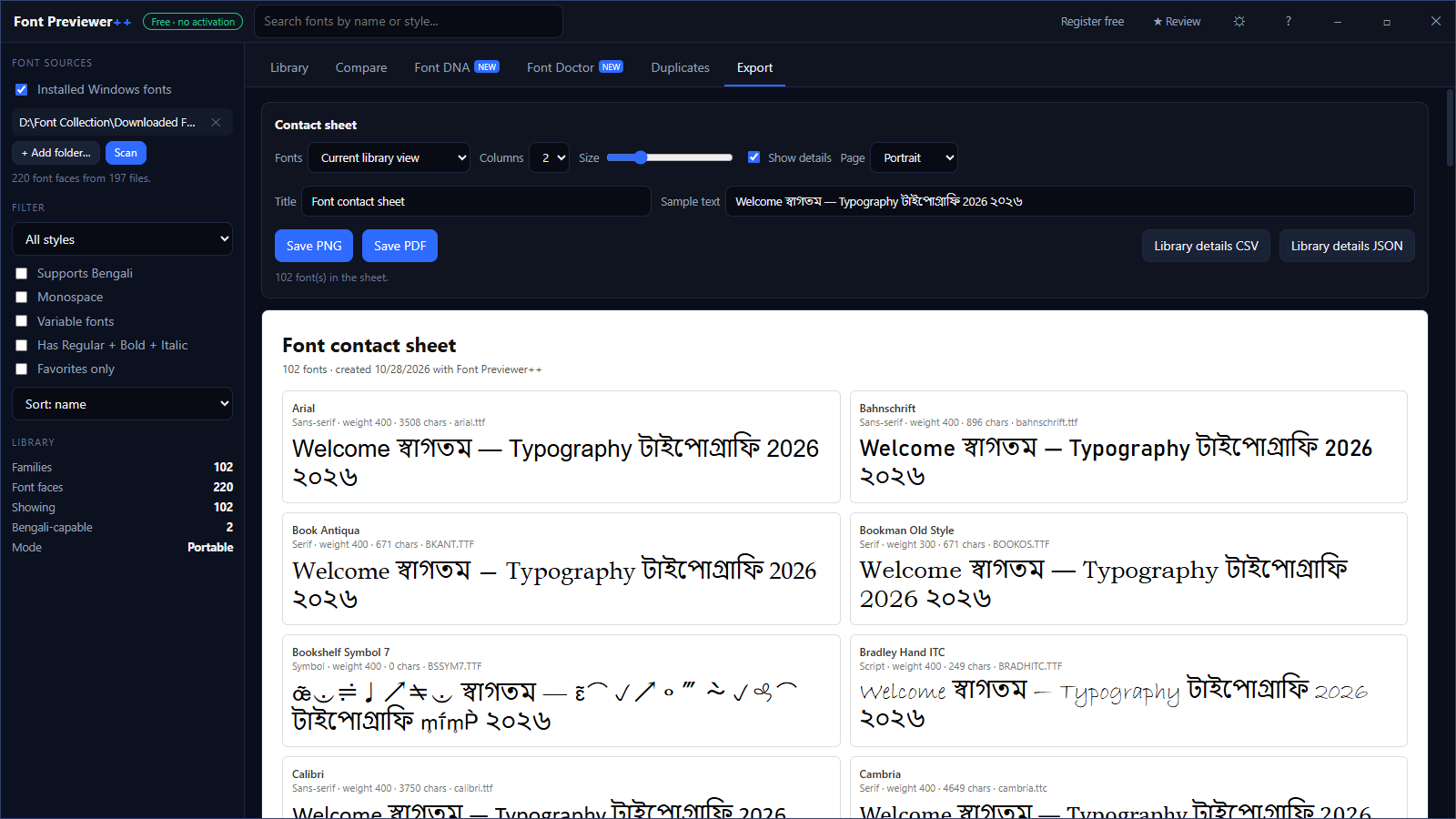
The Export tab builds a printable contact sheet from the current library view, your favourites, your compare list, or all styles of one selected family. Choose one to four columns, the sample size, portrait or landscape pages, a title and your own sample text, with or without font details. Save it as a PNG image or a PDF. You can also export the full library details as CSV for spreadsheets or JSON for other tools.
9. Portable Mode
Place an empty file called portable.txt next to the program and Font Previewer++ keeps its settings and data in a Data folder beside it instead of your user profile. Copy the folder to a USB drive and carry your font workspace with you. Without that file the app stores its settings in your user profile and removes them when you uninstall it.
10. Dark and Light Themes
Switch between a dark and a light theme from the title bar. The choice, your folders, text and size, favourites, sort order and last open tab are remembered for next time.
11. Optional Free Registration and Reviews
You never need to register to use anything. If you would like to, Register free in the title bar takes a name and email. Your email is stored only with the consent you give, and marketing email is a separate tick box that is off unless you choose it. The Review button lets you leave a star rating and a comment. Reviews are checked before anything is published, and if you are offline your entry waits on your PC and is sent the next time the app starts.
How Font DNA Thinks: The Rules Behind Each Suggestion
Font DNA is deliberately not a black box. Every candidate from your library is scored with the same visible rules, and each result lists the reasons that raised its score and the cautions that lowered it. These are the ideas it applies.
- Style contrast. A serif with a sans-serif is treated as a classic contrast, because the two shapes are clearly different and hierarchy reads at a glance. Two serifs tend to compete, and two sans-serifs with similar weights can look too alike, so both get a caution. A monospace font is rewarded as an accent for code or numbers. A script or display face is rewarded as a short accent next to a plain partner that carries the reading text.
- Body-text suitability. The font that will carry the paragraphs is checked for a comfortable x-height. A small x-height is flagged because small text becomes harder to read, and a very tall x-height is flagged because long paragraphs can look crowded.
- Real styles, not fake ones. A body font that ships a genuine Bold and Italic scores higher. If the Bold is missing, Font DNA warns that the browser or program would synthesize it. A heading font earns credit for a genuinely heavy weight.
- Matching size feel. When two fonts have nearly the same x-height they look the same size when mixed. When they differ a lot, Font DNA warns that one will look smaller at the same font size.
- Your goal. The goal you choose tilts the result without hiding the reasons, as described below.
- Only sensible candidates. Maths, symbol and emoji fonts are excluded so they are never offered as text fonts.
The Five Goals
- General design — balanced rules with no stylistic bias.
- Modern tech / SaaS website — favours clean sans-serif and monospace shapes, rewards a monospace accent for code and labels, and marks script faces down.
- Luxury brand — rewards high-contrast serif headings for a refined look and light-weight sans-serif body text for an airy, upscale feel, and marks monospace down.
- Blog / editorial reading — rewards a serif text face for long reading and a sans-serif heading for a light, scannable page.
- Bengali + English — pairs a Bengali font with a Latin one. It rewards a partner that covers all English letters, or a partner with the complete Bengali character set, warns when Bengali coverage is only partial, warns when Bengali and Latin glyphs may look uneven in size, and warns when the font data has no Bengali shaping features, which can stop conjuncts from forming correctly.
How Font Doctor Works
Font Doctor combines two jobs that normally need separate tools: checking your text against a font, and checking the font file itself.
- Text coverage. Paste or type the text, or load a ready-made sample (bilingual, Bengali paragraph, Bengali conjuncts, or an English pangram). Font Doctor lists each character the chosen font does not contain and shows your text with those characters marked in red, so you can see exactly where the problem would appear.
- Bengali detail. For Bengali text it reports how much of the core Bengali character set the font covers, graded as full, partial, minimal or none, and whether the font declares the layout features Bengali needs to join characters into conjuncts.
- Font file checks. About fifteen structural checks examine the tables inside the font file and report findings in plain language, so a damaged or unusual file is spotted before it causes trouble in a document.
- Face by face. If the family has several styles, you can check each face separately, because Regular and Bold do not always cover the same characters.
- Library-wide search. Which of my fonts support this text? runs the same test over every font you have scanned and lists the ones that pass, with an option to look only at fonts installed in Windows.
A Typical Session, Step by Step
- Add your sources. Tick Installed Windows fonts, add the folders where you keep downloaded fonts, and press Scan.
- Type your own text. Replace the sample line with a real headline or a sentence from your project, in English, Bengali or both.
- Filter. Choose a style, tick Supports Bengali if you need it, and star the fonts you like.
- Compare. Add your finalists to the Compare tab and look at them side by side at the size you will actually use.
- Check. Paste your full text into Font Doctor and make sure nothing is missing.
- Pair. Open Font DNA, pick your main font, choose the goal, and read the suggestions and their reasons.
- Export. Save a contact sheet as PNG or PDF to share with a client or keep for reference.
Real-World Workflows
Bengali and English Publishing
A Bengali font that looks beautiful in a specimen can still fail on conjuncts, or sit next to an English font that looks too small beside it. Filter your library to fonts that support Bengali, run your actual paragraph through Font Doctor, then use Font DNA with the Bengali + English goal to find an English partner whose letters and x-height sit well beside the Bengali. Export a contact sheet of the finalists for the client.
Brand and Web Design
Pick the brand’s main font, tell Font DNA whether it is the heading or the body, and choose Modern tech, Luxury or Editorial. Read the cautions as carefully as the reasons: they tell you what to check in a mock-up, such as a missing real Bold or a mismatch in x-height.
Developers and Licence Checks
The detail panel shows the licence text and the embedding permission stored in the font. Before you ship a font in a website or an app, you can see whether the font file allows embedding and what the vendor says about its use. This is information read from the file, and it is not legal advice, so always check the licence the font came with.
Cleaning an Old Font Folder
Scan the folder, open Duplicates and press Analyze. You will see exact copies and different files that carry the same font face, with their versions and paths. Use Show in folder to review each one yourself. Nothing is deleted for you.
Privacy and Your Data
Font Previewer++ reads font files from your disk and keeps all of that information on your PC. Your fonts and files are never uploaded. The only time the app contacts the internet is if you choose to register or send a review, and then it sends only the details you typed, a random install identifier that is not linked to your hardware, and the app version. If you are offline, your entry is held on your PC and sent later. Registration is optional, and marketing email is a separate choice that is off by default.
Who Is Font Previewer++ For?
- Graphic designers and agencies — Choose type quickly from a large library, compare finalists and send a contact sheet to a client.
- Bengali and multilingual publishers — Be sure a font covers every character and conjunct before a job goes to print, and pair a Bengali font with an English one with reasons you can explain.
- Content creators and video editors — Find the right font for thumbnails, titles and social posts without opening a design app.
- Web and app developers — Check character coverage, licence and embedding permission before shipping a font.
- Teachers, students and office users — See what is installed and find a clear, readable font for a document or presentation.
- Anyone with an untidy fonts folder — Find duplicates, spot damaged files and understand what you really have.
System Requirements
- Windows 10 or Windows 11 (64-bit)
- The .NET 8 runtime is included, so there is nothing else to install
- Microsoft Edge WebView2 Runtime (already present on current Windows 10 and 11 systems)
- Up to about 150 MB of disk space (the installer is 46 MB and the portable ZIP is 62 MB)
- No administrator rights needed: the installer works per user
- The files are not yet code-signed, so Windows SmartScreen may show a warning the first time you run them
- An internet connection is optional and used only if you choose to register or leave a review
Download and Safety Check
Font Previewer++ is free. There are two downloads of the same program, so you can choose the one you prefer.
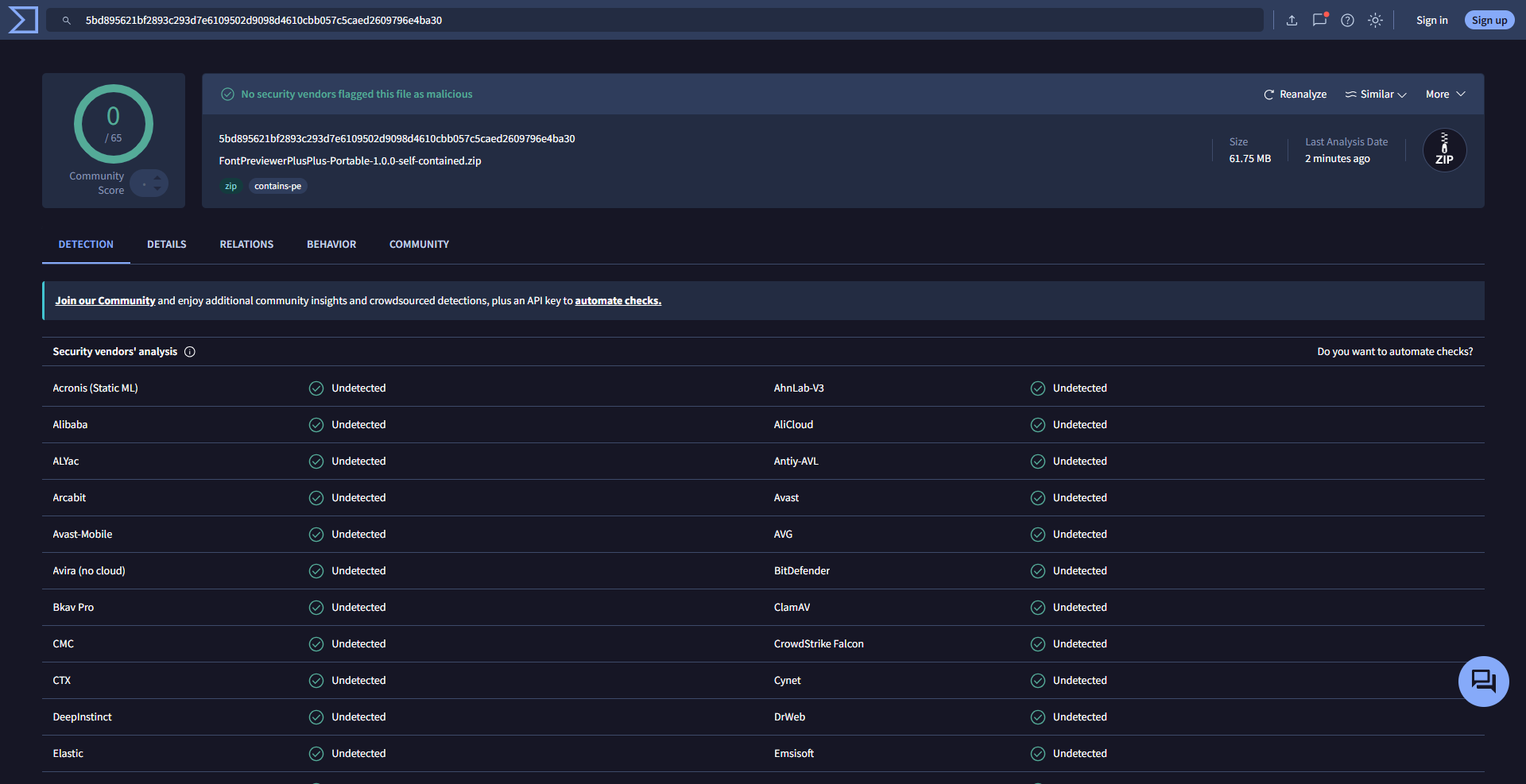
- Portable ZIP, no installation: FontPreviewerPlusPlus-Portable-1.0.0-self-contained.zip (61.8 MB). Unzip it anywhere and run FontPreviewerPP.exe. SHA-256: 5bd895621bf2893c293d7e6109502d9098d4610cbb057c5caed2609796e4ba30
- Installer: FontPreviewerPlusPlus-Setup-1.0.0.exe (46.4 MB). Installs per user without administrator rights. SHA-256: 5e9335e4f5696fc9628af83417ed7ef9ddc2df4c148f498371de6c9e24e2ce3c
Both files were scanned on VirusTotal on 29 October 2026. The results are shown as they are:
- Portable ZIP: 0 of 65 security vendors flagged it. Open the live VirusTotal report.
- Installer: 1 of 68 flagged it. The one engine is Deep Instinct, a machine-learning detector that often flags new installers that are not code-signed. The other 67 engines did not flag it, and we believe it is a false positive. Open the live VirusTotal report.
Neither file is code-signed yet, so Windows SmartScreen may show a warning the first time you run them. You can compare the SHA-256 above with the file you downloaded.
Frequently Asked Questions
Is Font Previewer++ really free?
Yes. Every feature is available to everyone, with no activation, no licence key and no time limit. Registration is optional and unlocks nothing, because nothing is locked.
Does Font Previewer++ install, modify or delete any fonts on my system?
No. It only reads font files. Duplicate detection reports what it finds and leaves every file where it is.
Can I preview fonts from a folder without installing them to Windows?
Yes. Add the folder in the sidebar and its fonts appear alongside your installed ones. They are drawn directly from the files and are never installed. Remove the folder from the list to take them out of the library.
Which font formats does it read?
TrueType (.ttf), OpenType (.otf) and TrueType Collections (.ttc). Fonts inside a collection are listed individually.
Does it support Bengali and other complex scripts?
Yes. Text is drawn by the font as real Unicode. Font Previewer++ grades each font’s Bengali coverage, offers a Supports Bengali filter, includes Bengali and conjunct samples in Font Doctor, and has a Bengali + English goal in Font DNA.
Does it support variable fonts?
Variable fonts are detected, can be filtered, and have their axes (for example weight and width) listed with their ranges in the detail panel.
How does Font DNA decide which fonts go together?
It scores each candidate from your own library with fixed rules: contrast in style between heading and body, compatible x-height, enough weights for hierarchy, and script coverage for the goal you chose. Every result shows its reasons and cautions. The scores are guidance based on common typographic practice, not a judgement of taste.
What does Font Doctor check?
It compares your pasted text with the characters the font contains, marks the missing ones, checks Bengali coverage and layout features, and runs about fifteen structural checks on the font file. It also searches your library for fonts that support your text.
Does it work offline?
Yes. Scanning, previewing, pairing, checking and exporting all work without an internet connection. The internet is used only if you register or leave a review.
What happens to my email if I register?
It is stored with the consent you gave. Marketing email is a separate opt-in that is off by default. To have your registration removed, contact us through this website.
Can I use it commercially or white-label it?
Font Previewer++ is free to use. If you want it under your own brand, with its full source code, or customised for your business, see the White Label, With Source Code and Customized Software options further down this page.
Know Your Fonts Before You Use Them
Choosing a font is only half the job. You also need to know it can display your text, that it belongs with the other fonts on the page, and that you are not carrying twenty copies of it. Font Previewer++ answers all of that in one small desktop app: scan your folders, preview with your own text, check with Font Doctor, pair with Font DNA, clear out duplicates and export a contact sheet, all offline and without ever touching your font files.
Whether you are a designer making typography decisions every day or someone who needs the right font for a single Bengali document, Font Previewer++ is free. Download it, run it, and see what your font collection can really do.
Choose Your Plan
Use it as a service, white-label it, get the full source, or let us build a custom version just for you.
- ✓ All features unlocked
- ✓ Works fully offline
- ✓ Portable: no installation needed
- ✓ Your brand, your name
- ✓ Sell to unlimited clients
- ✓ Full installer & assets
- ✓ Complete source code
- ✓ Modify anything
- ✓ Commercial use rights
- ✓ Any modules you need
- ✓ Tailored to your business
- ✓ Agreed price, no surprises