Why Workstations Lose Speed Over Time
Every single week you run your computer, invisible digital debris accumulates under the surface. Temporary caches bloat from normal daily usage, system pathways cross directions, and stealth background applications quietly attach themselves to your startup sequence.
The result? Your hardware isn't old—it's simply crowded. The utility safely unburdens your storage blocks to bring back original click responsiveness.
One-Click Simplicity. No Jargon.
Most operating toolkits on the market are intentionally confusing. They scare users with cryptic alerts or swamp you under endless, risky confirmation checklists. Our development blueprint focuses entirely on clean, background automation.
You do not need to be an administrator or understand complex software settings. Simply click the interface activation handle, let the automated sequence clean the targets, and return immediately to a light, responsive system environment.
Is Your PC Actually Protected — Or Just Hoping for the Best?
Most Windows users rely on whatever came pre-installed and never think twice about it — until something goes wrong. A trojan quietly installed through a downloaded setup file. A browser hijacker redirecting every search. A keylogger sitting in your system temp folder for weeks. By the time you notice, the damage is done.
DefensePro was built to make sure that never happens to you.
It is a complete, professional-grade security suite for Windows — real-time protection, deep virus scanning, network firewall, browser guard, privacy cleanup, and advanced security tools, all in one fast, clean application. Not a bloated antivirus that slows your PC to a crawl. Not a free tool stuffed with ads and upsells. A serious security platform built for people who take their digital safety seriously.
Everything Protected. All at Once.
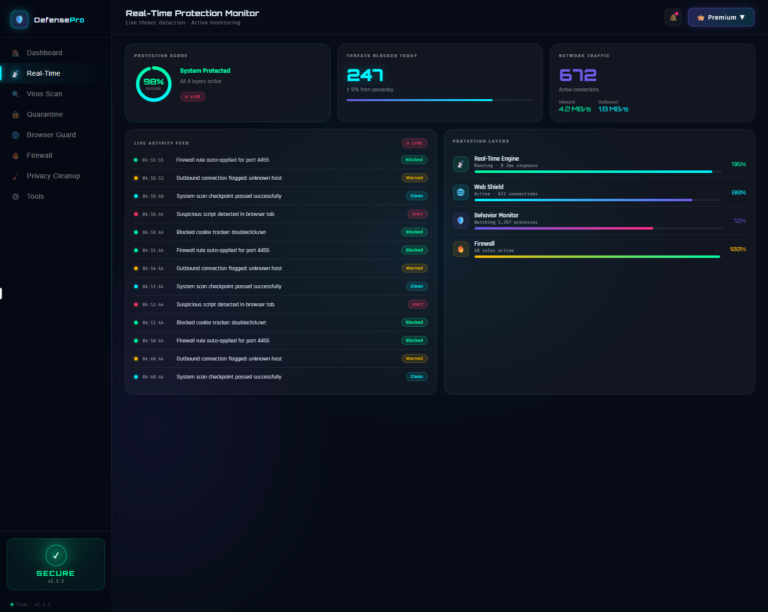
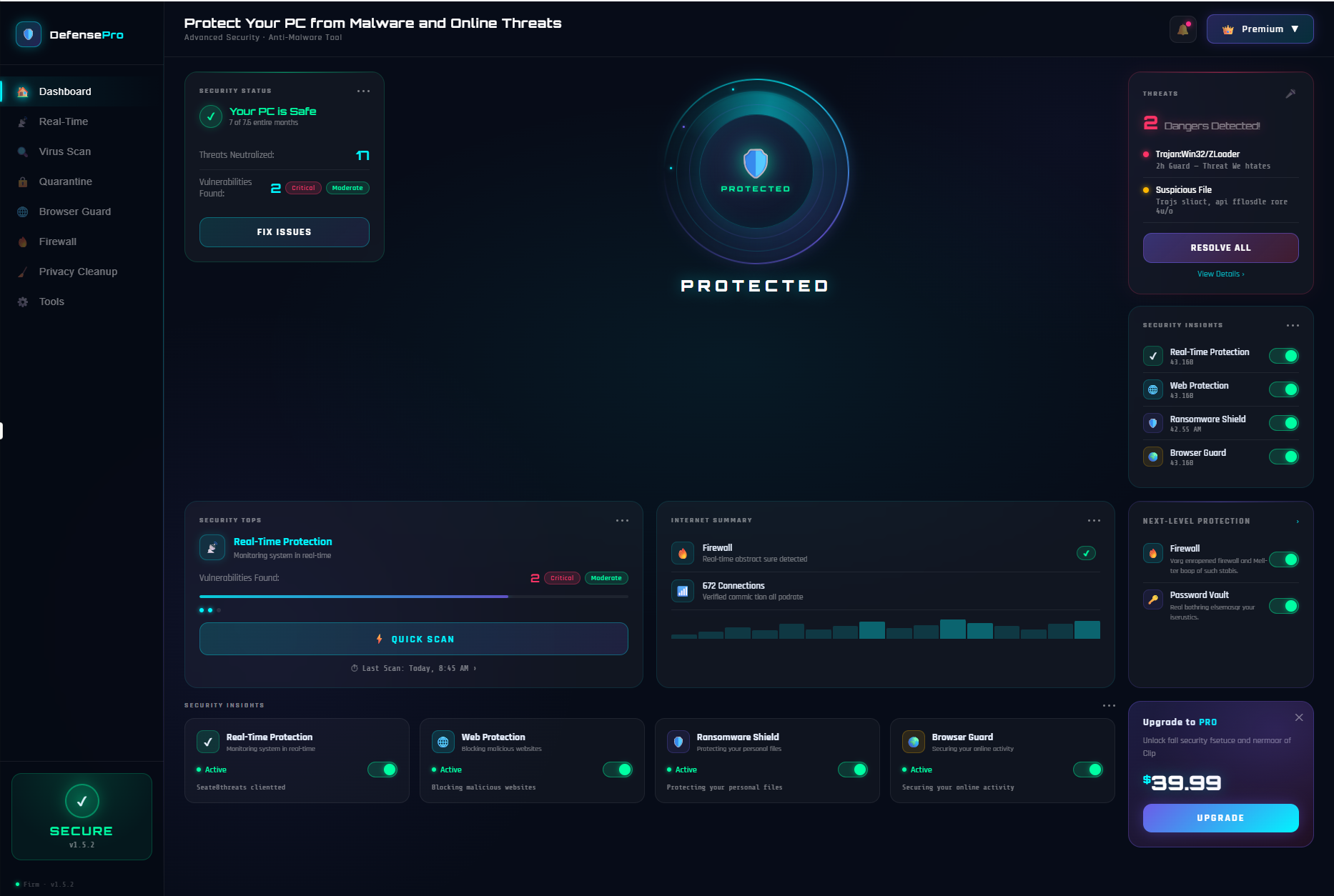
The moment DefensePro starts, four protection layers activate simultaneously — Real-Time Engine, Web Shield, Behavior Monitor, and Firewall. Your protection score is shown live on the dashboard. 98% means 98%. Every layer is running, every threat vector is covered, and if anything drops, you know immediately.
The live activity feed shows you exactly what DefensePro is doing in real time — firewall rules auto-applied, suspicious scripts blocked in browser tabs, outbound connections flagged, system checkpoints passed. You are never in the dark about what is happening on your machine.
Virus Scanner That Goes Deep
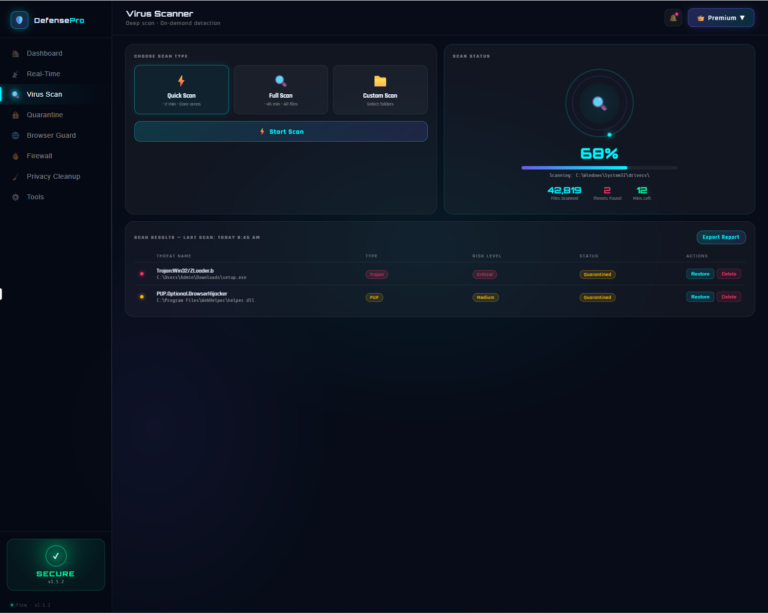
Run a Quick Scan in under 2 minutes for core threat areas. Launch a Full Scan across every file on your drive. Or choose Custom Scan to target a specific folder you are suspicious about. A live progress display shows files scanned, threats found, and time remaining — and when the scan finishes, every detected threat is listed with its type, risk level, and current status so you know exactly what was found and what was done about it.
Quarantine Vault — Nothing Escapes, Nothing Is Lost
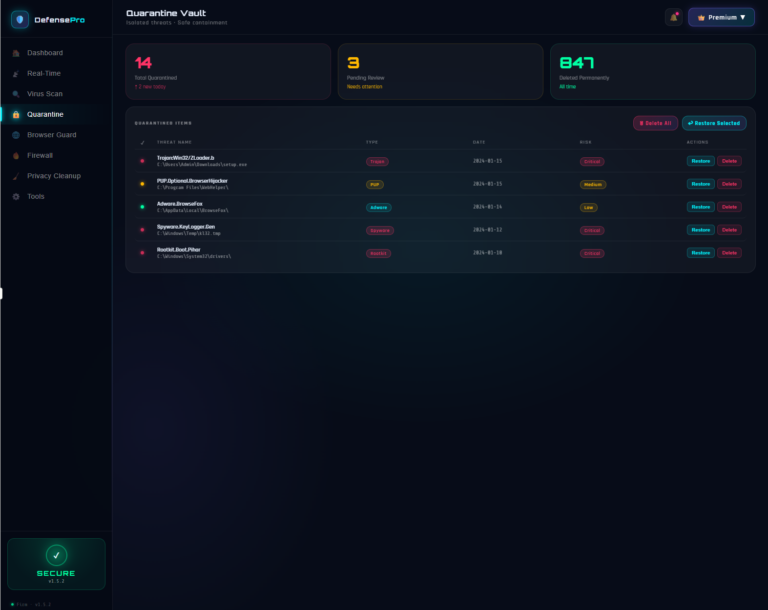
Every threat DefensePro catches goes into the Quarantine Vault — isolated, contained, and completely unable to cause harm. You can see the full list of quarantined items with their threat name, type, detection date, and risk level. Restore anything that was flagged by mistake. Permanently delete what you know is malicious. Full control, always yours.
Browser Guard — Your Online Shield
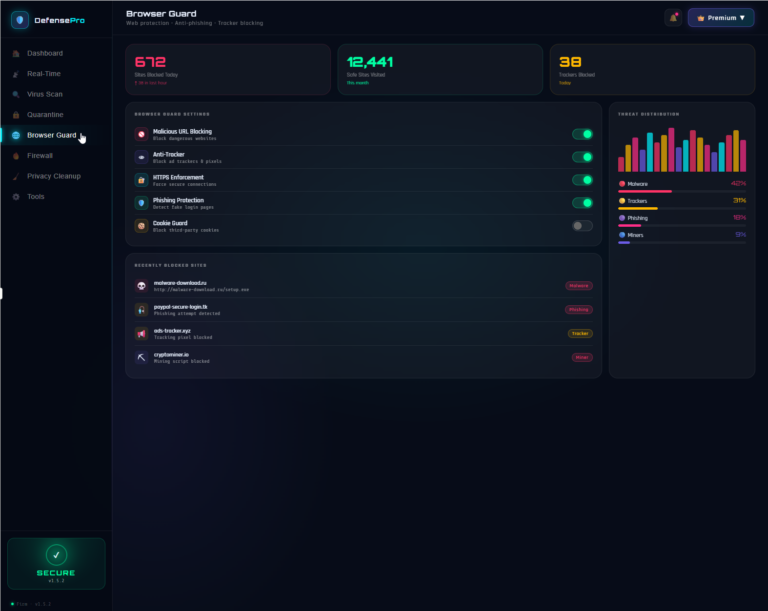
Every time you open a browser, DefensePro’s Browser Guard goes with you. Malicious URL blocking stops dangerous websites before they load. Anti-Tracker kills ad trackers and pixels following you around the web. HTTPS Enforcement forces secure connections. Phishing Protection detects fake login pages designed to steal your credentials. Cookie Guard blocks third-party cookies that build profiles on your behaviour.
672 sites blocked today. 12,441 safe sites visited this month. 38 trackers stopped. The numbers speak for themselves.
Network Firewall With Full Rule Control
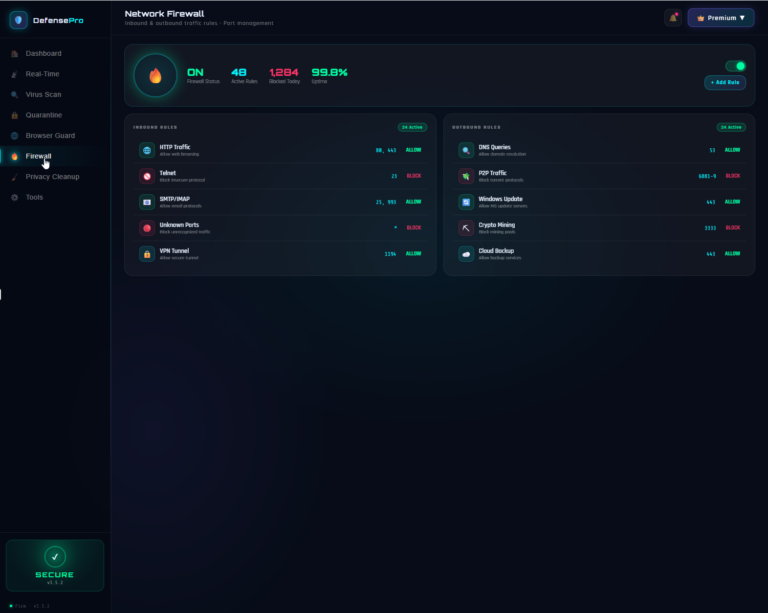
DefensePro’s built-in Network Firewall gives you complete visibility and control over every connection in and out of your machine. 48 active rules. 1,284 connections blocked today. 99.8% uptime. Inbound and outbound rules are listed separately — HTTP traffic, Telnet, SMTP/IMAP, VPN tunnels, DNS queries, Windows Update, and more. Torrent protocols blocked. Crypto mining pools blocked. You decide what gets through and what does not.
Privacy Cleanup — Erase What You Do Not Want Left Behind
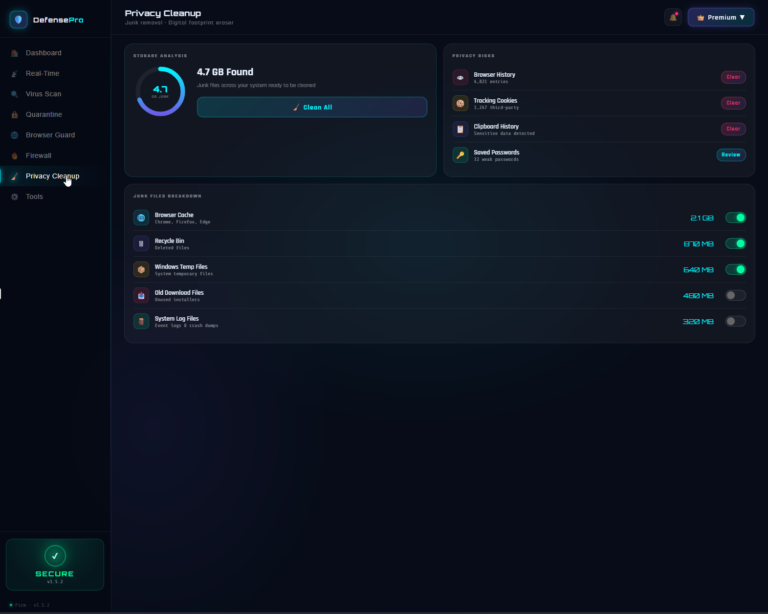
4.7 GB of junk found — and that is just the average. Browser cache from Chrome, Firefox, and Edge. Recycle Bin leftovers. Windows Temp files. Old download installers. System log files and crash dumps. DefensePro scans all of it, shows you exactly how much each category is consuming, and lets you clean everything with a single click — or choose precisely what to remove and what to keep.
Beyond junk files, the Privacy Risks panel shows your Browser History entries, third-party tracking cookies, Clipboard History with sensitive data, and Saved Passwords flagged as weak. Real privacy, not just a cleanup tool.
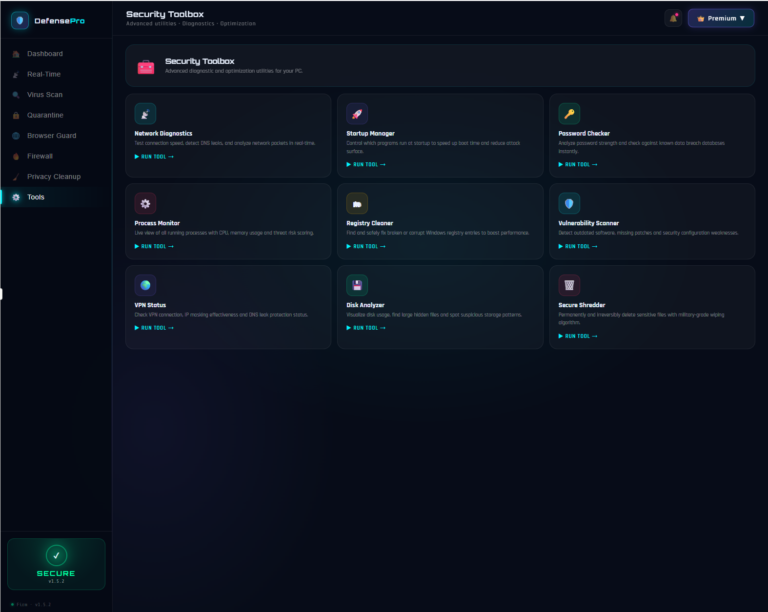
Security Toolbox — Nine Advanced Utilities Built In
Most security tools stop at scanning. DefensePro goes further with nine built-in professional utilities:
Network Diagnostics — Test connection speed, detect DNS leaks, and analyze network packets in real time.
Startup Manager — Control which programs launch at startup to speed up boot time and reduce your attack surface.
Password Checker — Analyze password strength and check against known data breach databases instantly.
Process Monitor — Live view of every running process with CPU, memory usage, and threat risk scoring.
Registry Cleaner — Find and safely fix broken or corrupt Windows registry entries to boost performance.
Vulnerability Scanner — Detect outdated software, missing patches, and security configuration weaknesses.
VPN Status — Check VPN connection, IP masking effectiveness, and DNS leak protection status.
Disk Analyzer — Visualize disk usage, find large hidden files, and spot suspicious storage patterns.
Secure Shredder — Permanently and irreversibly delete sensitive files with military-grade wiping algorithm.
Light Mode. Dark Mode. Your Choice.
DefensePro looks as good as it performs. A clean, modern dark interface designed to stay out of your way while keeping you fully informed. Switch to light mode anytime. No restarts, no fuss.
Built by a Developer with 20+ Years of Experience
DefensePro is not a corporate antivirus product managed by a committee. It is built and maintained by Debasis Bhattacharjee, Senior Software Architect and AI Developer with over two decades of experience building software used by millions of people. Updates are fast, support is personal, and every feature exists because a real user needed it.
No subscriptions. No pop-ups. No bloatware. One purchase, full protection.
Your PC deserves more than hope. Give it DefensePro.