Modern Uninstaller - Software Details
All Software
💻 Desktop Application

Modern Uninstaller

Complete PC Uninstaller & System Cleanup Tool

4.8 Rating
👥 520,000+ Users
📥 0+ Downloads
📌 v5.8.2 Version
Free 30-Day Trial
No Credit Card Required
Windows 7/8/10/11 (32-bit & 64-bit)
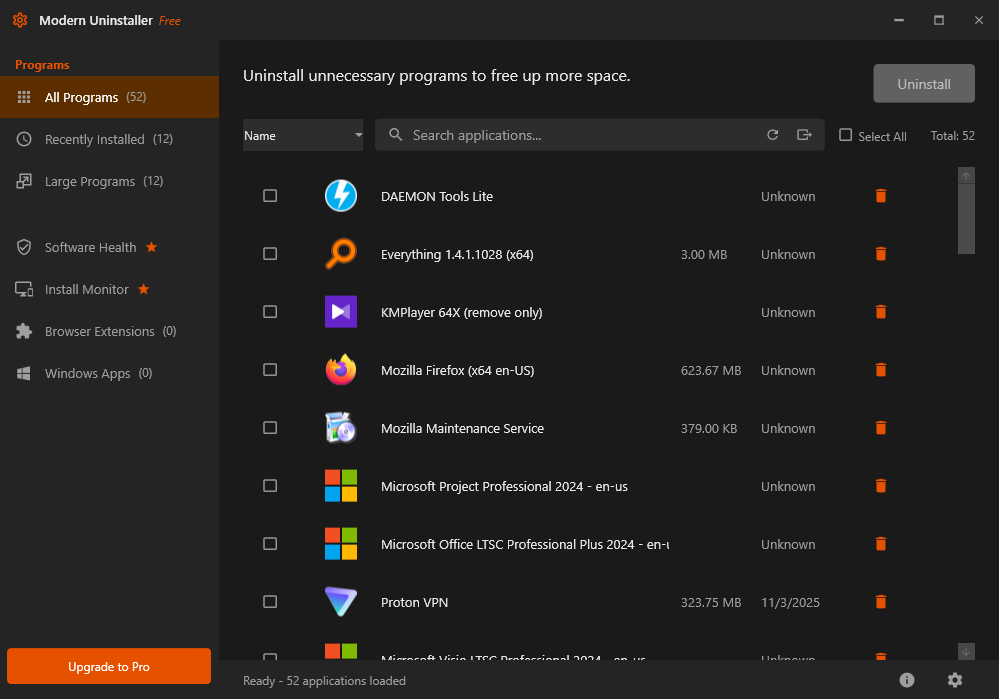
Modern Uninstaller Screenshot
🚀

📖 About This Software

🗑️ What is Modern Uninstaller?

Modern Uninstaller is the ultimate Windows uninstaller software designed to completely remove unwanted programs, browser extensions, toolbars, and Windows Store apps from your computer. While Windows' built-in uninstaller often leaves behind traces, registry entries, and leftover files that slow down your system, Modern Uninstaller performs deep scans to eliminate every trace of uninstalled programs, ensuring your PC stays clean, fast, and optimized.

Whether you're a home user frustrated with stubborn programs that won't uninstall, an IT professional managing multiple workstations, or a power user who demands complete control over installed software, Modern Uninstaller provides the tools you need to maintain a pristine Windows environment. With over 500,000 satisfied users worldwide and a 4.8-star rating, Modern Uninstaller has become the go-to solution for complete software removal on Windows.

💡 Why Modern Uninstaller Exists

The problem with most uninstallers—including Windows' built-in "Add or Remove Programs"—is that they rely on the software developer's uninstaller, which often does an incomplete job. Programs leave behind:

  • Registry Entries: Hundreds of registry keys that clutter your Windows registry
  • Leftover Files: Configuration files, cache, logs, and temporary files scattered across your hard drive
  • Hidden Folders: Program data folders in AppData, ProgramData, and other hidden locations
  • Startup Entries: Programs that continue to launch at startup even after uninstallation
  • Browser Extensions: Toolbars and extensions that hijack your browser settings
  • Shared DLL Files: Library files that take up space and may conflict with other programs

Over time, these leftovers accumulate, consuming valuable disk space, slowing down system performance, causing errors, and creating security vulnerabilities. Modern Uninstaller solves this problem by performing deep system scans that detect and remove every trace of uninstalled programs, ensuring your Windows installation stays as clean as the day you installed it.

🎯 Core Capabilities Deep Dive

🔍 Complete Uninstall Technology

Modern Uninstaller's Complete Uninstall feature is the heart of the application. Unlike standard uninstallers, it uses a three-phase removal process:

Phase 1 - Standard Uninstall: First, Modern Uninstaller runs the program's own uninstaller using Windows APIs. This ensures compatibility and prevents any immediate system issues.

Phase 2 - Deep Scan: After the standard uninstall completes, Modern Uninstaller performs a comprehensive scan of your entire system, checking over 50 locations where programs commonly leave traces, including all registry hives, AppData folders, Program Files directories, System32 folders, and temporary file locations.

Phase 3 - Leftover Removal: Finally, Modern Uninstaller presents you with a detailed list of all discovered leftovers—files, folders, registry entries, shortcuts, and startup items—allowing you to review and safely remove them with a single click.

🔎 Advanced Leftover Hunter

Even if you've already uninstalled programs using other methods, Modern Uninstaller's Leftover Hunter can find and clean up the traces they left behind. This powerful scanner uses pattern matching, heuristic analysis, and a database of over 100,000 known applications to identify orphaned files and registry entries.

The Leftover Hunter examines:

  • Registry keys in HKEY_LOCAL_MACHINE and HKEY_CURRENT_USER
  • Application data folders in %AppData%, %LocalAppData%, %ProgramData%
  • Program installation directories and subdirectories
  • Start Menu and Desktop shortcuts
  • Startup entries in registry and startup folders
  • Windows Services and drivers
  • Shared DLL references and COM objects

⚡ Batch Uninstall - Save Hours of Time

Need to clean up multiple unwanted programs at once? Modern Uninstaller's Batch Uninstall feature lets you select multiple applications and remove them all in one operation. Perfect for:

  • Fresh PC Setup: Remove pre-installed bloatware from new computers
  • System Cleanup: Clear out trial software and unused applications
  • IT Management: Standardize software across multiple workstations
  • Before Selling: Quickly remove personal software before selling or donating a PC

The batch uninstall process runs unattended, automatically handling prompts and confirmations, and provides a detailed log of all operations performed.

🛡️ Safe Uninstall with System Protection

Safety is paramount when making system changes. Modern Uninstaller includes multiple layers of protection to prevent accidental damage to your Windows installation:

  • Automatic Restore Points: Creates a Windows System Restore point before every uninstall operation
  • Registry Backup: Backs up all registry keys before deletion, allowing instant restoration if needed
  • Safe Mode: Analyzes dependencies and warns if removing a program might affect other software
  • Protected Items List: Prevents accidental removal of critical Windows components and system software
  • Undo Feature: Can reverse the last uninstall operation if something goes wrong

💪 Forced Uninstall for Stubborn Programs

Encountered a program that refuses to uninstall? Maybe it shows an error, its uninstaller is corrupted, or it's partially installed? Modern Uninstaller's Forced Uninstall feature can remove even the most stubborn software by:

  • Terminating all running processes associated with the program
  • Removing Windows services and drivers installed by the application
  • Deleting all program files, even if they're locked or in use
  • Cleaning all registry entries related to the program
  • Removing shell extensions and context menu entries
  • Clearing Start Menu shortcuts and Desktop icons

This feature is particularly useful for removing malware remnants, corrupted installations, or software whose uninstaller no longer works.

🌐 Browser Extension Manager

Modern browsers are often cluttered with unwanted toolbars, search hijackers, and adware extensions. Modern Uninstaller includes a dedicated Browser Extension Manager that works with all major browsers:

  • Chrome: Remove extensions, reset homepage, clear search engines
  • Firefox: Clean add-ons, restore default settings, remove search providers
  • Edge: Manage Microsoft Edge extensions and settings
  • Internet Explorer: Remove toolbars and BHOs (Browser Helper Objects)
  • Opera: Clean extensions and restore browser defaults

The Browser Extension Manager can also reset your browsers to their default state, removing all customizations and extensions in one click—perfect for recovering from browser hijackers.

📊 Installation Monitor

The Installation Monitor is a proactive feature that tracks every change a program makes to your system during installation. It records:

  • All files and folders created
  • Every registry key and value added or modified
  • Shortcuts created on Desktop and Start Menu
  • Startup entries added
  • Windows Services installed
  • File associations changed

When you later uninstall the program, Modern Uninstaller can use this installation log to remove every single item, guaranteeing 100% clean uninstallation even for programs with poor uninstallers.

🏪 Windows Store App Removal

Windows 10 and 11 come with many pre-installed Microsoft Store apps that cannot be easily uninstalled through standard methods. Modern Uninstaller provides full control over these apps, allowing you to remove:

  • Built-in apps like Mail, Calendar, Maps, and Weather
  • Gaming apps like Xbox and Microsoft Solitaire Collection
  • Media apps like Movies & TV and Groove Music
  • Cortana and other system apps
  • Third-party Store apps

This feature gives you complete control over which Microsoft Store apps remain on your system, helping you free up disk space and remove bloatware.

🔧 Startup Manager

Many programs add themselves to Windows startup, slowing down boot times and consuming system resources. Modern Uninstaller's Startup Manager gives you complete visibility and control:

  • View all programs that launch at Windows startup
  • See startup impact ratings (High/Medium/Low) for each program
  • Enable or disable startup programs with one click
  • Permanently remove unwanted startup entries
  • Search online for unknown startup items

🎯 Who Benefits from Modern Uninstaller?

🏠 Home Users

Keep your personal computer clean and fast by completely removing trial software, bloatware, and unwanted programs. Perfect for anyone who wants their PC to run like new without technical knowledge.

💼 IT Professionals

Manage software across multiple workstations efficiently with batch uninstall, command-line support, and network deployment options. Quickly clean up employee computers, prepare systems for redeployment, and maintain standardized software configurations.

⚙️ Power Users

Take complete control over your Windows installation with advanced features like forced uninstall, installation monitoring, registry editing, and portable mode. Perfect for enthusiasts who demand maximum control and performance.

🏢 Small Businesses

Maintain clean, efficient workstations across your organization with centralized software management. Remove unauthorized software, standardize installations, and keep systems running smoothly without dedicated IT staff.

💎 Key Benefits & Business Value

  • Faster PC Performance: Remove bloatware and leftover files that slow down your system by up to 40%
  • More Disk Space: Recover gigabytes of wasted space from incomplete uninstallations and leftover files
  • Improved Stability: Eliminate registry clutter and conflicts that cause errors and crashes
  • Enhanced Security: Remove traces of uninstalled programs that could pose security risks
  • Time Savings: Batch uninstall and automation save hours compared to manual removal
  • Peace of Mind: System protection features ensure you can always undo changes if needed
  • Professional Support: Access to expert technical support and regular updates

🏆 Why Choose Modern Uninstaller?

  • Complete Removal Guarantee: 100% removal of program traces or your money back
  • Safe & Reliable: Used by over 500,000 users worldwide with 4.8-star rating
  • Fast & Efficient: Optimized algorithms complete scans in seconds
  • Always Updated: Regular updates ensure compatibility with latest Windows versions
  • No Bloatware: Clean installation with no bundled software or adware
  • Professional Support: Email and live chat support from Windows experts
  • Money-Back Guarantee: 30-day full refund if not satisfied

🚀 Get Started Today

Join over 500,000 satisfied users who trust Modern Uninstaller to keep their Windows PCs clean, fast, and optimized. Whether you need to remove one stubborn program or clean up your entire system, Modern Uninstaller provides the tools you need with the safety and reliability you demand.

Download the free trial today and experience the difference of truly complete software removal. No credit card required, no obligations—just a cleaner, faster PC in minutes.

Try Modern Uninstaller free for 30 days. Your PC will thank you. →

Key Features

Discover what makes this software powerful and unique

🗑️

Complete Uninstall

Thoroughly removes all program files, folders, registry entries, and traces that standard uninstallers leave behind. Our three-phase removal process ensures 100% clean uninstallation.

🔍

Leftover Hunter

Advanced scanner that finds and removes leftover files and registry entries from previously uninstalled programs. Uses pattern matching and heuristic analysis to detect orphaned items.

Batch Uninstall

Remove multiple programs at once with automated batch uninstall. Perfect for cleaning new PCs of bloatware or preparing systems for redeployment. Save hours of time.

💪

Forced Uninstall

Remove stubborn programs that won't uninstall normally. Terminates processes, removes locked files, cleans registry, and eliminates all traces even for corrupted installations.

🛡️

Safe Uninstall Mode

Multiple safety features including automatic restore points, registry backups, dependency analysis, and protected items list ensure you can always undo changes if needed.

🌐

Browser Cleanup

Remove unwanted browser extensions, toolbars, search hijackers, and adware from Chrome, Firefox, Edge, Internet Explorer, and Opera. Restore browsers to default settings.

📊

Installation Monitor

Track every change programs make during installation. Record files, registry keys, shortcuts, and services added. Use this log for 100% complete uninstallation later.

🏪

Windows Store App Removal

Remove built-in Windows 10/11 apps that can't be uninstalled normally. Full control over Microsoft Store apps including Xbox, Mail, Maps, and pre-installed bloatware.

🚀

Startup Manager

View and control all programs that launch at Windows startup. See impact ratings, enable/disable items, or permanently remove unwanted startup entries to speed up boot times.

🧹

Registry Cleaner

Deep scan and clean invalid registry entries, broken shortcuts, and orphaned keys left by uninstalled programs. Safely optimize your Windows registry for better performance.

🔒

File Shredder

Securely delete sensitive files beyond recovery using military-grade shredding algorithms. Overwrite data multiple times to ensure complete data destruction.

⌨️

Command Line Support

Automate uninstallation tasks with command-line interface. Perfect for IT professionals managing multiple workstations, scripting, and integration with deployment tools.

💰 Get Started Options

Try it free or get it white-labeled for your business

🎁 Free Trial

$0

Try before you buy • No commitment

✓ What's Included

  • 30-day full access trial
  • All features unlocked
  • No credit card required
  • Test on your data
  • Email support included
  • No installation limits

20+ years experience building software for 5+ million users worldwide

Trusted by entrepreneurs, agencies, and businesses to deliver professional white-label solutions

Frequently Asked Questions

Everything you need to know about Modern Uninstaller

What are the system requirements for Modern Uninstaller?
Modern Uninstaller works on Windows 7, 8, 10, and 11 (both 32-bit and 64-bit versions). You need at least 2GB of RAM (4GB recommended), 50MB of free disk space for installation, and administrator privileges. The software runs on any PC that can run Windows, from budget laptops to high-end workstations.
Is Modern Uninstaller safe to use? Will it damage my Windows installation?
Yes, Modern Uninstaller is completely safe! We include multiple safety features: automatic System Restore point creation before each uninstall, registry backups that can be restored with one click, dependency analysis to warn about potential conflicts, and a protected items list that prevents removal of critical Windows components. Over 500,000 users trust Modern Uninstaller daily. If anything goes wrong, you can use the Undo feature or restore from the automatic backup.
How is Modern Uninstaller different from Windows' built-in uninstaller?
Windows' "Add or Remove Programs" relies on each software's own uninstaller, which often does an incomplete job. Programs leave behind registry entries, configuration files, cache data, and folders scattered across your system. Modern Uninstaller performs a deep scan after the standard uninstall, detecting and removing all these leftovers. It also offers features Windows doesn't have: forced uninstall for stubborn programs, batch uninstall for multiple apps, browser cleanup, Windows Store app removal, and installation monitoring.
Can I uninstall programs that don't appear in the Windows uninstaller list?
Yes! Modern Uninstaller's Forced Uninstall feature can remove programs even if they don't have a proper uninstaller, appear corrupted, or are partially installed. It can also remove portable programs, malware remnants, and software whose uninstaller no longer works. The Forced Uninstall feature terminates all processes, removes locked files, cleans registry entries, and eliminates all traces of the program.
What happens if I accidentally uninstall something important?
Modern Uninstaller creates an automatic System Restore point before every uninstall operation. If you accidentally remove something you need, simply use Windows System Restore to revert your PC to the state before the uninstall. Additionally, Modern Uninstaller's Undo feature can reverse the last uninstall operation, and all registry changes are backed up and can be restored. We also maintain a protected items list of critical Windows components that cannot be accidentally removed.
Does Modern Uninstaller remove browser toolbars and extensions?
Yes! Modern Uninstaller includes a dedicated Browser Cleanup tool that works with Chrome, Firefox, Edge, Internet Explorer, and Opera. It can remove unwanted extensions, toolbars, search hijackers, homepage changers, and adware. You can selectively remove individual extensions or reset your entire browser to default settings with one click. This is particularly useful for cleaning up after adware infections or removing bundled toolbars.
Can I uninstall multiple programs at once?
Yes! The Batch Uninstall feature lets you select multiple programs and remove them all in one automated operation. This is perfect for cleaning up new PCs with pre-installed bloatware, removing trial software en masse, or preparing computers for redeployment. The batch process runs unattended, automatically handling prompts and confirmations, and provides a detailed log of all operations performed. Available in Pro and Business editions.
Does Modern Uninstaller work with Windows 11?
Yes! Modern Uninstaller is fully compatible with Windows 11, including the latest 22H2 and 23H2 updates. It can remove Windows 11's built-in apps (like Teams, Widgets, Chat), clean up the new Microsoft Store apps, and handle all Windows 11-specific features. We regularly update Modern Uninstaller to ensure full compatibility with new Windows updates and features.
What's the difference between the Free Trial and paid versions?
The Free Trial gives you full access to all features for 30 days with no limitations—you can test everything including complete uninstall, leftover hunter, browser cleanup, and installation monitor. After 30 days, you'll need to purchase a license to continue using advanced features like batch uninstall, forced uninstall, and command-line support. The Single PC License is a one-time payment for lifetime usage on one computer, while Family Pack covers 3 PCs and Business/Enterprise editions offer volume licensing for companies.
Do you offer technical support? What if I need help?
Yes! All registered users receive priority email support with response within 24 hours on business days. Business and Enterprise license holders get premium support with faster response times and phone support options. We also provide comprehensive documentation, video tutorials, and a knowledge base with common solutions. Our support team consists of Windows experts who can help with any uninstallation issues, from simple questions to complex troubleshooting.

⚙️ Technical Specifications

Detailed technical information

💻
Operating System
Windows 7, 8, 10, 11 (32-bit & 64-bit)
🧠
RAM Required
2GB minimum, 4GB recommended
💾
Disk Space
50MB for installation
⚙️
Processor
Intel Pentium 4 or AMD equivalent, 1GHz+
🔐
Permissions
Administrator rights required
🌍
Languages
English, Spanish, French, German, Chinese, Japanese, 20+ more
📄
License Type
Lifetime license, one-time payment
🔄
Updates
Free updates for 1-2 years (depending on plan)
💬
Support
Email support, knowledge base, video tutorials
🌐
Network Deployment
MSI installer, silent install, command-line (Business edition)

🖼️ Gallery Images

Visual showcase of the software interface and features

💻 System Requirements

Minimum specifications to run this software

🖥️
Operating System
Windows 7/8/10/11 (32-bit & 64-bit)
🧠
RAM
4 GB or higher
💾
Storage
500 MB available space
Processor
Intel Core i3 or equivalent
🌐
Internet
Required for updates
🎨
Display
1280x720 or higher

🏷️ Tags & Keywords

uninstaller pc cleaner windows software removal registry cleaner leftover cleaner batch uninstall forced uninstall system optimizer

🚀 Impressed? Want Your Own Software Like This?

I build white-label software solutions that you can brand and sell as your own!

Whether you need a tool like Modern Uninstaller, or something completely custom, I deliver professional desktop and web applications with full source code, branding rights, and ongoing support. Launch your own software business or add powerful tools to your product lineup—without the development headache.

✅ Complete White-Label Rights   |   ✅ Your Branding & Logo   |   ✅ Full Source Code   |   ✅ Resell & Keep 100% Profits

💼 Get Custom Software Built

💡 Over 20 years of experience building software for 5+ million users worldwide