About This Software
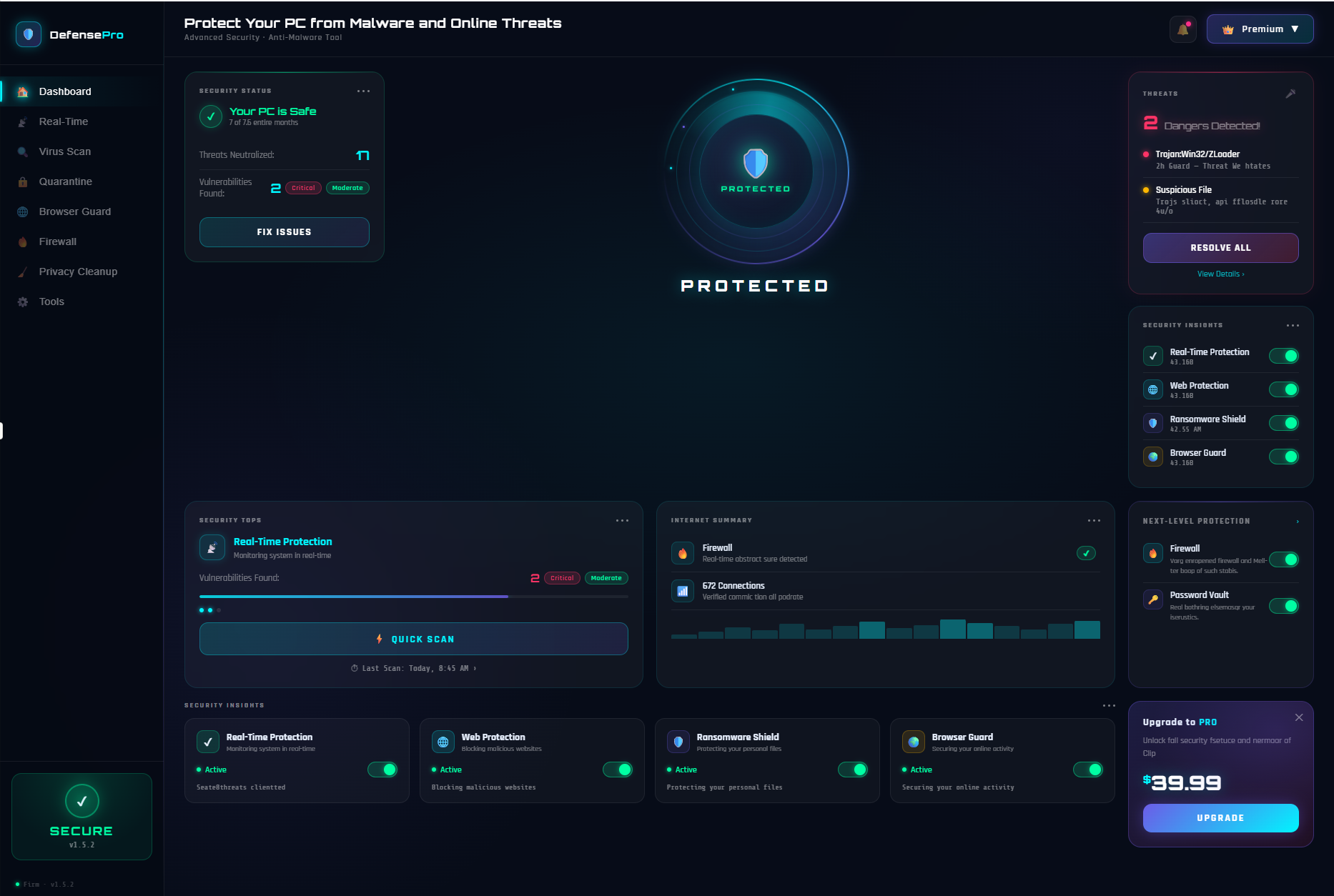
🛡️ | Dashboard | Security status, threats neutralized, vulnerabilities and quick scan
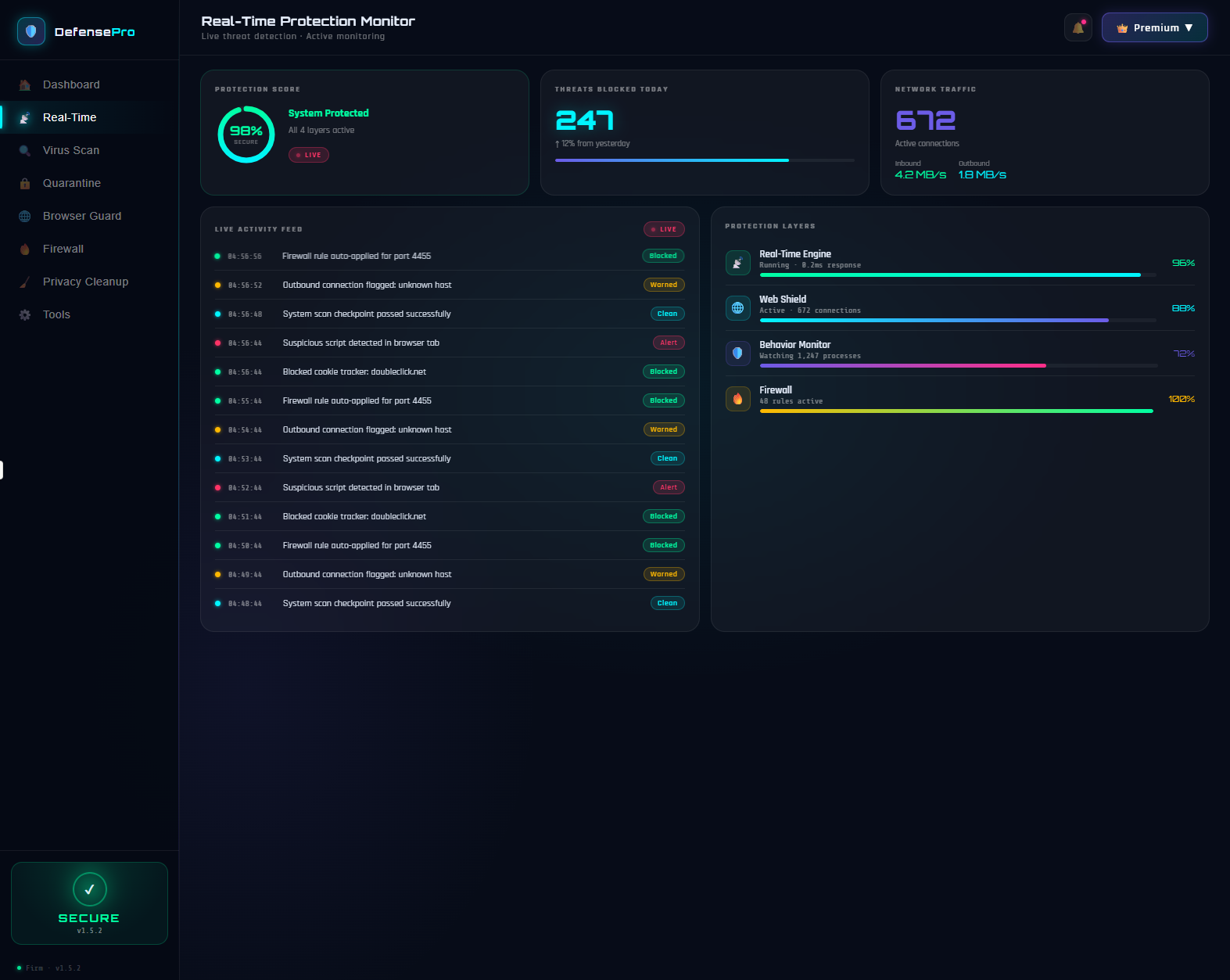
⚡ | Real-Time Protection | Live activity feed, 98% protection score, 247 threats blocked today
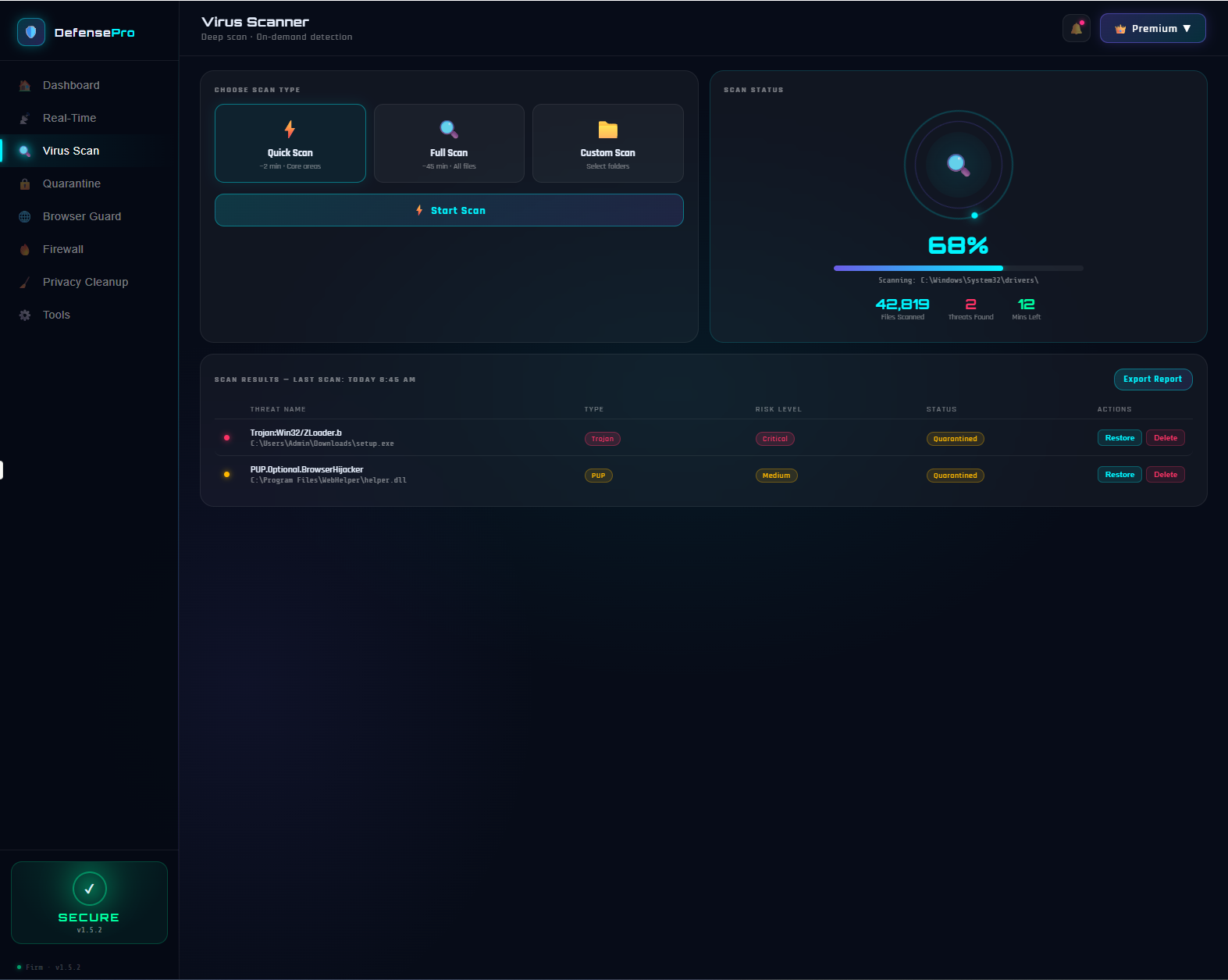
🔍 | Virus Scanner | Quick, Full and Custom scan with real-time progress and threat results
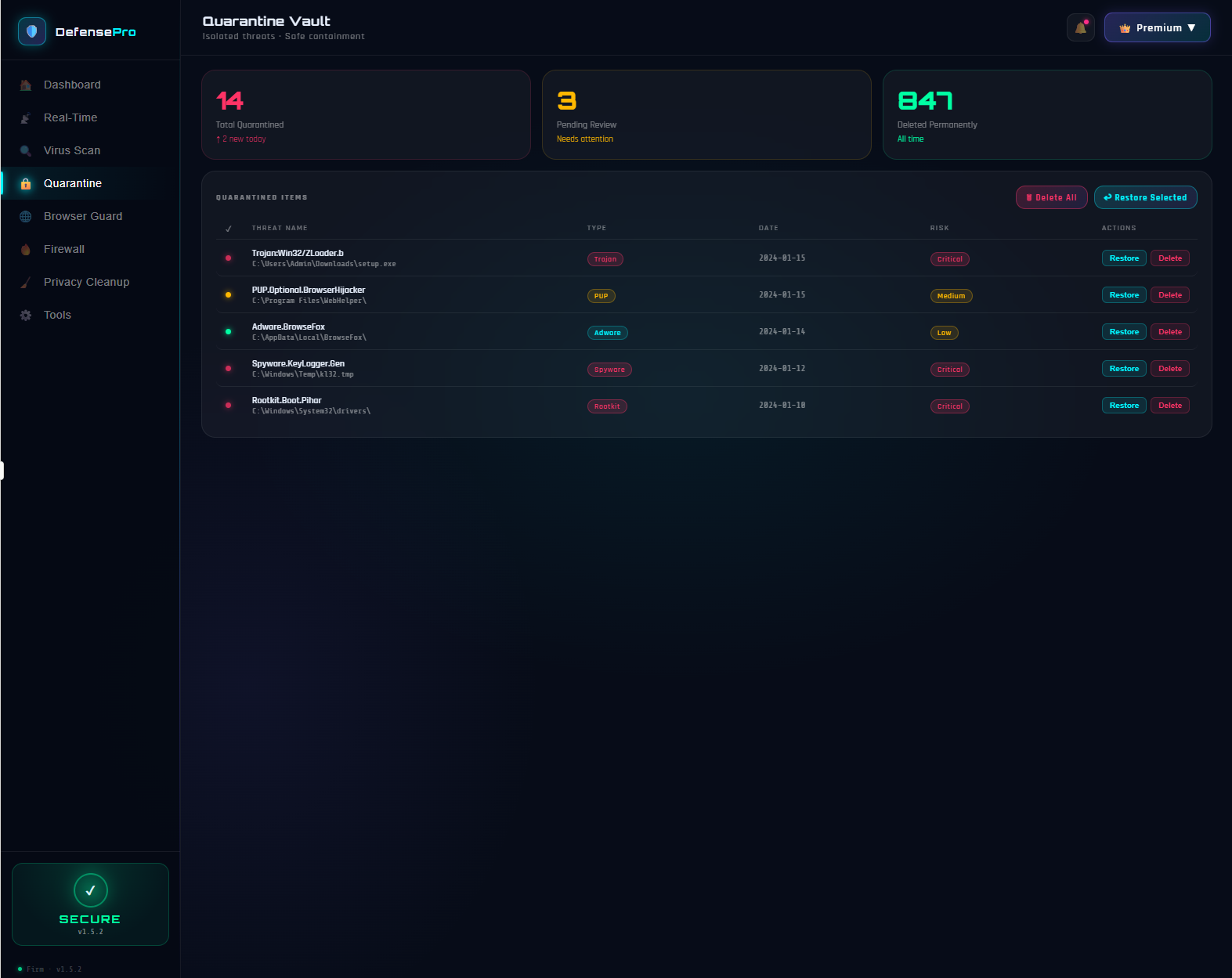
🔒 | Quarantine Vault | Isolated threat storage with restore or permanent delete options
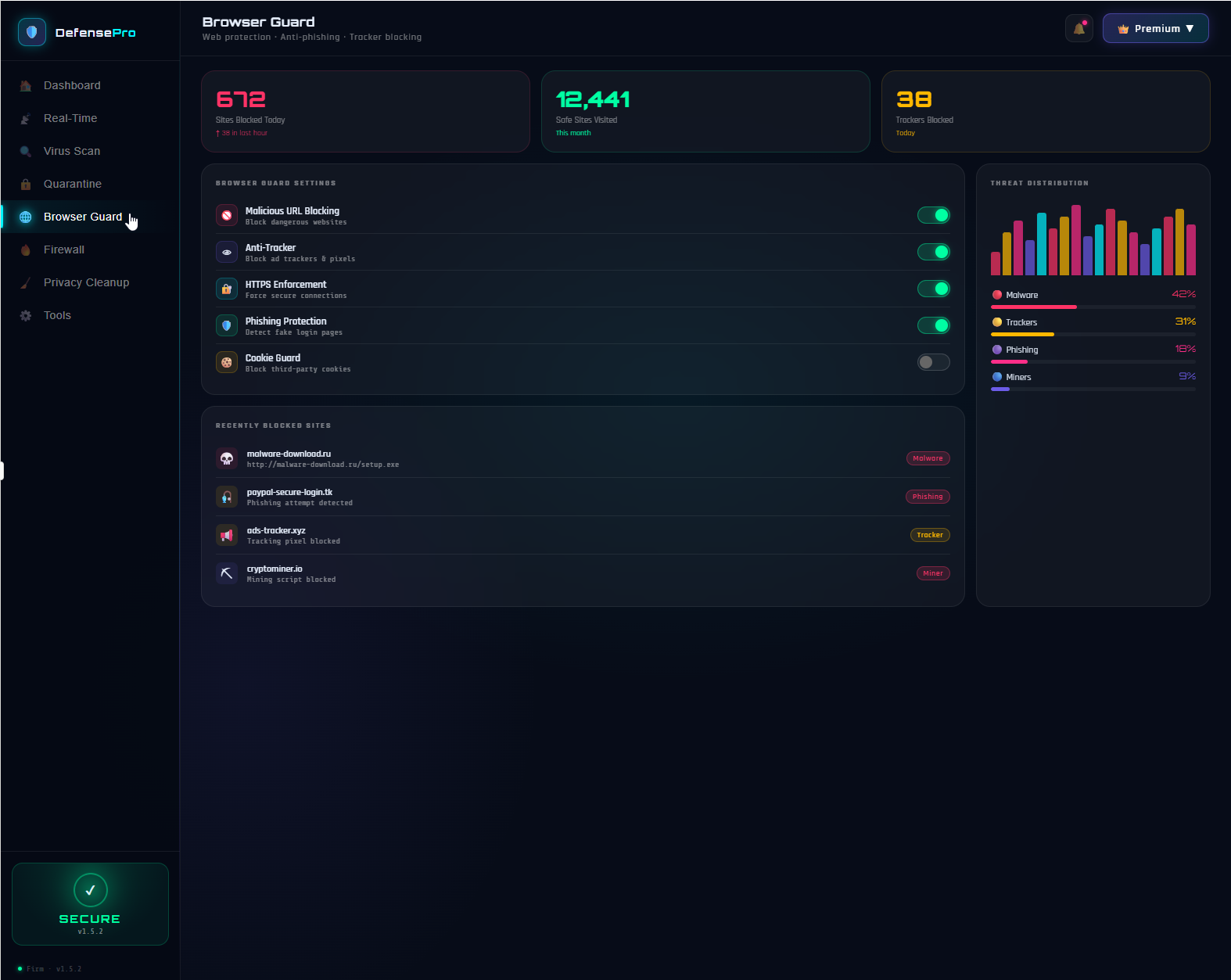
🌐 | Browser Guard | Blocks malicious URLs, trackers, phishing pages and third-party cookies
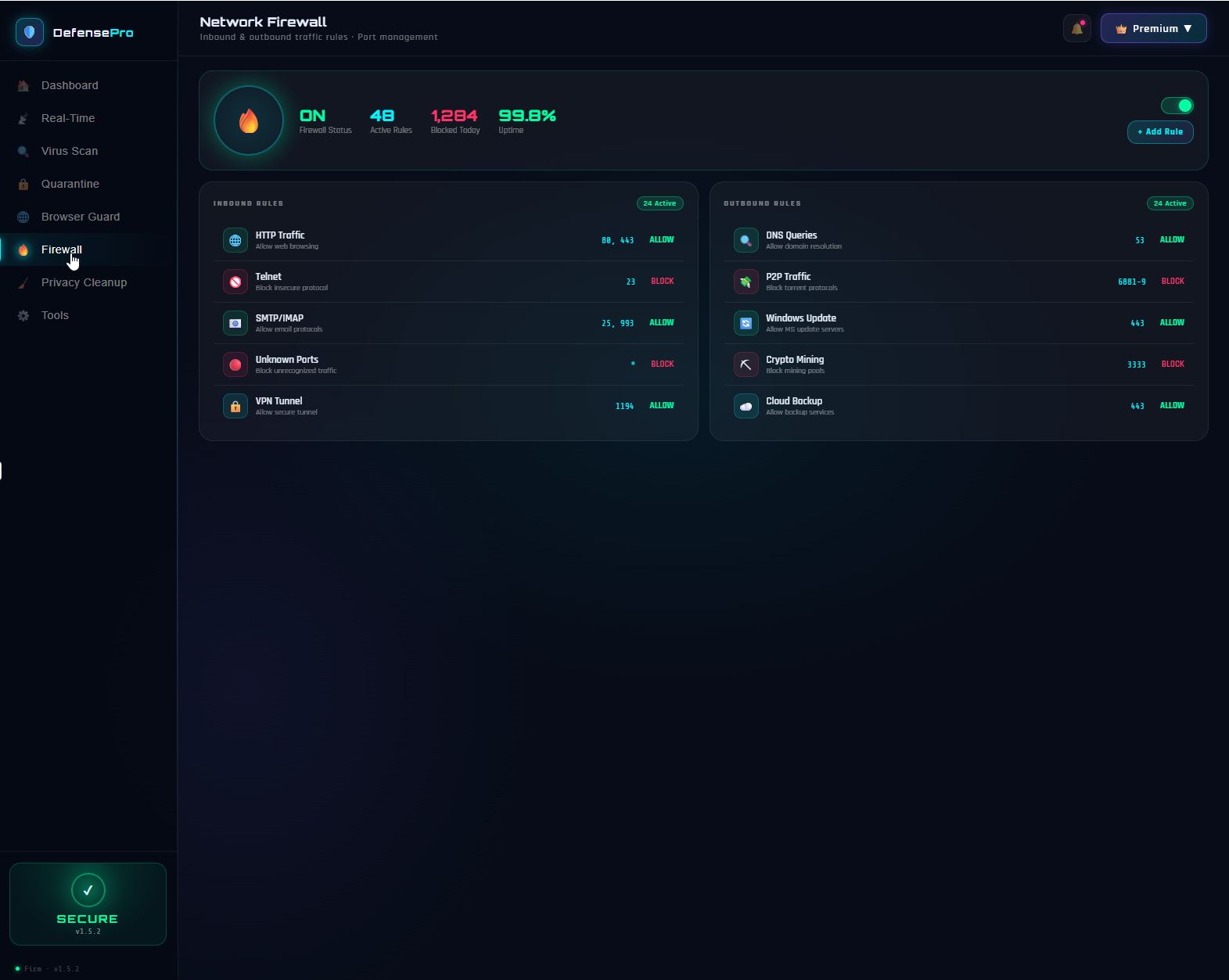
🔥 | Network Firewall | 48 active inbound and outbound rules with 99.8% uptime
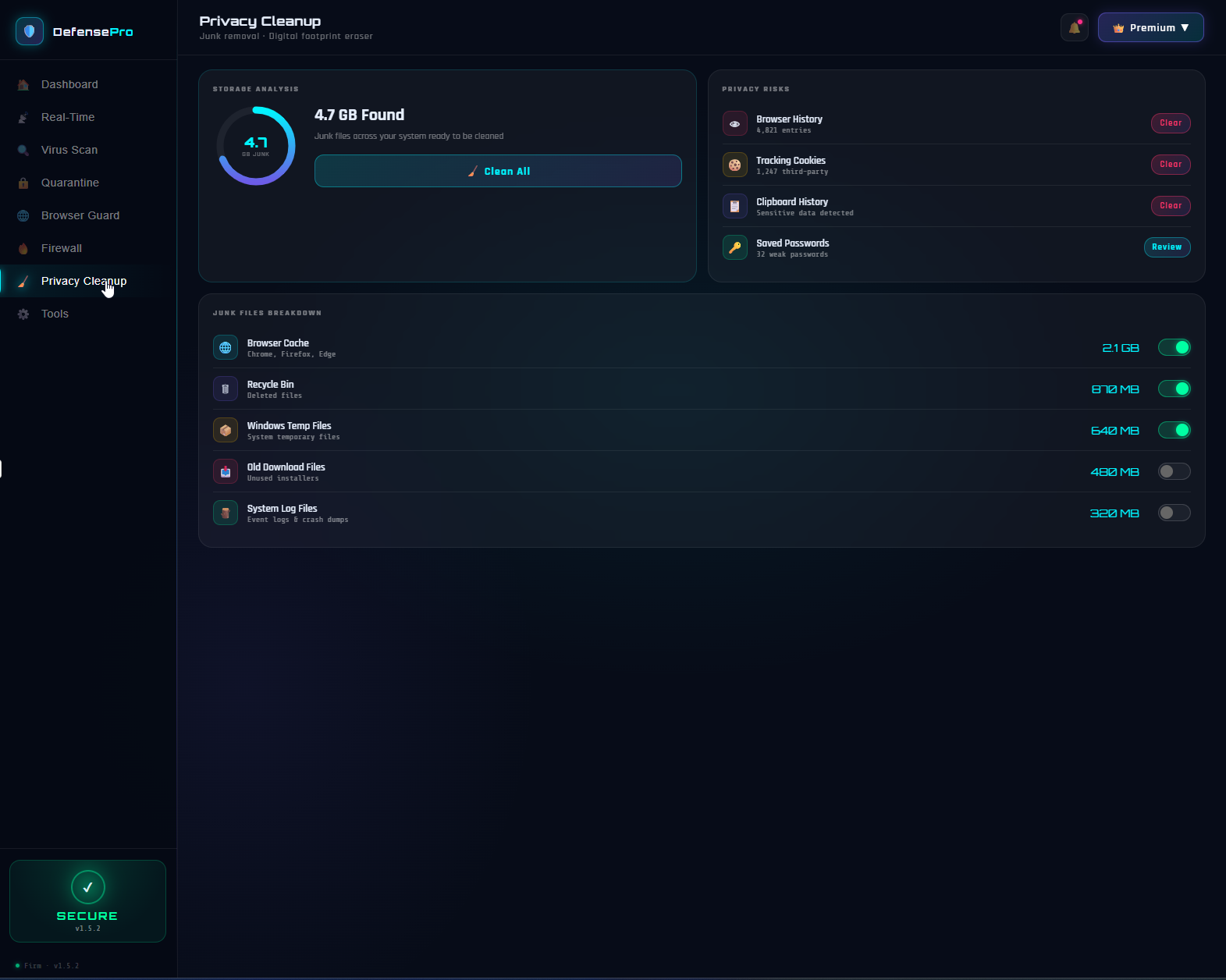
🧹 | Privacy Cleanup | Removes 4.7GB junk, clears browser history, cookies and clipboard data
Your PC Is Under Attack Right Now — You Just Can’t See It.
Every time you browse the web, open an email, download a file, or connect to a network, your computer is exposed to threats you cannot see with the naked eye. Trojans hiding inside innocent-looking downloads. Phishing pages designed to steal your passwords. Tracking scripts following your every move online. Malware silently running in the background collecting your data. Most people only discover these threats after the damage is already done. Defense Pro was built to stop every one of them before they ever reach you.
What Is Defense Pro?
Defense Pro is a comprehensive Windows security suite that provides multi-layer protection against every category of digital threat. It combines real-time malware detection, a smart network firewall, browser protection, privacy cleanup, and a secure quarantine vault — all in one clean, unified application. Whether you are a home user, a remote worker, or a business professional, Defense Pro runs silently in the background keeping your system protected around the clock without slowing you down.
Security Dashboard — Your Complete Protection Overview
The moment you open Defense Pro, the Dashboard gives you an instant, complete picture of your system’s security health. A large central status indicator shows whether your PC is fully protected or needs attention. You can see exactly how many threats have been neutralized, how many vulnerabilities exist and their severity level — Critical or Moderate — and trigger a quick fix with a single button.
The right panel shows live threat alerts as they happen, security insights for each active protection layer, and next-level protection features including the Firewall and Password Vault. Everything you need to know about your PC’s safety is visible at a glance, without digging through menus or settings.
Real-Time Protection — 24/7 Threat Monitoring
The Real-Time Protection module is the core engine of Defense Pro. Running continuously in the background, it monitors your entire system with a 98% protection score across four active layers — Real-Time Engine, Web Shield, Behavior Monitor, and Firewall.
A live activity feed shows every security event as it happens — firewall rules being applied, suspicious scripts detected in browser tabs, outbound connections flagged, cookie trackers blocked — each stamped with a precise timestamp and status tag showing whether it was Blocked, Warned, or Clean. Today alone, 247 threats were blocked with network traffic showing 672 active connections being monitored in real time.
Virus Scanner — Deep, Fast, Precise
The Virus Scanner gives you three scan modes to match your needs. Quick Scan takes around 2 minutes and checks core areas most likely to harbor threats. Full Scan runs a complete check of every file on your system in approximately 45 minutes. Custom Scan lets you select specific folders for targeted investigation.
During a scan, a live progress display shows files scanned, threats found, and time remaining. After scanning, a detailed results table lists every detected threat by name, file path, type, risk level, and current status — with individual Restore and Delete buttons for each item and an Export Report option to save your findings.
Quarantine Vault — Isolated and Contained
Any threat detected by Defense Pro is immediately moved to the Quarantine Vault — a secure, isolated container where it cannot cause any harm. The vault tracks every quarantined item with its threat name, file path, type, detection date, and risk level. You can review each item individually and choose to restore it if it was a false positive or delete it permanently.
The vault dashboard shows your total quarantined count, items pending review, and the total number of threats permanently deleted over time — giving you a complete audit trail of every security event Defense Pro has handled on your behalf.
Browser Guard — Stop Threats Before They Load
The Browser Guard module protects you the moment you open your browser. It blocks malicious URLs before the page loads, enforces HTTPS connections to prevent insecure browsing, detects phishing pages designed to steal your login credentials, blocks ad trackers and tracking pixels, and guards against third-party cookies harvesting your data.
Today alone, Browser Guard blocked 672 dangerous sites, verified 12,441 safe sites, and stopped 38 trackers. The threat distribution chart shows the breakdown — 42% malware, 31% trackers, 18% phishing, and 9% miners — so you always know exactly what is targeting you.
Network Firewall — Total Traffic Control
The Network Firewall gives you complete control over every connection entering and leaving your PC. With 48 active rules, 99.8% uptime, and 1,284 connections blocked today, it silently manages your network traffic without any manual intervention needed.
Inbound rules handle HTTP traffic, block insecure Telnet protocols, manage email connections, block unknown ports, and allow secure VPN tunnels. Outbound rules manage DNS queries, block P2P and torrent traffic, allow Windows Update servers, block cryptocurrency mining pools, and permit secure cloud backup services. You can add custom rules at any time with a single click.
Privacy Cleanup — Erase Your Digital Footprint
Privacy Cleanup found 4.7 GB of junk across your system ready to be removed. It breaks down exactly what it found — 2.1 GB of browser cache from Chrome, Firefox and Edge, 870 MB in the Recycle Bin, 640 MB of Windows temp files, 480 MB of old download installers, and 320 MB of system log files.
Beyond storage cleanup, the Privacy Risks panel identifies specific privacy threats — 5,821 browser history entries, 1,247 third-party tracking cookies, clipboard history containing sensitive data, and 32 weak saved passwords flagged for review. Clean everything at once or select specific categories to remove individually.
Why Defense Pro Over Other Security Tools?
Most security tools do one thing — scan for viruses. Defense Pro does seven things simultaneously. Real-time monitoring, browser protection, network firewall, privacy cleanup, quarantine management, vulnerability detection, and behavior analysis all working together in one unified application. No need to install five different tools from five different vendors. No conflicts between security apps. No performance hit from running multiple background processes.
Built by an experienced developer with over 20 years of software expertise, Defense Pro is updated continuously to address new and emerging threats. Clean interface, no bloatware, no forced upgrades, no scare tactics — just professional-grade protection that works silently and reliably every single day.
Gallery Images
Visual showcase of the software interface and features