PageHound Review 2026: SEO Audit Tool That Shows What to Fix First + OTO Info
PageHound is an SEO audit tool that scores a page, shows the evidence for every issue and tells you how to fix it. Here is what a scan looks like, what every upgrade and downsell adds, a tested self-hosted install, and where it falls short. I built it, so I say so up front.
In this review I cover what PageHound does, who it is for, how much it costs, its pros and cons, what the upsells (OTOs) are, and the exclusive bonuses you get when you buy through my link — so you can decide whether it is right for you.
At a glance
PageHound Review — Overview
- CreatorDebasis Bhattacharjee (Debmedia Technologies LLP)
- ProductPageHound
- Launch DateLaunch edition coming soon
- Refund30 Days refund policy
- Pricing
$47 planned regular price$27 (planned one-time launch price) - Official WebsiteComing soon
- TrainingBuilt-in docs and a bonus training video series
- ExperienceNone. Paste a URL and read the report
- SupportTicket-based support center with private ticket pages
- BonusYes — you get exclusive bonuses (see below)
For a limited time
Get PageHound for $27 (planned one-time launch price) $47 planned regular price
Get Instant Access → ✓ 30 Days money-back guarantee · Affiliate link — I may earn a commission
What Exactly Is PageHound?
PageHound is an SEO audit tool with one clear promise: paste a URL, get a health score, and see what is wrong with the page, with the evidence and the exact change to make. It does not bury you in a sixty-item warning list. It scores the page, groups the problems, shows the proof for each one and tells you how to fix it.
Most SEO tools make the same mistake: they confuse more data with more help. You paste your page, you get hundreds of lines of red and amber, and no idea where to begin. PageHound is built around the opposite idea. The full audit and its evidence are free to read, and the paid features are about doing the job faster and at larger scale: crawling a whole site, scheduling repeat scans, tracking keyword positions, and sending clients branded reports. This review goes through what that means on the screen, what each upgrade adds, and where the product falls short.
Who PageHound is for
If you own a blog, a store or a small-business site and you want to know why a page is not ranking, the free audit is the place to start. If you are a freelancer or a small agency who audits pages for clients, the paid features (crawl, schedule, compare, branded PDF reports and team seats) are aimed at you. It is not a replacement for a full enterprise suite. It does not pretend to be, and I come back to that in the cons.
What is under the hood
PageHound is written in PHP 8 with SQLite. There is no database server to run and no heavy framework, which is why one package can run on ordinary shared hosting. Scans are done by PageHound’s own crawler and checks, so a normal page scan costs CPU time, not a per-scan fee to a third-party SEO API. The two features that do call outside services are the rank tracker (it uses Google’s official Custom Search API) and the AI fix suggestions (they use an OpenAI key). Both are metered per month for exactly that reason: each check costs real money.
The scan, step by step
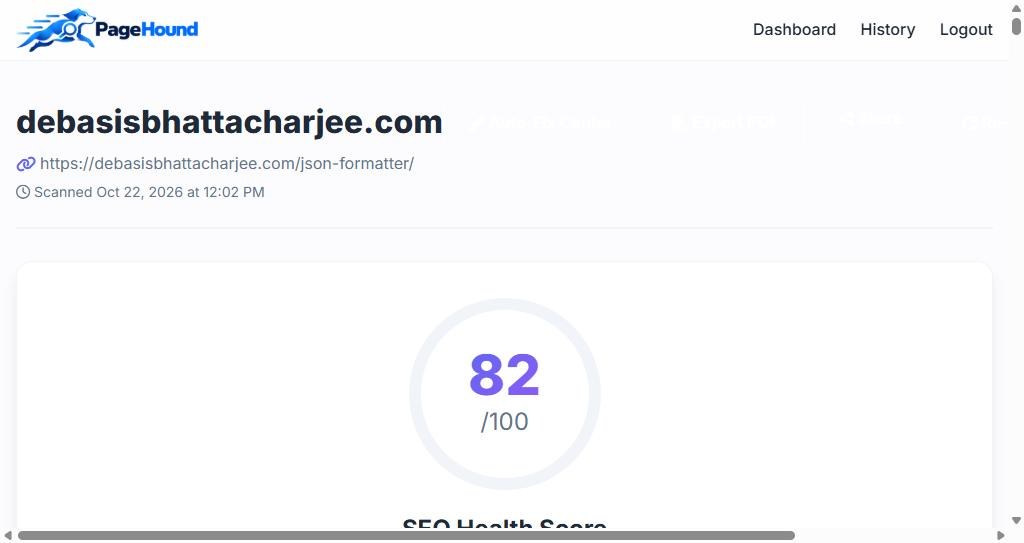
You paste a URL into the box and press Analyze Now. PageHound fetches the page, checks it, saves the result to your history, and opens the report. The first thing you see is the overall SEO Health Score out of 100.
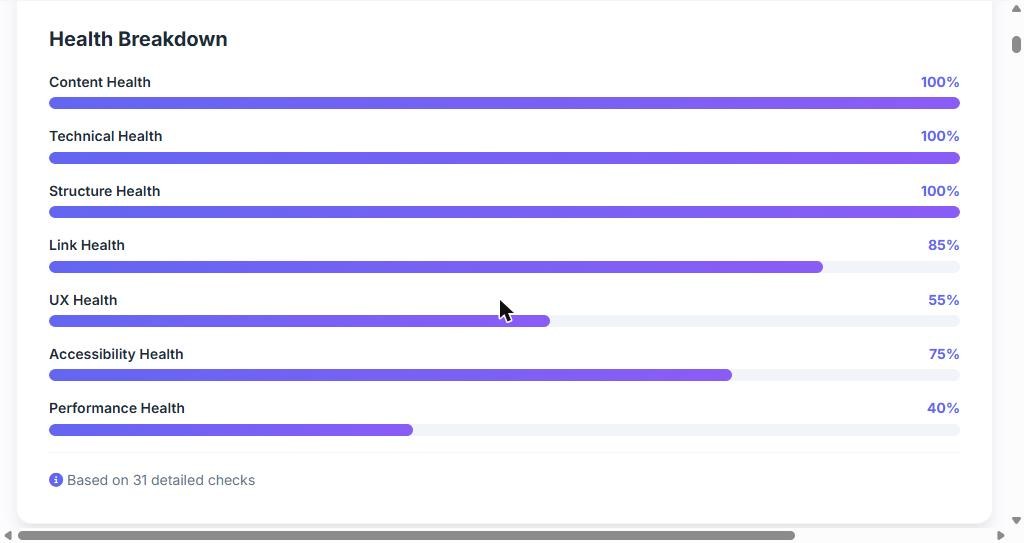
Right under the score is the health breakdown. Instead of one vague number, you get seven separate scores: content, technical, structure, links, UX, accessibility and performance. That matters because a page can be perfect on content and still weak on speed, and the breakdown shows you which kind of work it needs. On my test page the first three scores were 100 per cent, links were 85, accessibility 75, UX 55 and performance only 40, which matched what I already knew: the page is well written and slow.
Page DNA
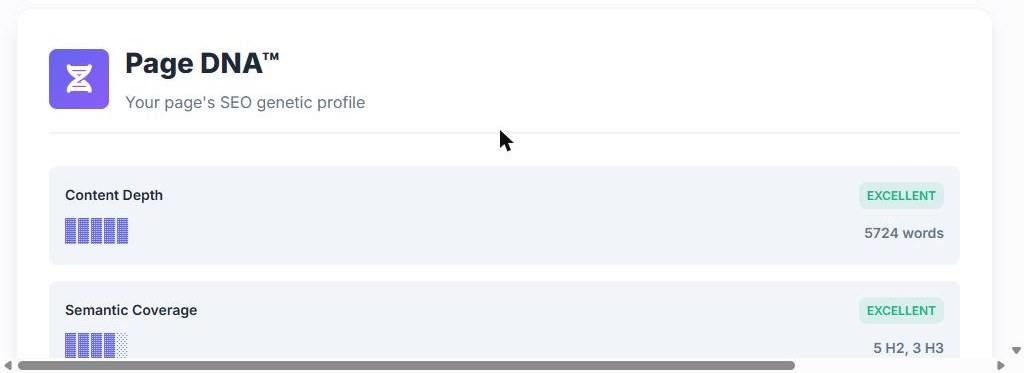
Page DNA is PageHound’s name for a plain-language profile of the page. It reports things such as content depth (my page had 5,724 words, rated excellent) and semantic coverage (how many H2 and H3 headings the page uses). It is a quick read of the page’s shape before you go into the detail.
The detailed analysis, with evidence
Below that sits the part I find most useful: the detailed analysis, grouped into content, technical, structure, link, accessibility and performance issues. Each item has a name you can understand, for example “Missing Security Headers”, “Broken Links Found”, “Render-Blocking Resources” or “Compression Not Enabled”, and PageHound shows the evidence behind it, such as the real URLs and sizes it found, along with how to fix it. There is also an “AI visibility readiness” check that looks at whether AI crawlers are allowed in your robots file.
There is a “Fix These First” box above the detail, meant to list the handful of changes that matter most. I will be honest about it: it draws on a short list of basic rules (a missing H1, thin content, a missing meta description, images without alt text and similar). On my own pages, which already get those basics right, that box was empty even though the detailed analysis listed plenty of issues. So treat the detailed list as the real report and the top box as a quick check for basic problems.
History, re-scans and before-and-after
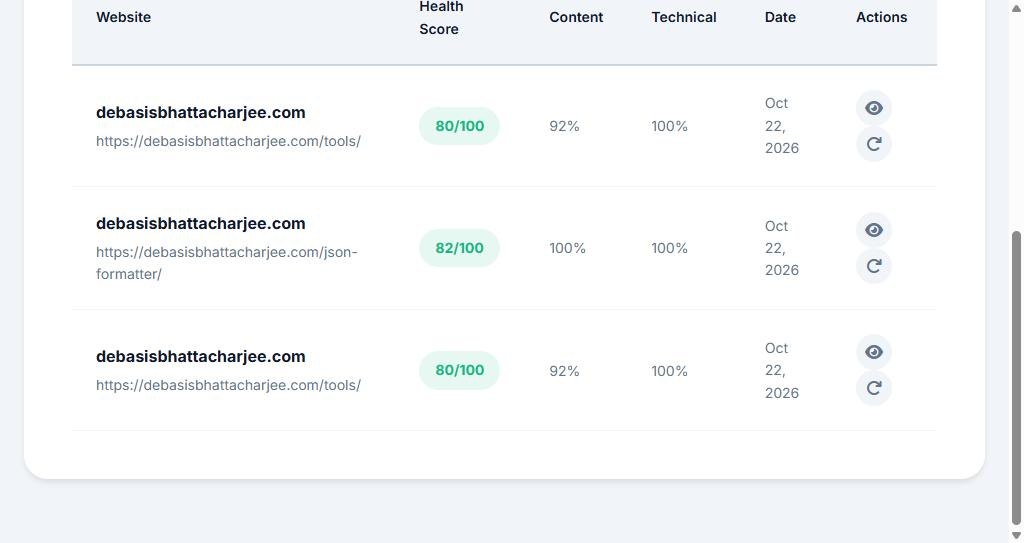
Every scan is saved. The history page lists your scans with score, content and technical health and the date, and each row has a button to open the report and another to scan the same URL again. When you rescan a page, PageHound compares it with the previous scan of the same URL, so you can see whether your fix actually moved the score. That before-and-after view is simple, and it is the habit that makes an SEO tool pay for itself.
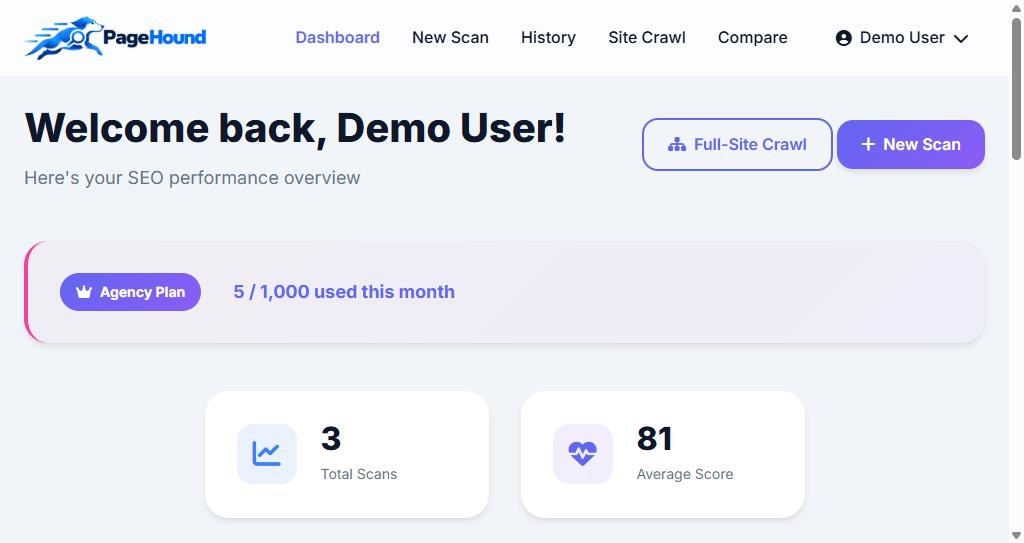
The dashboard
The dashboard shows your plan, how much of your allowance you have used and your total scans and average score, with quick buttons for a new scan or a full-site crawl. It is clean and fast to read.
The paid features, one by one
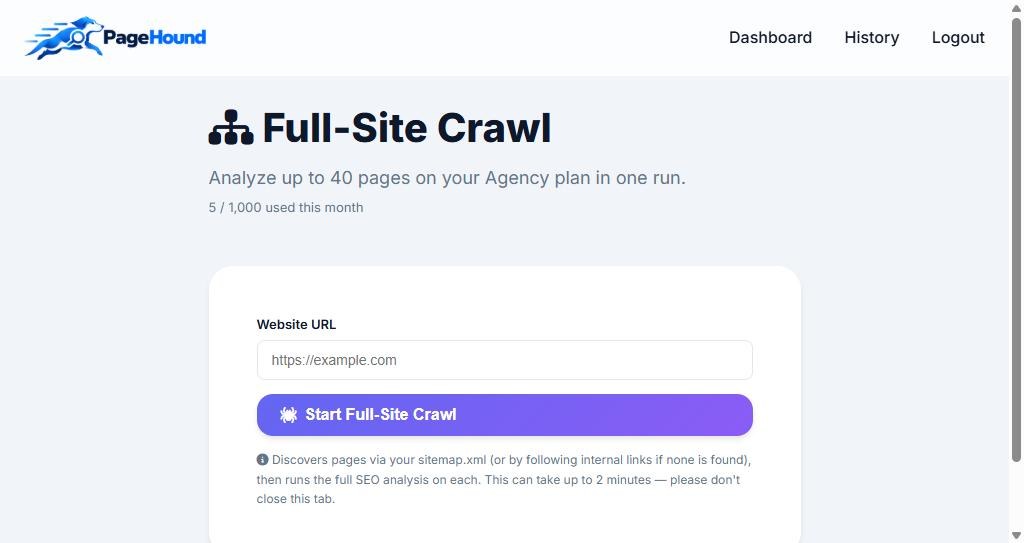
Full-site crawl. Instead of one page, PageHound finds your pages through your sitemap, or by following internal links if there is none, and runs the full analysis on each. The crawl page tells you it can take up to two minutes and to keep the tab open.
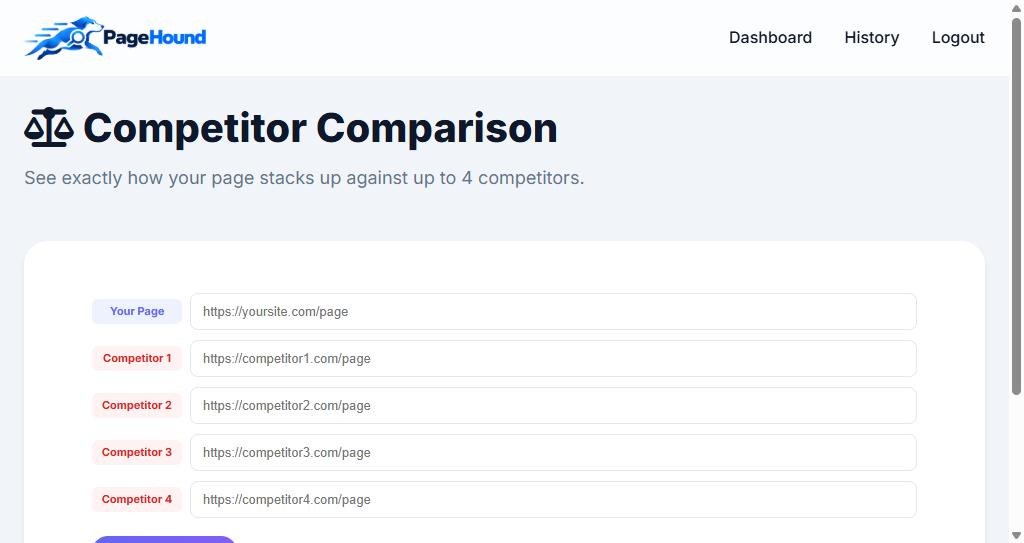
Competitor comparison. Enter your page and up to four competitor pages, and PageHound lines them up side by side. The smaller paid plan allows two competitors; the larger one allows four.
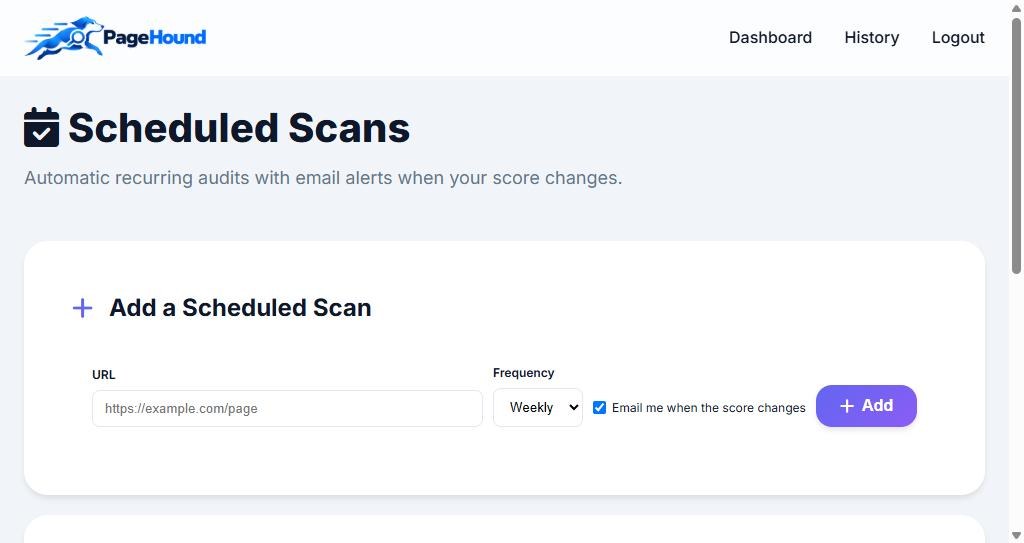
Scheduled scans. Add a URL, pick how often it should run and tick the box to be emailed when the score changes. This needs a cron job on the server, which is one line.
Rank tracker. Add a domain and a keyword and PageHound checks where you appear in Google using Google’s official Custom Search API, never by scraping or guessing. It needs those API credentials to be configured on the server, and each check counts against a monthly allowance.
AI fixes. The Auto-Fix Center can write suggested fixes for issues using an OpenAI key. It is metered, with a monthly quota and a daily cap, because each suggestion costs a small amount.
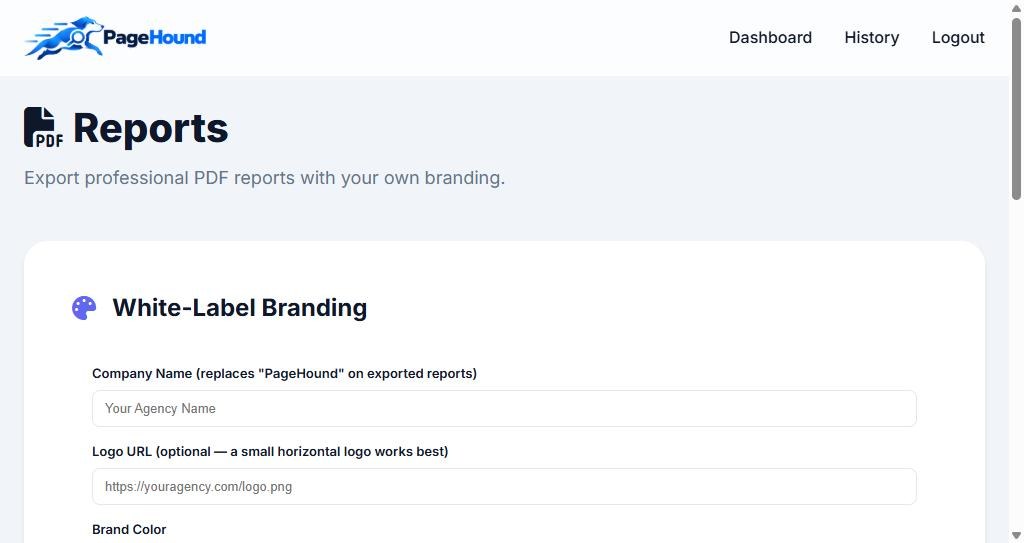
White-label PDF reports. This is the feature agencies care about. You set your company name, logo address and brand colour once, and exported PDF reports carry your branding instead of PageHound’s. Reports can also be shared through a link.
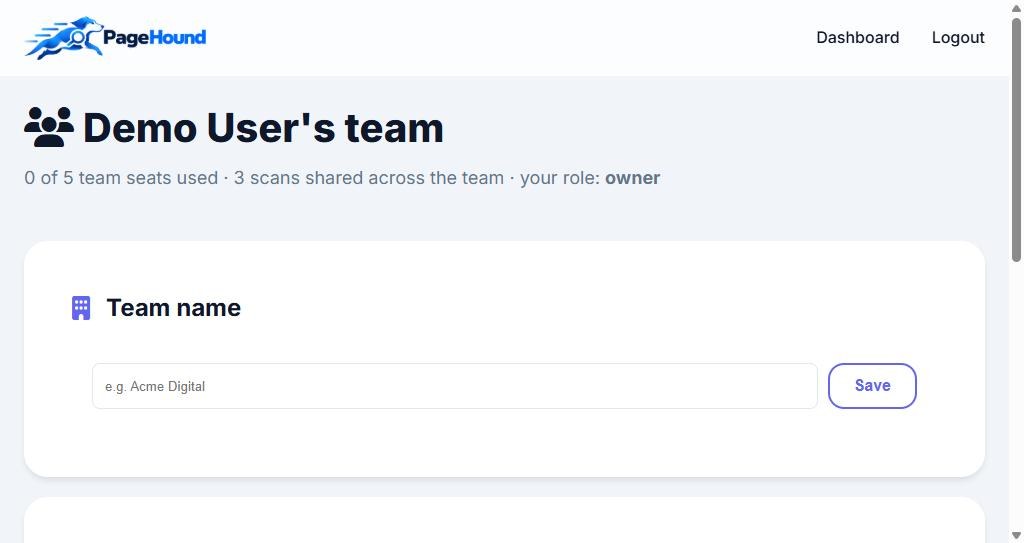
Team seats. The top plan lets you invite teammates (five seats), with owner, admin and member roles. Everyone works in one shared workspace, so scans, scheduled scans and tracked keywords are shared across the team.
What PageHound costs today
Today PageHound is sold as monthly plans, and these are the numbers in the product:
- Free: $0, three scans a week, one page per scan.
- Pro: $29 a month (or $290 a year): 200 page scans a month, site crawl, competitor comparison, scheduled scans and the rank tracker.
- Agency: $99 a month (or $990 a year): 1,000 page scans a month, bigger crawls, more competitors, white-label reports and five team seats.
The launch edition planned for this page is a one-time version of the same idea. Its limits will be published before checkout opens. The table below is the planned shape of the launch offer, not a live price list.
The planned launch offer at a glance
| Step | Offer | Planned price | What changes |
|---|---|---|---|
| Front end | PageHound Lifetime | $27 (then $47) | Page audits, health breakdown, Page DNA, history |
| OTO #1 | Pro: Crawl, Scheduled Scans and Rank Tracker | $67 (then $127) | Whole-site crawl, scheduled scans, rank tracker, higher limits |
| Downsell #1 | Pro Lite | $37 | Scheduled scans and higher limits only |
| OTO #2 | White-Label Reports | $97 (then $197) | Branded PDF reports and shared report links |
| Downsell #2 | Reports Lite | $47 | A limited number of branded reports each month |
| OTO #3 | Agency Team | $97 (then $197) | Team seats, roles and a shared workspace |
| OTO #4 | Self-Hosted Edition | $197 (then $297) | Run PageHound on your own server |
If someone took the front end and every upgrade, the total would be $485. Almost nobody needs that. Most people need the front end alone, or the front end plus the Pro upgrade. The upgrade notes below are written so you can see quickly which one, if any, applies to you.
The self-hosted edition, tested
Because it is the most unusual upgrade, I tested it end to end. I built the package, unpacked it into an empty folder, and ran the web installer with a licence key. The installer checks the server first (PHP 8.1 or newer, SQLite, cURL and a few other extensions, and that the folders are writable), then checks the licence key with the vendor, then creates the database and your admin account and logs you in. The installed copy took my own product name and gave the owner the full Agency feature set on my own server. Installing needs no MySQL: everything lives in one SQLite file with a random file name.
Two honest points. First, the licence is bound to a domain and the installed copy checks in with my licence server about once a day. It tolerates being offline for a grace period, but it does depend on that server being reachable. Second, because the code is PHP, a determined person could remove the checks. They are there to keep honest customers licensed and to give me revocation, not to be unbreakable protection.
Which version should you pick?
- You just want to know why a page is not ranking: the front end (or today’s free plan) is enough.
- You manage a whole site, or want repeat checks and keyword positions: add Pro. If you only need scheduled scans, the smaller version is cheaper.
- You send reports to clients: add White-Label Reports.
- You work with a team: add Agency Team.
- You want your own copy on your own hosting: the self-hosted edition, and only if you are comfortable running PHP, SQLite and a cron job.
Everything is planned to be covered by a 30-day money-back guarantee handled through WarriorPlus when checkout opens.
PageHound Review — How Does It Work?
Here is how it works, step by step.
There is nothing to install. Sign up, paste the address of the page you want to check and press the button. PageHound fetches the page, runs its checks and saves the result in your history. On a heavy page a scan can take a little while, because it follows redirects and checks links.
The report opens with an overall SEO Health Score out of 100, then splits it into content, technical, structure, links, UX, accessibility and performance. This tells you what kind of work the page needs, not just that it needs some.
Page DNA gives a plain-language read of the page: content depth (word count), semantic coverage (headings), and similar signals. It is a quick look at the shape of the page before you go into the detail.
Issues are grouped into content, technical, structure, links, accessibility and performance. Each one names the problem, shows the evidence PageHound found and explains how to fix it. Start with the items that match your lowest scores.
Every scan is saved. Scan the same URL again after a fix and PageHound compares it with the previous scan of that URL, so you can see whether the score really moved.
When one page is not enough, the paid features take over: a whole-site crawl, competitor comparison, scheduled scans with email alerts, a Google rank tracker, and white-label PDF reports for clients.
PageHound Review — Features & Benefits
What you actually get.
SEO Health Score with a seven-part breakdown
One overall score out of 100, split into content, technical, structure, links, UX, accessibility and performance, so you can see which kind of work a page needs.
Detailed issues with evidence and fixes
Every issue names the problem, shows the evidence found on the page (real URLs, sizes, counts) and says how to fix it, instead of just listing warnings.
Page DNA
A plain-language profile of the page: content depth, semantic coverage and similar signals at a glance.
Scan history and before-and-after
Every scan is saved. Rescan a URL and PageHound compares it with the previous scan of that same URL to show whether your fix worked.
Full-site crawl
Finds your pages through the sitemap, or by following internal links, and runs the full analysis on each page.
Competitor comparison
Put your page next to competitor pages (two on the smaller paid plan, four on the larger) and see how they compare.
Scheduled scans with email alerts
Add a URL, choose how often to scan it and get an email when the score changes. Needs one cron line on the server.
Rank tracker
Real Google positions through the official Custom Search API, not scraped or estimated. Metered monthly because each check costs real API money.
AI fix suggestions
The Auto-Fix Center can write suggested fixes for issues using an OpenAI key, with a monthly quota and a daily cap.
White-label PDF reports and share links
Set your company name, logo and colour once and your exported reports carry your branding. Reports can also be shared with a link.
Team seats and a shared workspace
Five seats on the top plan with owner, admin and member roles. Scans, schedules and tracked keywords are shared across the team.
Self-hosted edition with an installer
A packaged copy with a web installer, SQLite storage and a licence key bound to your domain, for people who want to run it on their own hosting.
- Free audit with the evidence shown, not hidden behind a paywall
- Seven separate scores instead of one vague number
- Every issue comes with evidence and a fix
- Rescan and compare to see whether a fix worked
- Crawl, schedule, rank tracking and competitor comparison on the paid plans
- White-label PDF reports and team seats for agencies
- Self-hosted edition with a tested installer
- 30-day money-back guarantee planned for the launch offer
PageHound Review — Pros and Cons
The honest picture, good and bad.
Pros
- The audit and its evidence are readable for free: you see what is wrong before you pay for anything
- Seven separate scores tell you what kind of work a page needs
- Each issue shows evidence and a fix, not just a warning
- Rescan and compare shows whether your change actually moved the score
- Plain-language reports that a client can follow
- White-label PDF reports and share links are built in for agencies
- No database server needed: PHP and SQLite, so it runs on ordinary hosting
- Rank positions come from Google's official API, not guesses
- Self-hosted edition builds cleanly and installs with a short web installer
- Metered features (rank checks, AI fixes) have clear monthly quotas, so costs cannot run away
Cons
- It is a new product with no long track record and no independent user reviews yet
- The vendor wrote this review, so treat the score as one informed but interested opinion
- The 'Fix These First' box uses a short list of basic rules and was empty on my own pages even though the detailed analysis listed many issues
- The crawl page says a run covers up to 40 pages on the Agency plan, while the plan table promises far larger crawls
- A scan of a very heavy page can take longer than 30 seconds, so the host must allow longer scripts
- Rank tracking needs Google API credentials on the server and each check is metered
- It is not an enterprise suite: no backlink database and no keyword research tool
- The self-hosted edition checks its licence with my server about once a day, so it depends on that server being reachable
- The one-time launch edition is not open yet, so nothing here can be bought today
- Checkout will run through WarriorPlus, so expect an upsell sequence after you buy
For a limited time
Get PageHound for $27 (planned one-time launch price) $47 planned regular price
Get Instant Access → ✓ 30 Days money-back guarantee · Affiliate link — I may earn a commission
PageHound Review — Who Can Use It?
Check who can benefit from PageHound:
- Bloggers who want to know why a post is not ranking
- Small-business owners checking their own site
- Online store owners auditing key product and category pages
- Freelance SEOs who audit pages for clients
- Small agencies who need branded reports
- Web designers who want a quick quality check before handover
- Content writers who want a score and clear fixes
- Affiliate marketers with their own review sites
- WordPress site owners comfortable pasting a URL
- People who want an SEO tool on their own hosting
PageHound Review — Is There Any Upsell Or OTO?
Yes, there are 4 optional upgrades (OTOs) plus 2 downsell offers that appear if you decline an upgrade. You do not need any of them to use PageHound, but they may be useful depending on your situation.
OTO / Upsell #1Pro: Crawl, Scheduled Scans and Rank Tracker
$67 (then $127)- Full-site crawl that finds pages from your sitemap or internal links
- Scheduled scans with an email alert when the score changes
- Rank tracker using Google's official Custom Search API
- Competitor comparison
- Higher monthly limits than the front end
- Who it is for: anyone managing a whole site, not just one page
- My take: the upgrade most people who keep using PageHound will want; the rank tracker is metered because each check costs real API money
Downsell #1Pro Lite (scheduled scans only)
$37- Shown only if you say no to Pro
- Scheduled scans with email alerts
- Higher limits than the front end
- No crawl, no rank tracker
- Who it is for: people who only want PageHound to watch a few pages for them
- My take: a cheap way to get the habit going; you can still upgrade later
OTO / Upsell #2White-Label Reports
$97 (then $197)- Export PDF reports with your own company name, logo and colour
- Shareable report links
- Use the same reports for every client
- Who it is for: freelancers and agencies who send audits to clients
- My take: only worth it if you really send reports to other people
Downsell #2Reports Lite (limited branded reports each month)
$47- Shown only if you say no to White-Label Reports
- A smaller monthly allowance of branded reports
- Same branding settings as the full upgrade
- Who it is for: people who send only a few reports each month
- My take: a sensible way in if you have just a couple of clients
OTO / Upsell #3Agency Team
$97 (then $197)- Invite teammates with owner, admin and member roles
- One shared workspace for scans, scheduled scans and tracked keywords
- Five seats
- Everyone works inside the same plan allowance
- Who it is for: small agencies and teams, not solo users
- My take: skip it if you work alone
OTO / Upsell #4Self-Hosted Edition
$197 (then $297)- The full PageHound package with a web installer
- Runs on PHP 8.1 or newer with SQLite: no MySQL needed
- A licence key bound to your domain
- Use your own branding, and optionally your own Stripe or PayPal to charge your own customers
- Needs outbound HTTPS so the licence can be checked about once a day, with an offline grace period
- Who it is for: developers and agencies who want PageHound on their own hosting
- My take: only if you are comfortable running a PHP site and a cron job; everyone else is better on the hosted version
My verdict
PageHound Review — Why Should You Get This?
Most SEO tools drown you in data and leave you to guess what matters. PageHound does the sensible thing: it shows you the whole audit and its evidence, splits the score into seven parts so you can see what kind of work a page needs, and lets you rescan to prove a fix worked. The paid features (crawl, schedules, rank tracking, competitor comparison, branded reports and team seats) are about speed and scale rather than hiding the answer. The weak spots are real: it is new, the Fix These First box is thin, heavy pages can scan slowly, rank checks depend on Google credentials, and the one-time launch edition is not open yet. Start with the free audit, scan a page you care about, and add an upgrade only when you hit a real limit. I built it, so read the score as one informed but interested opinion.
Frequently Asked Questions
Exclusive when you buy through my link
PageHound Exclusive Bonuses
When the launch opens and you buy PageHound through the link on this page, I will send you these bonuses. Send me your purchase details to claim them.
On-Page SEO Checklist
A printable checklist matched to the areas PageHound scores, so you can work through a page one section at a time.
Client Audit Report Template
A short document that helps you explain a PageHound report to a client in plain language.
SEO Fix Video Series
Short videos showing how to fix the most common issues PageHound finds.
How to apply for the bonuses
- Buy PageHound using the link on this page once the launch opens.
- Send me your transaction details for verification through the contact page.
- I will verify your purchase and send you the bonuses.
Affiliate disclosure: I may earn a commission if you buy through my link, at no extra cost to you.