BridgeCraft Review 2026: Affiliate Bridge Page Builder for $27 + OTO Info
BridgeCraft is a hosted affiliate bridge page builder sold for a one-time $27 founding price. Here is what the wizard and editor do, what the 38 designs look like, what every upsell and downsell adds, and where it falls short. I built it, so I say so up front.
In this review I cover what BridgeCraft does, who it is for, how much it costs, its pros and cons, what the upsells (OTOs) are, and the exclusive bonuses you get when you buy through my link — so you can decide whether it is right for you.
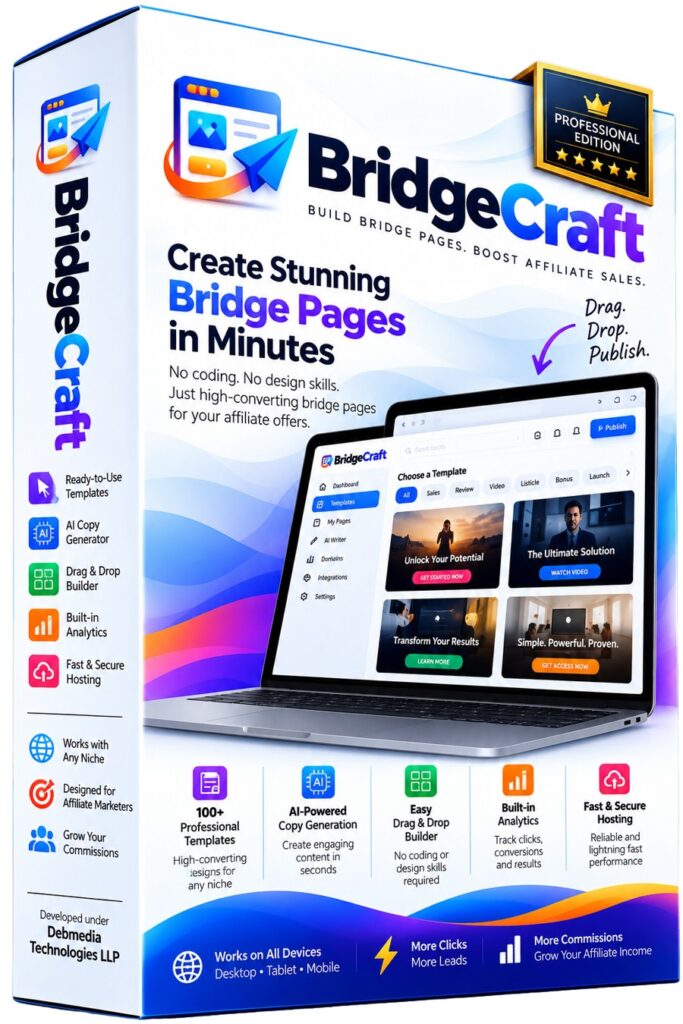
At a glance
BridgeCraft Review — Overview
- CreatorDebasis Bhattacharjee (Debmedia Technologies LLP)
- ProductBridgeCraft
- Launch DateFounding-member launch on WarriorPlus
- Refund30 Days refund policy
- Pricing
$47 after launch$27 (one-time) - Official WebsiteComing soon
- TrainingBuilt-in quick-start and a bonus training video
- ExperienceNone. Pick a design, answer five short steps, publish
- SupportTicket-based support center with private ticket pages
- BonusYes — you get exclusive bonuses (see below)
For a limited time
Get BridgeCraft for $27 (one-time) $47 after launch
Get Instant Access → ✓ 30 Days money-back guarantee · Affiliate link — I may earn a commission
What Exactly Is BridgeCraft?
BridgeCraft is a hosted tool for building affiliate bridge pages. You pick a ready-made design, add your product details and your affiliate link, and publish a page that sits between your traffic and the offer you are promoting. There is no code to write, no theme to install and no page builder to learn from scratch: a five-step wizard fills in the page for you, and a visual editor lets you change anything it got wrong.
Most bridge-page tools fall into two camps. Either you get a blank editor and a lot of freedom, which is a polite way of saying you have to be a designer, or you get a handful of tired templates that every other affiliate is already using. BridgeCraft’s pitch is a library of designs that genuinely look different from each other, plus the guided wizard on top. This review goes through what that means in practice, what each screen looks like, what every upgrade adds, and where the product falls short.
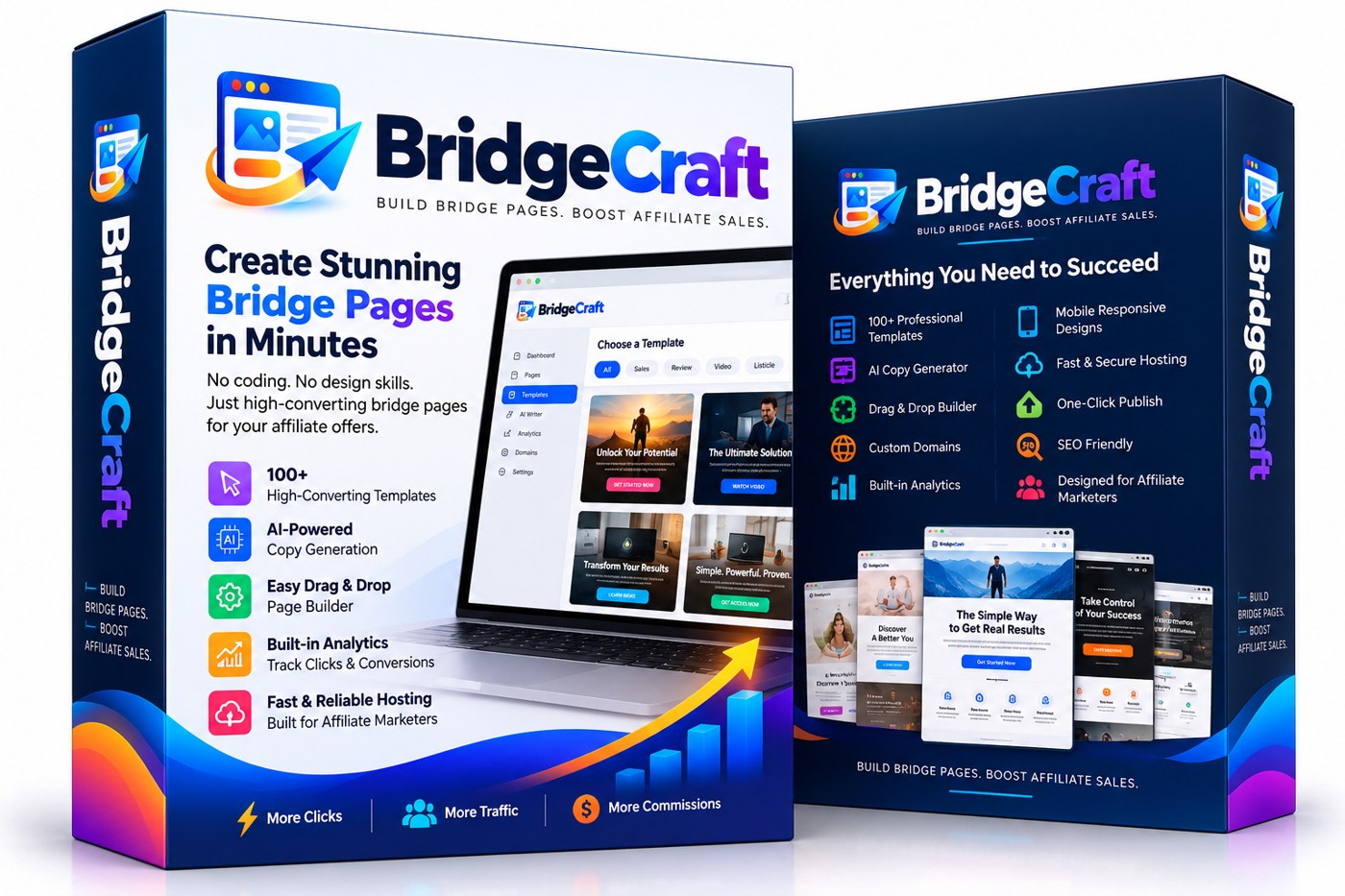
What a bridge page is, and why bother
A bridge page (some people say pre-sell page) is a short page you control that stands between an ad, an email or a social post and the vendor’s sales page. Sending cold traffic straight to someone else’s page has three problems. You cannot warm the visitor up, you cannot measure anything before the click, and some ad platforms and email providers do not like raw affiliate links. A bridge page fixes all three: it tells the visitor why this product might help them, shows an honest disclosure, and then passes them on with a single clear button.
The catch is that building one properly takes time. You need a design that does not look amateur, copy that does not sound like every other affiliate page, tracking so you know what works, and a page that loads fast on a phone. Good designers are slow and expensive, and a blank editor produces what a blank editor produces. That gap is exactly what BridgeCraft goes after.
What is under the hood
BridgeCraft is written in PHP 8 with SQLite and a small amount of vanilla JavaScript. There is no heavy framework and no build step. That matters less to you as a buyer than it does to me as the developer, but it explains two things you will notice: the app is quick, and published pages are light. Fonts are self-hosted instead of loaded from third-party servers, so a published page does not depend on an outside service to look right.
The security basics are in place: CSRF protection on every form that changes data, hashed passwords, rate limiting on login, password reset and AI requests, real file-type checking on image uploads, and a strict allow-list when rich text is saved. If you add an AI key (more on that below), it is stored encrypted and never shown back to you in plain text. Visitor IP addresses are hashed before analytics store them, so the numbers work without keeping raw addresses.
The five-step wizard
You start by clicking Create New Bridge Page. Step one asks for the product name, the product or sales page URL, your affiliate link, a short description and a category. The description box has a hint that matters: it says “facts only”, because everything the generator writes is grounded in what you type there. The more accurate your facts, the better the copy.
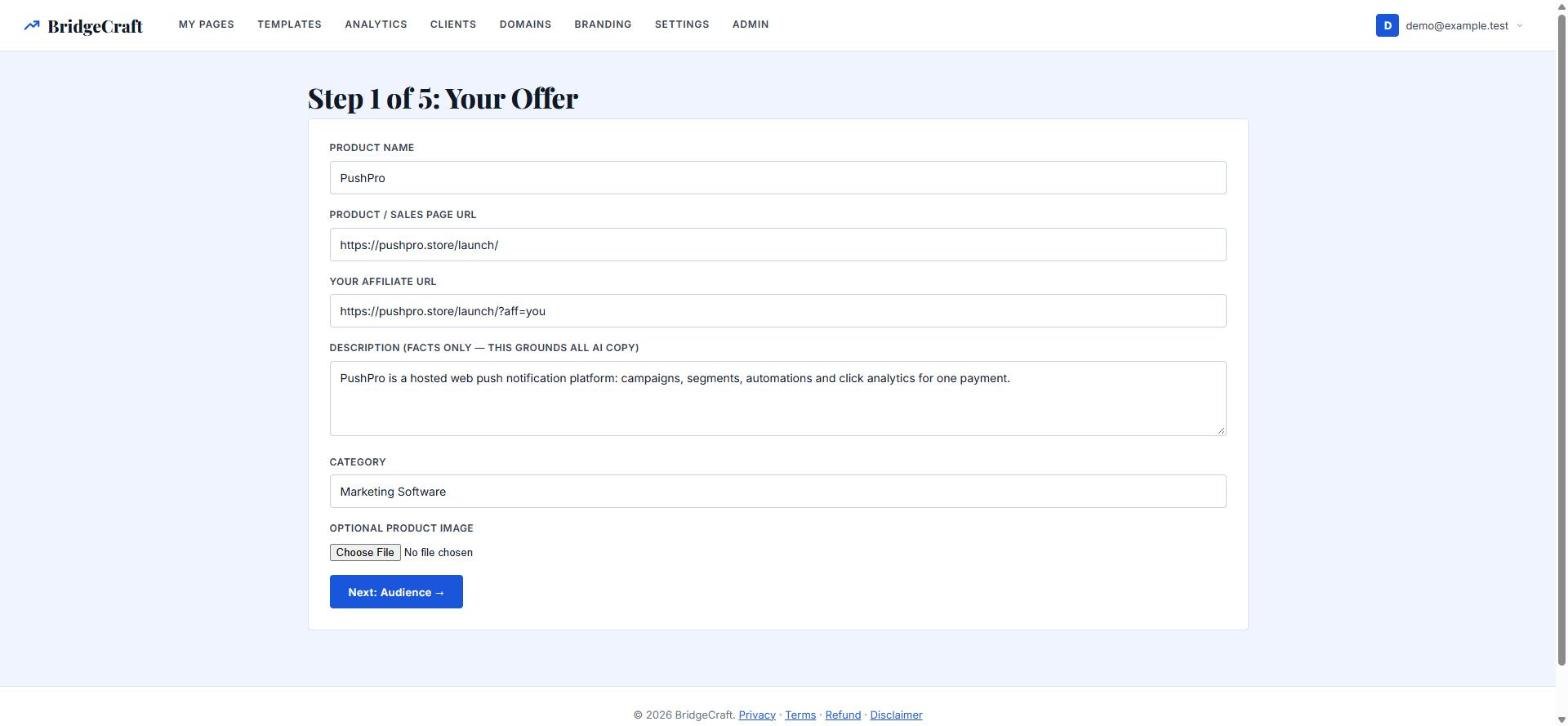
Step two asks who the page is for: affiliate marketers, entrepreneurs, freelancers, creators, agencies, beginners or a custom audience. Step three is the promotion angle, and there are ten to choose from: review, problem-solution, curiosity, benefits, comparison, deal, bonus, launch, video and authority. If you cannot decide, an “AI recommend an angle” button suggests one based on your product (it needs an AI key; without one you simply choose by hand).
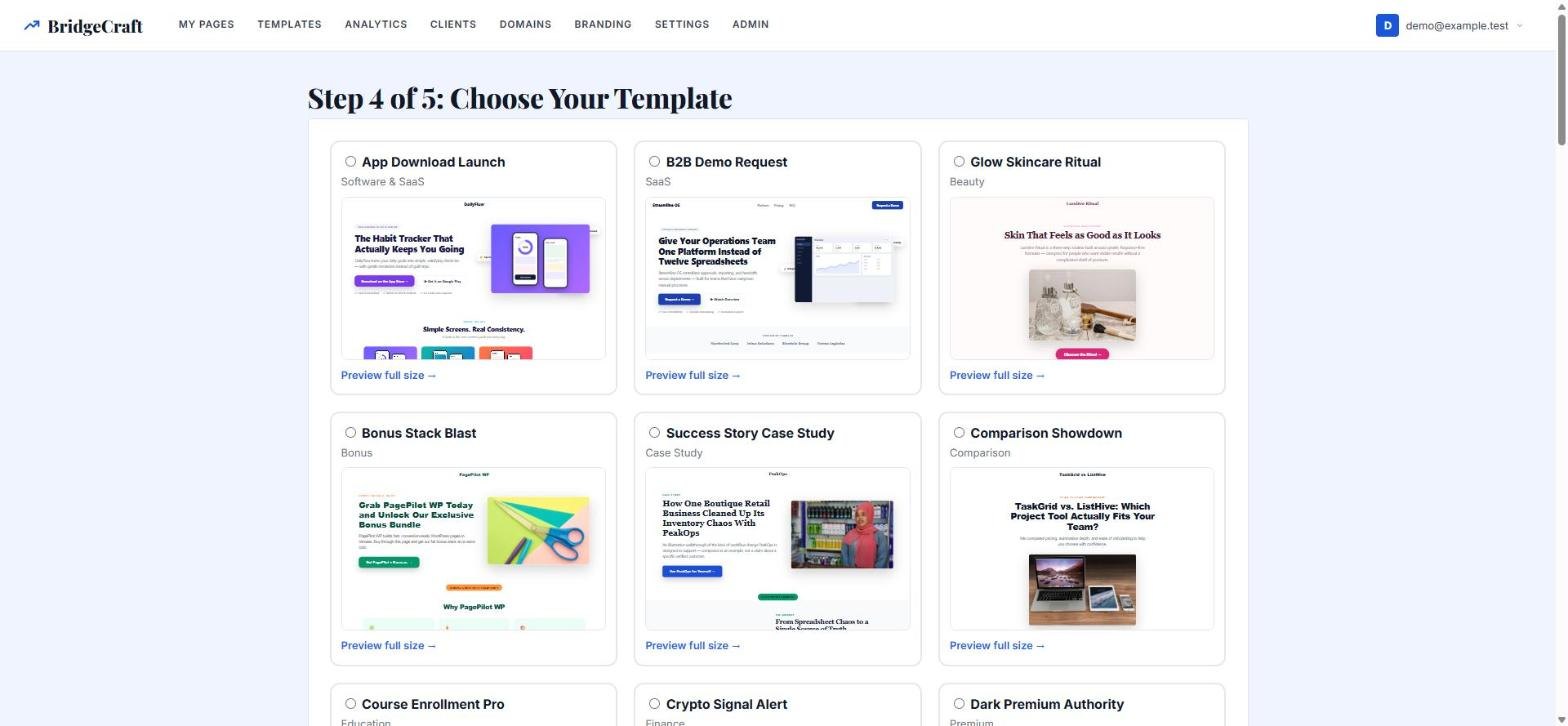
Step four is the design, shown as a grid of live thumbnails. Every design has a “Preview full size” link that opens it on desktop, tablet and mobile, so you can judge it properly before you commit. Step five is a short summary and one button: Generate My Bridge Page. A few seconds later you are in the editor with a finished first draft.
The design library
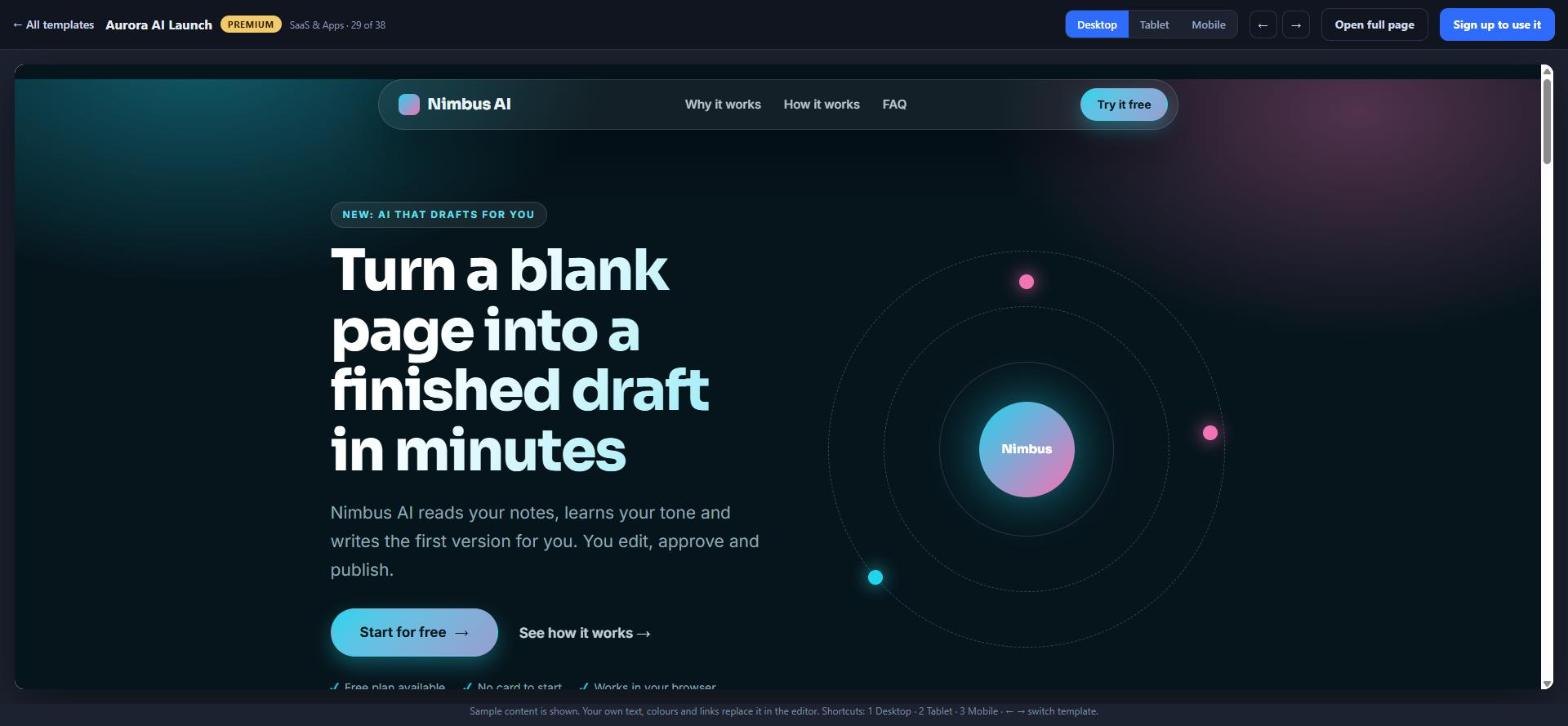
This is the heart of the product, so here are the honest numbers. BridgeCraft ships with 38 designs today: 11 basic designs and 27 premium ones. They cover the angles affiliates actually use: tool reviews, comparisons, case studies, flash deals, free-trial signups, webinar registrations, giveaways and bonus bundles, course launches, coaching applications, wellness and e-commerce offers, event tickets and more. They are not colour swaps of one layout: each design has its own structure, typography and button placement, with realistic sample content instead of lorem ipsum, so what you preview is close to what you publish.
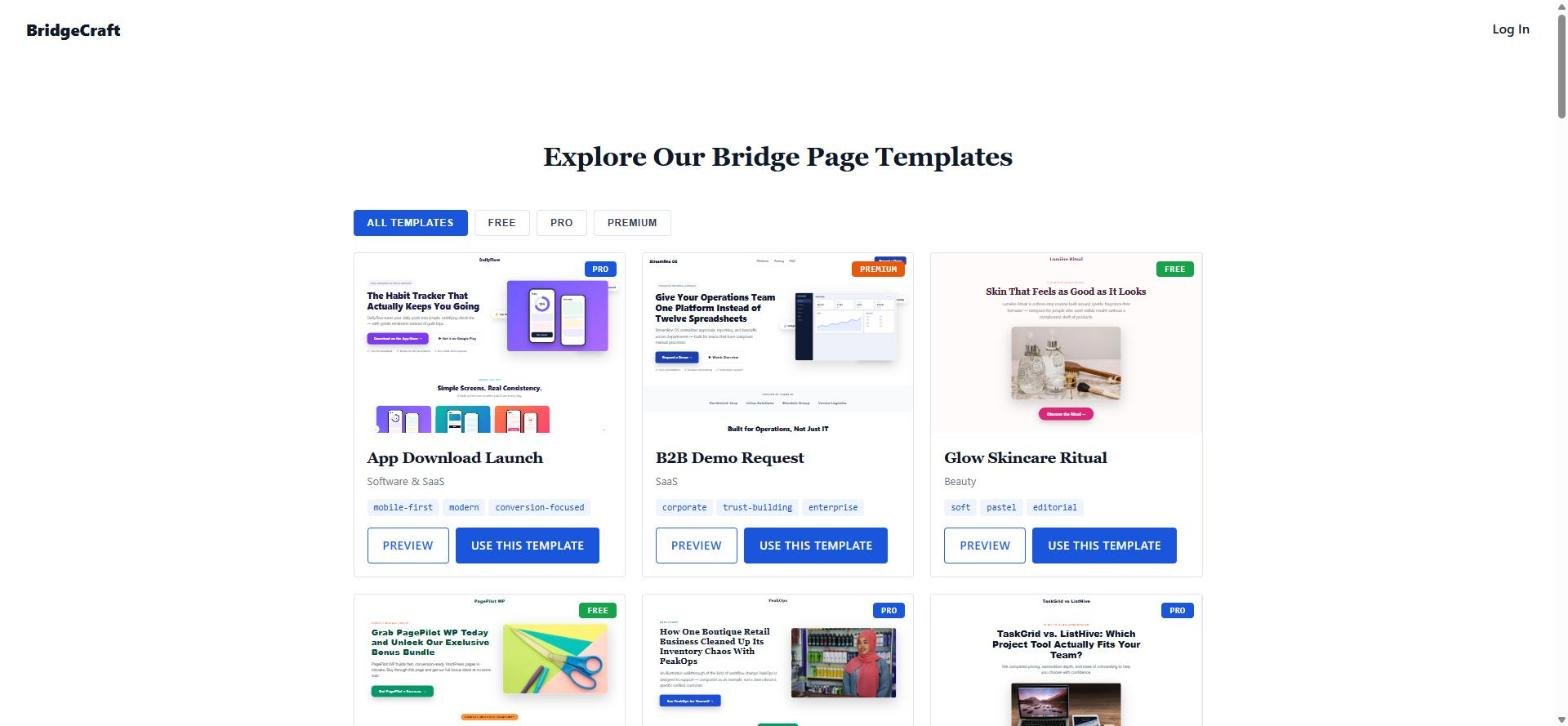
The split between basic and premium is the whole business model of the front end, so be clear about it. With the front-end purchase you can build with the 11 basic designs. The 27 premium designs can be previewed by anyone, in full, but building with them needs the Premium Design Vault upgrade (or the smaller Premium Lite set). I did it this way on purpose so you can see exactly what you would be paying for before you pay.
The editor
The editor is a two-pane screen. On the left are your controls; on the right is a live preview inside a browser frame, with desktop, tablet and mobile switches above it. Changes appear as you make them and the page saves automatically while you work, so you do not lose edits if you close the tab.
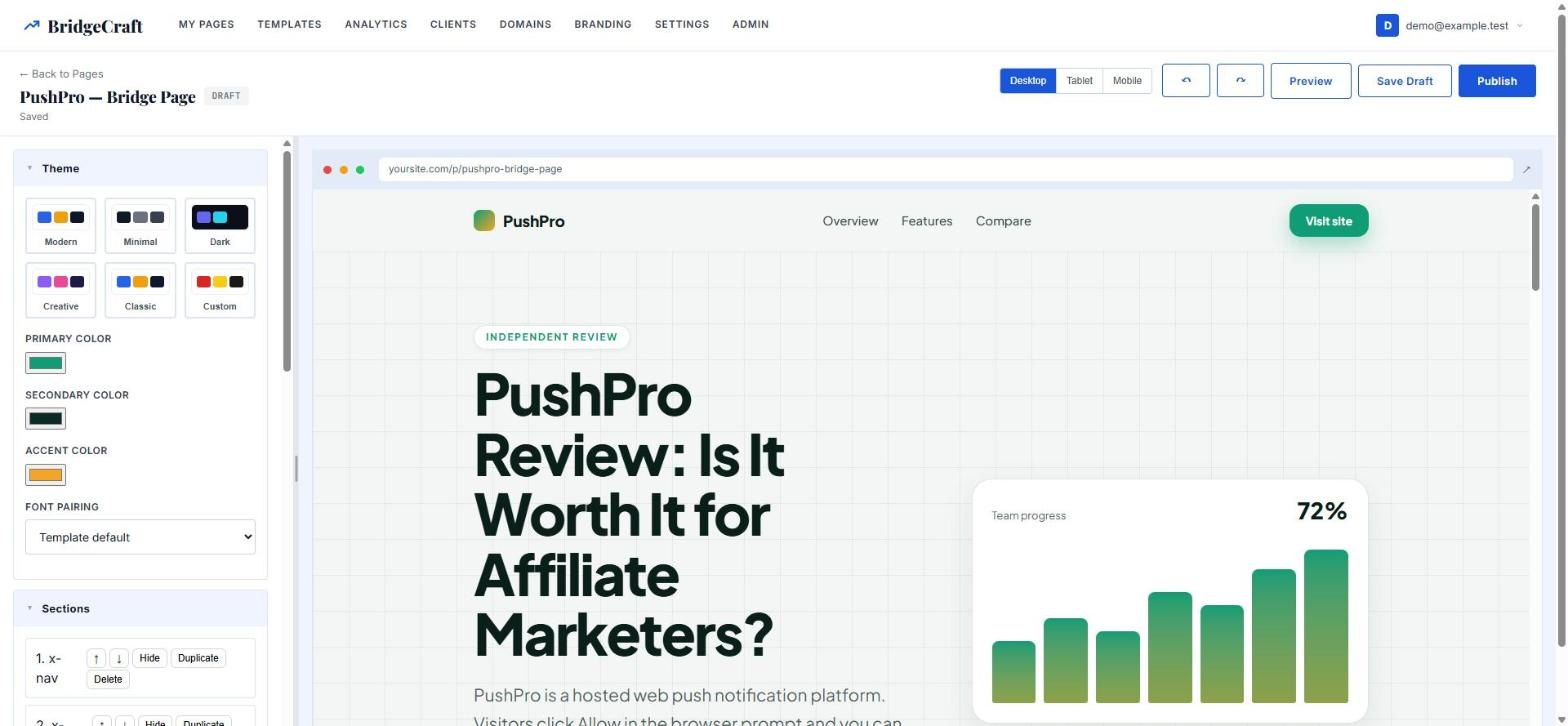
You can change the colour theme from presets or pick your own primary, secondary and accent colours, choose a font pairing, and edit text directly. Each section can be hidden, duplicated, deleted or moved up and down, and you can add new sections from a library of building blocks such as hero, benefits, how it works, comparison table, pros and cons, FAQ, testimonial slots, pricing, a guarantee box, video, a bonus stack and an affiliate disclosure. There is undo and redo, image upload, and a field for SEO title and description with a live character count. One thing to know up front: sections are moved with buttons, not by dragging them around the page.
Copy that stays inside the facts
Out of the box the generator writes a headline, sub-headline, benefit points and call-to-action text from your answers, with no AI key required. If you want AI-written copy, add your own key for OpenAI, Anthropic or Gemini in Settings. Because it is your key, I carry no AI cost and there is no usage fee from me; you pay your provider directly for what you use.
The shared instructions behind the AI features tell the model not to invent claims, testimonials, earnings or statistics, and everything is grounded in the facts you entered. That is a deliberate choice: invented proof is the fastest route to a banned ad account or a refund. There is also a headline picker that offers four labelled variants (conversion, curiosity, problem-solution and review styles) and a bonus-stack helper that turns your bonus ideas into a tidy stack section. Both use your AI key if you have one.
Publishing and numbers
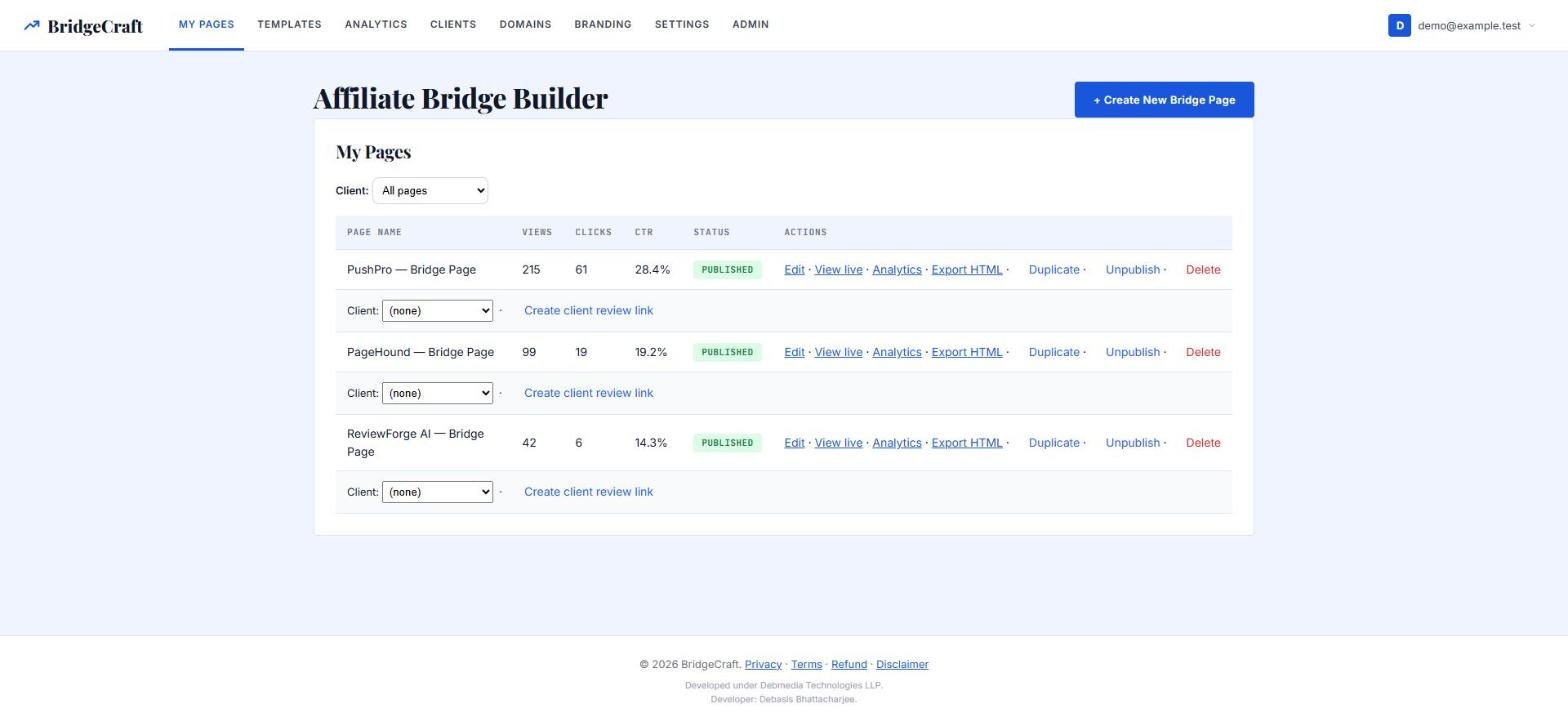
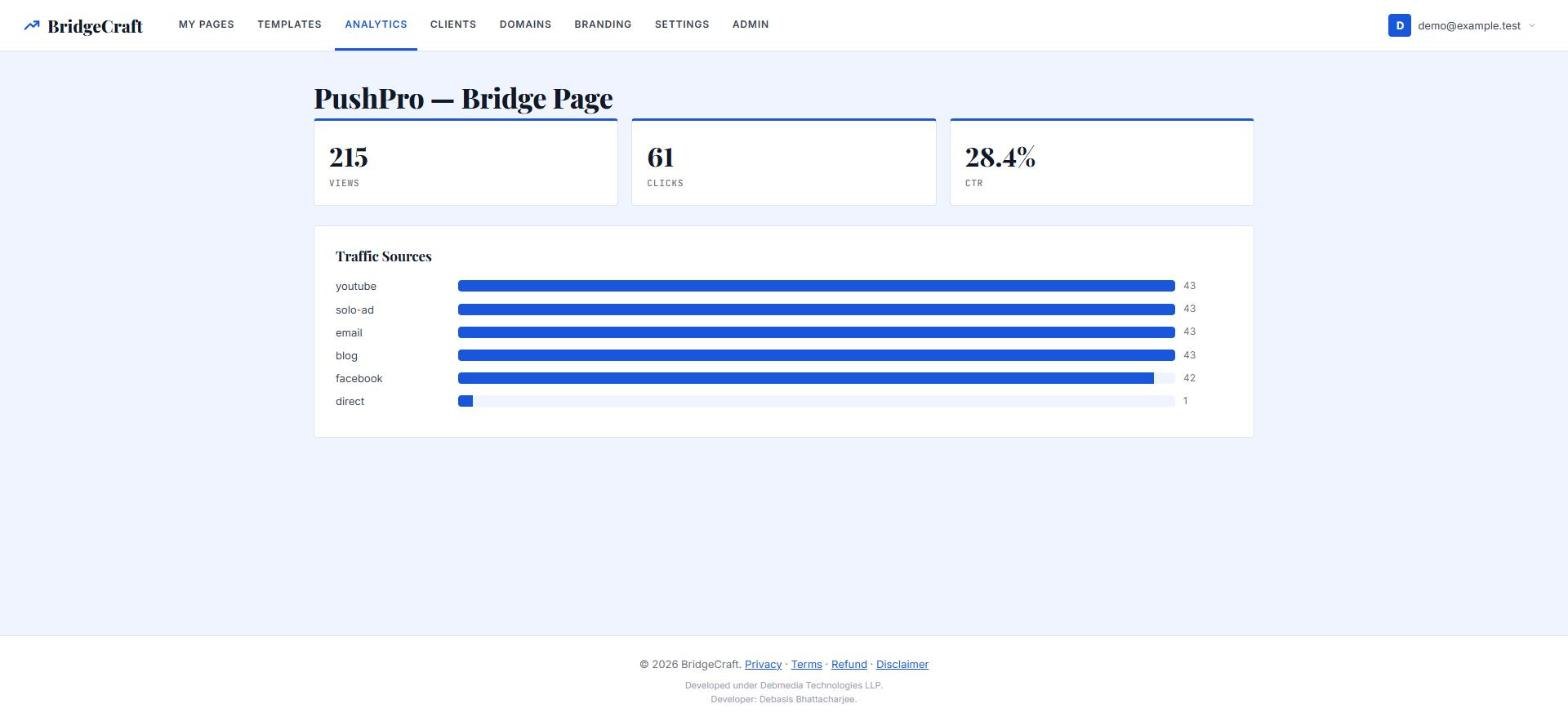
Publishing is one click. Your page goes live at a public address, ready for your ads or emails. Each page records views, clicks on the main button, click-through rate and the traffic sources you tag with utm_source and utm_campaign. A simple dashboard lists your pages with their numbers, and every row has links to edit, view live, see analytics, export, duplicate, publish or unpublish.
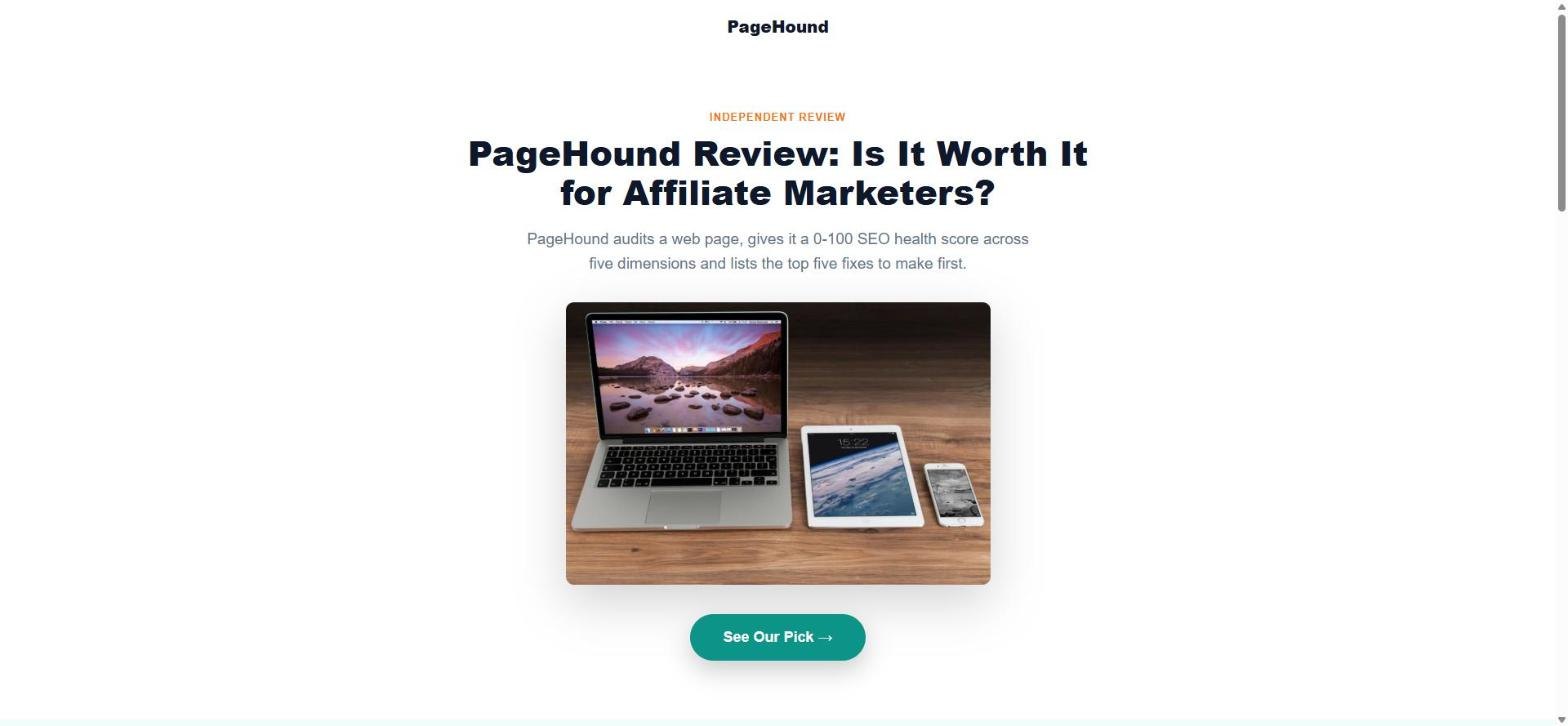
Published pages are intentionally plain on the outside: no navigation menu, one main call to action, and small links to the legal pages in the footer. A visitor lands, reads, and has one thing to click. You write your affiliate disclosure text once in Settings, and there is a disclosure section you can add to any page.
What you actually get for $27
The front-end offer, BridgeCraft Lifetime, is a hosted account with these limits, which the product enforces rather than merely printing on a sales page:
- All 11 basic designs, plus full-size previews of all 27 premium designs
- The five-step wizard, the visual editor and the live preview
- Built-in copy generation, and AI copy with your own OpenAI, Anthropic or Gemini key
- One-click publishing with views, clicks and UTM analytics
- SEO fields, an affiliate disclosure and image upload
- Up to 25 pages
- Free updates to version 1.x
As with any lifetime offer, read the last line carefully. “Lifetime” here means the lifetime of version 1.x on the hosted service. I host it, and every lifetime buyer costs me hosting every month, which is why the limits are explicit. If you want the software on your own server, that is what the last upgrade is for.
The whole offer at a glance
There are four upgrades and two downsells. A downsell only appears if you decline the upgrade above it, and the full upgrade always wins over its smaller version.
| Step | Offer | Price | What changes |
|---|---|---|---|
| Front end | BridgeCraft Lifetime | $27 (then $47) | 11 basic designs, wizard, editor, analytics, 25 pages |
| OTO #1 | Premium Design Vault | $47 (then $97) | Build with all 27 premium designs |
| Downsell #1 | Premium Lite | $27 | 10 hand-picked premium designs |
| OTO #2 | Unlimited Pro | $67 (then $127) | Unlimited pages, HTML export, custom domains |
| Downsell #2 | Pro Lite | $37 | 100 pages and HTML export |
| OTO #3 | Agency Licence | $97 (then $197) | Client workspaces and private review links |
| OTO #4 | White-Label + Self-Hosted | $197 (then $397) | Your brand on the dashboard, plus your own install |
If someone bought the front end and said yes to all four upgrades, the total would be $435. Almost nobody needs that. Most affiliates need the front end plus, at most, the Vault. The upgrades below are written so you can see quickly which one, if any, applies to you.
Which version should you pick?
- You promote a few offers and want clean pages fast: the front end is enough. Do not buy anything else.
- You want to stand out visually: Premium Lite if ten designs cover your niches, the Vault if you want all of them.
- You run many pages or want your own domain: Unlimited Pro. If you only need more room and an export, Pro Lite is cheaper.
- You build pages for clients: Agency Licence, and add the white-label and self-hosted upgrade only if clients should see your brand, not mine.
Everything above is covered by a 30-day money-back guarantee handled through WarriorPlus. Refunding the front end switches the account off, and refunding an upgrade removes only that upgrade, automatically. I tested the purchase, refund and unlock logic with an automated script rather than assuming it works.
BridgeCraft Review — How Does It Work?
Here is how it works, step by step.
After you buy through WarriorPlus, BridgeCraft creates your account automatically and sends a link to set your password. There is nothing to install, and you log in from any browser. The dashboard starts empty, with one big button: Create New Bridge Page. If the e-mail does not arrive in a few minutes, check the spam folder, then open a support ticket with your order e-mail.
Step 1 asks for the product name, the sales page URL, your affiliate link, a short description and a category. Write facts only, because the generator grounds every line of copy in this description. You can also upload a product image.
Choose who the page is for (affiliate marketers, entrepreneurs, freelancers, creators, agencies, beginners or your own) and one of ten angles: review, problem-solution, curiosity, benefits, comparison, deal, bonus, launch, video or authority. An optional AI button recommends an angle if you have connected your own AI key.
A grid of live thumbnails shows every design. Click Preview full size on any of them to see desktop, tablet and mobile before you decide. Basic designs build with the front end; premium designs preview for everyone and build with the Vault.
One click generates a finished first draft and drops you into the editor. Change text inline, swap colours and fonts, hide or move sections, upload your own images and fill in the SEO fields while the live preview updates beside you. The page autosaves as you go.
Press Publish and the page is live at its own address. Tag your links with utm_source and utm_campaign and BridgeCraft shows views, clicks, click-through rate and traffic sources for every page, so you keep the designs and traffic that earn clicks and drop the rest.
BridgeCraft Review — Features & Benefits
What you actually get.
Five-step wizard
Offer, audience, angle, design and generate. It turns a few facts into a finished first draft, so you start from a real page instead of a blank canvas.
38 distinct designs
11 basic and 27 premium designs for reviews, comparisons, case studies, deals, free trials, webinars, giveaways, courses and more. Each has its own layout and typography, and realistic sample content rather than lorem ipsum.
Full-size previews on every device
Preview any design, including the premium ones, on desktop, tablet and mobile before you choose. Nothing is hidden behind the paywall until you try to build with it.
Visual editor with live preview
Inline text editing, colour themes and font pairings, image upload, undo and redo, and autosave. Sections can be hidden, duplicated, deleted, added from a block library and moved up or down.
Copy generator that stays inside the facts
Built-in copy generation needs no key. Add your own OpenAI, Anthropic or Gemini key for AI copy; the instructions forbid invented claims, testimonials, earnings and statistics.
Headline variants and bonus-stack helper
Four labelled headline variants (conversion, curiosity, problem-solution and review) and a helper that turns your bonus ideas into a clean bonus stack section.
One-click publishing
Pages go live at a public address with SEO title and description, an affiliate disclosure section and one primary call to action. No navigation menu competes for the click.
Analytics without a plugin
Views, clicks, click-through rate and UTM traffic sources for every page and an overview across all your pages, with visitor IP addresses hashed before storage.
Mobile-ready pages
Every design is built to adapt to tablet and phone, and the editor has a mobile preview so you can check it yourself.
Self-hosted fonts and light pages
Fonts are served from BridgeCraft itself rather than a third-party font service, which keeps published pages quick and consistent.
Clean HTML export (Unlimited Pro)
Download any page as a zip with relative links and local fonts, ready to upload to any host. The export carries no tracking beacon.
Plan limits that are actually enforced
The 25-page cap, the premium-design lock and each unlock are checked live when you create a page or pick a design, not just printed on a pricing page.
- One-time $27 founding price for a hosted account
- 38 designs: 11 basic to build with, 27 premium to preview and unlock
- Five-step wizard and a visual editor with live preview
- Built-in copy generator, or AI copy with your own key
- One-click publish with views, clicks and UTM analytics
- Up to 25 pages on the front end
- Premium, unlimited, agency and white-label upgrade paths
- 30-day money-back guarantee on every purchase
BridgeCraft Review — Pros and Cons
The honest picture, good and bad.
Pros
- One-time payment for the front-end account: no monthly bill
- Designs that look genuinely different from each other, not one layout in many colours
- You can preview every premium design in full before you spend anything on it
- The wizard gets you from a few facts to a finished draft in minutes, with no coding or design skills
- Copy generation works without any AI key, and an AI key is optional and yours
- Built to avoid invented claims, testimonials and earnings figures in the copy
- Built-in analytics with UTM sources, so you can see which traffic earns clicks
- Clear upgrade paths, and refunding an upgrade removes only that upgrade
- Fonts are self-hosted and published pages stay light
- 30-day money-back guarantee through WarriorPlus
Cons
- It is a new product with no long track record and no independent user reviews yet
- The vendor wrote this review, so treat the score as one informed but interested opinion
- Only the 11 basic designs build with the front end; the other 27 need an upgrade
- The library has 38 designs today, not hundreds, so popular niches will see some overlap with other users
- Sections move with up and down buttons, not by dragging them around the page
- Generated pages can include sample visuals from the design, which you should replace with your own images
- Custom domains need the Unlimited Pro upgrade, and your own domain still needs an HTTPS certificate on the server, so test one domain before relying on it for a campaign
- White-label branding covers your dashboard and client review links, not the published pages themselves
- Team seats and roles are not part of the Agency Licence
- 'Lifetime' means the lifetime of version 1.x on the hosted service; owning the software outright is a separate upgrade
- Checkout runs through WarriorPlus, so expect an upsell sequence after you buy
For a limited time
Get BridgeCraft for $27 (one-time) $47 after launch
Get Instant Access → ✓ 30 Days money-back guarantee · Affiliate link — I may earn a commission
BridgeCraft Review — Who Can Use It?
Check who can benefit from BridgeCraft:
- Affiliate marketers who promote offers from WarriorPlus, ClickBank, Amazon and SaaS programmes
- Beginners who want a professional page without hiring a designer
- Bloggers who send readers to affiliate offers
- YouTubers and creators who need a landing page for a video description
- Email marketers who want a page between the email and the offer
- Freelancers who build pages for small clients
- Small agencies (with the agency upgrades)
- Media buyers who test several angles on one offer
- Course creators promoting other people's tools
- Anyone who wants to measure clicks before the visitor leaves
BridgeCraft Review — Is There Any Upsell Or OTO?
Yes, there are 4 optional upgrades (OTOs) plus 2 downsell offers that appear if you decline an upgrade. You do not need any of them to use BridgeCraft, but they may be useful depending on your situation.
OTO / Upsell #1Premium Design Vault
$47 (then $97)- Build with all 27 premium designs that are available today
- Every new premium design added in version 1.x is included
- Premium previews stay open to everyone, so you can look before you buy
- Applies to your account the moment checkout completes, with the same login
- Covered by the same 30-day guarantee
- Who it is for: affiliates who want pages that stand out from the basic set
- My take: the most useful upgrade for most people, and the main reason to buy anything beyond the front end
Downsell #1Premium Lite (10 designs)
$27- Shown only if you say no to the Vault
- Unlocks 10 hand-picked premium designs for affiliate offers: tool reviews, comparisons, case studies, deals, free trials, webinars, giveaways and courses
- Full-size previews of all 27 premium designs stay open to you
- Who it is for: people who want a few premium looks without paying for the whole set
- My take: good value if those ten fit your niches; the Vault costs only $20 more if you want everything
OTO / Upsell #2Unlimited Pro
$67 (then $127)- Unlimited pages instead of the 25-page cap
- Clean HTML export of any page as a zip
- Use your own domain for published pages, verified with CNAME and TXT records
- Who it is for: heavy users, anyone who wants a branded address, and anyone who needs to host pages elsewhere
- My take: buy it when you hit the page cap or need your own domain; if you only need room and an export, the Pro Lite downsell is cheaper
Downsell #2Pro Lite (100 pages + HTML export)
$37- Shown only if you say no to Unlimited Pro
- Raises the page cap from 25 to 100
- Clean HTML export of any page
- Custom domains are not included, they stay with Unlimited Pro
- Who it is for: people who need more pages and the export but not custom domains
- My take: a sensible middle step, and Unlimited Pro still wins if you hold both
OTO / Upsell #3Agency Licence
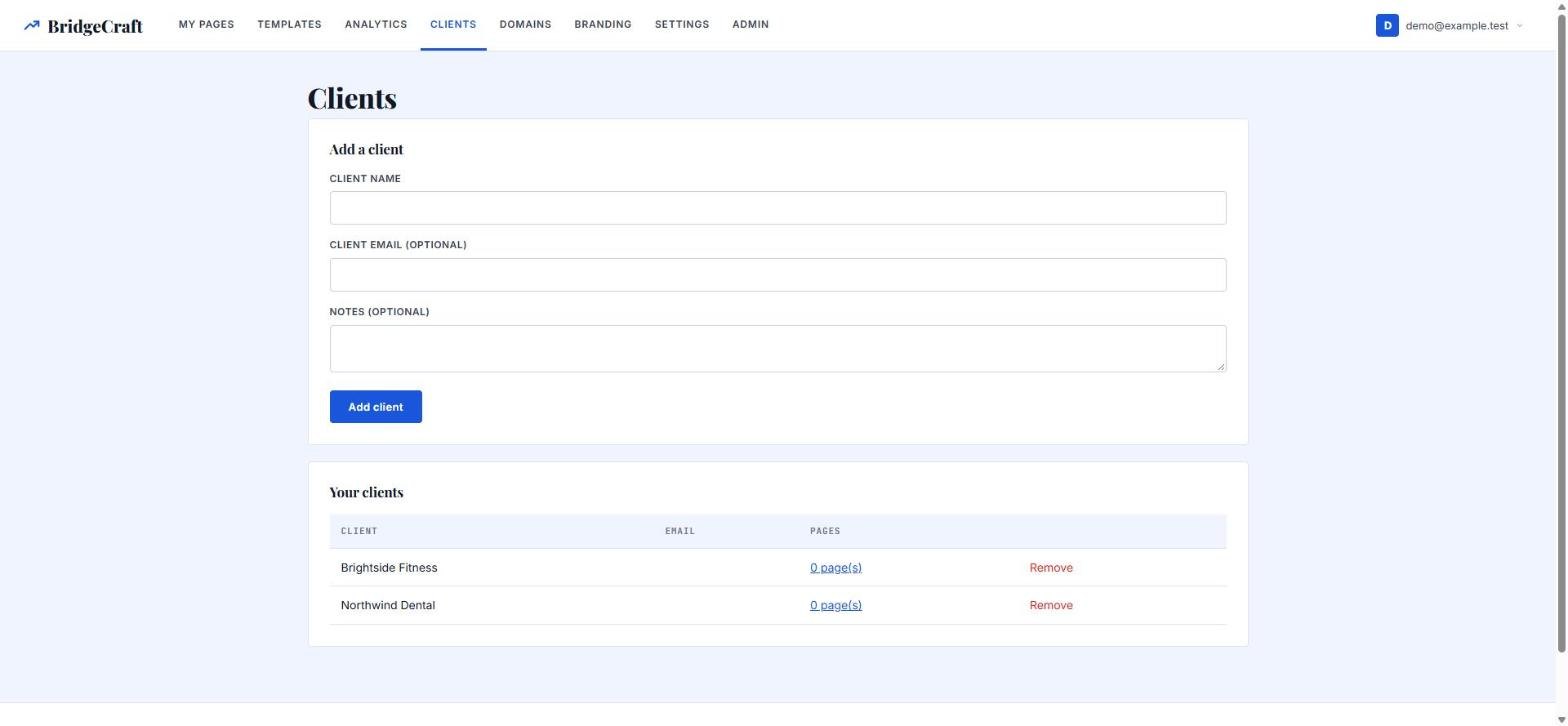
$97 (then $197)- Client workspaces to group pages by client
- Private client review links that also work for drafts, so clients can see a page before it goes live
- Hand pages over as a clean HTML export (needs Unlimited Pro)
- Who it is for: freelancers and agencies building pages for other people
- My take: worth it only if you really have clients; note that team seats and roles are not included
OTO / Upsell #4White-Label + Self-Hosted
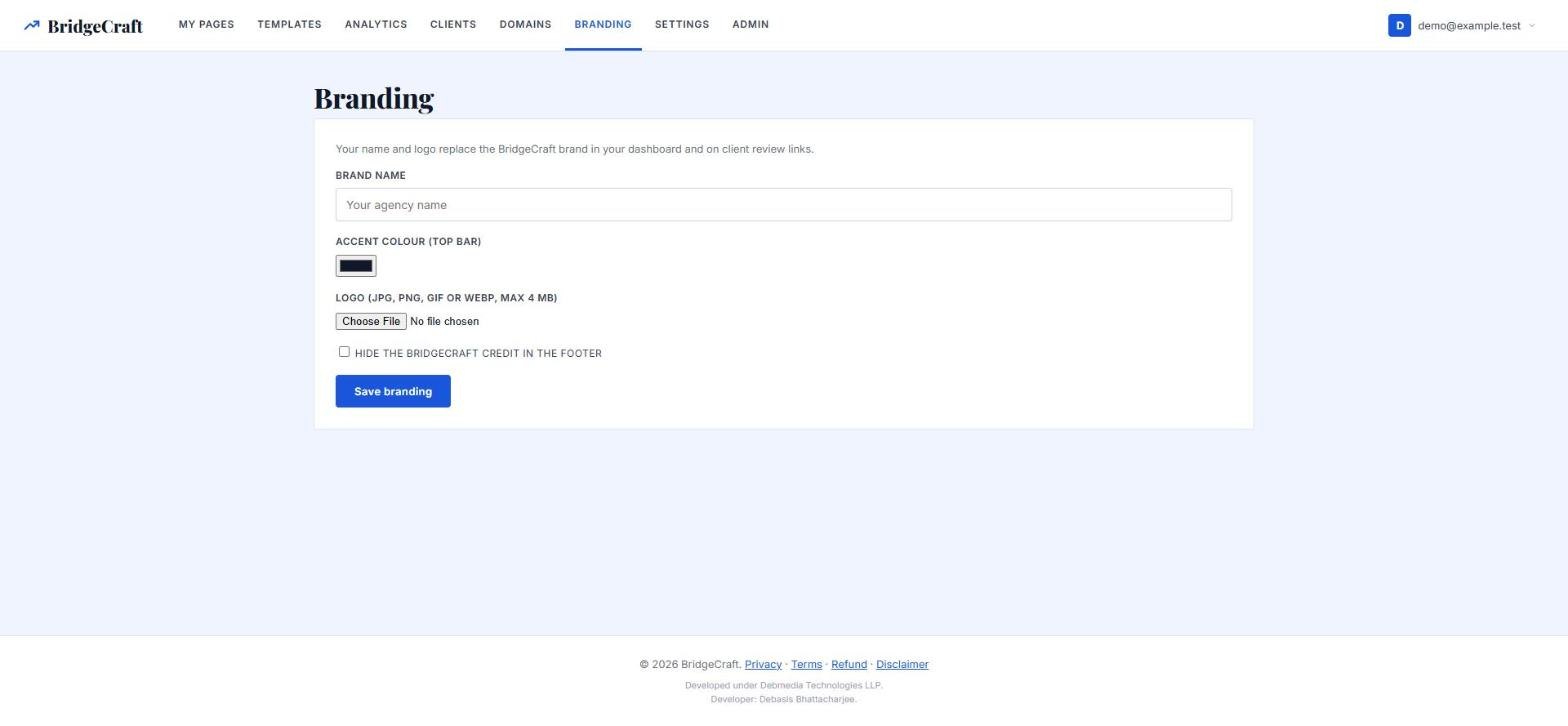
$197 (then $397)- Your logo, name and colour on your dashboard and on client review links
- Hide the BridgeCraft credit in the footer
- An install copy for your own PHP hosting with the basic designs (premium designs only if you also own the Vault)
- An install guide and a signed licence key
- Needs PHP 8.2 or newer with SQLite, a domain with HTTPS and write access to three folders
- Who it is for: agencies that want clients to see only their brand, and buyers who want to own the data and the server
- My take: only for people comfortable running their own hosting; licence keys are issued by hand, so expect a short wait
My verdict
BridgeCraft Review — Why Should You Get This?
Bridge pages are simple in theory and slow in practice: a decent design, honest copy, tracking and a fast page. BridgeCraft replaces that with a five-step wizard, a library of designs that really differ from each other, a clean editor and built-in analytics, for a single payment of $27 with a 30-day guarantee. The risk is low. The weak spots are real: it is new, the front end only builds with 11 designs, the library is 38 designs rather than hundreds, sections move with buttons rather than drag and drop, and your own domain needs an upgrade and a proper HTTPS setup. The upgrades are optional and aimed at specific people, so start with the front end, add the Vault if you want the premium looks, and only buy Unlimited Pro, Agency or White-Label when you hit a real limit. I built it, so read the score as one informed but interested opinion.
Frequently Asked Questions
Exclusive when you buy through my link
BridgeCraft Exclusive Bonuses
When you buy BridgeCraft through the link on this page, I will send you these bonuses. Send me your purchase details to claim them.
Bridge-Page Prompt Vault
AI prompts for pre-sell copy and headlines, written to stay inside the facts of your offer.
Swipe Copy for Eight Offer Types
Short, honest, ready-to-edit copy for common offer types, so you are never starting from nothing.
Affiliate Disclosure and Legal Pack
Page text for an affiliate disclosure, privacy notice and terms, to adapt to your own business.
Quick-Start Training Video
One full build from a blank dashboard to a published page.
How to apply for the bonuses
- Buy BridgeCraft using the link on this page once the launch opens.
- Send me your transaction details for verification through the contact page.
- I will verify your purchase and send you the bonuses.
Affiliate disclosure: I may earn a commission if you buy through my link, at no extra cost to you.