Why Workstations Lose Speed Over Time
Every single week you run your computer, invisible digital debris accumulates under the surface. Temporary caches bloat from normal daily usage, system pathways cross directions, and stealth background applications quietly attach themselves to your startup sequence.
The result? Your hardware isn't old—it's simply crowded. The utility safely unburdens your storage blocks to bring back original click responsiveness.
One-Click Simplicity. No Jargon.
Most operating toolkits on the market are intentionally confusing. They scare users with cryptic alerts or swamp you under endless, risky confirmation checklists. Our development blueprint focuses entirely on clean, background automation.
You do not need to be an administrator or understand complex software settings. Simply click the interface activation handle, let the automated sequence clean the targets, and return immediately to a light, responsive system environment.
You take your car in for regular check-ups. You visit the doctor for annual health screenings. But when did you last actually check what’s going on inside your computer? Most people never do — and then wonder why their PC starts slowing down, freezing, or behaving strangely out of nowhere.
Advanced PC Diagnostic Suite fixes that. Think of it as a full-body health check for your Windows PC, available any time you want it, right from your desktop.
You see everything at a glance — instantly.
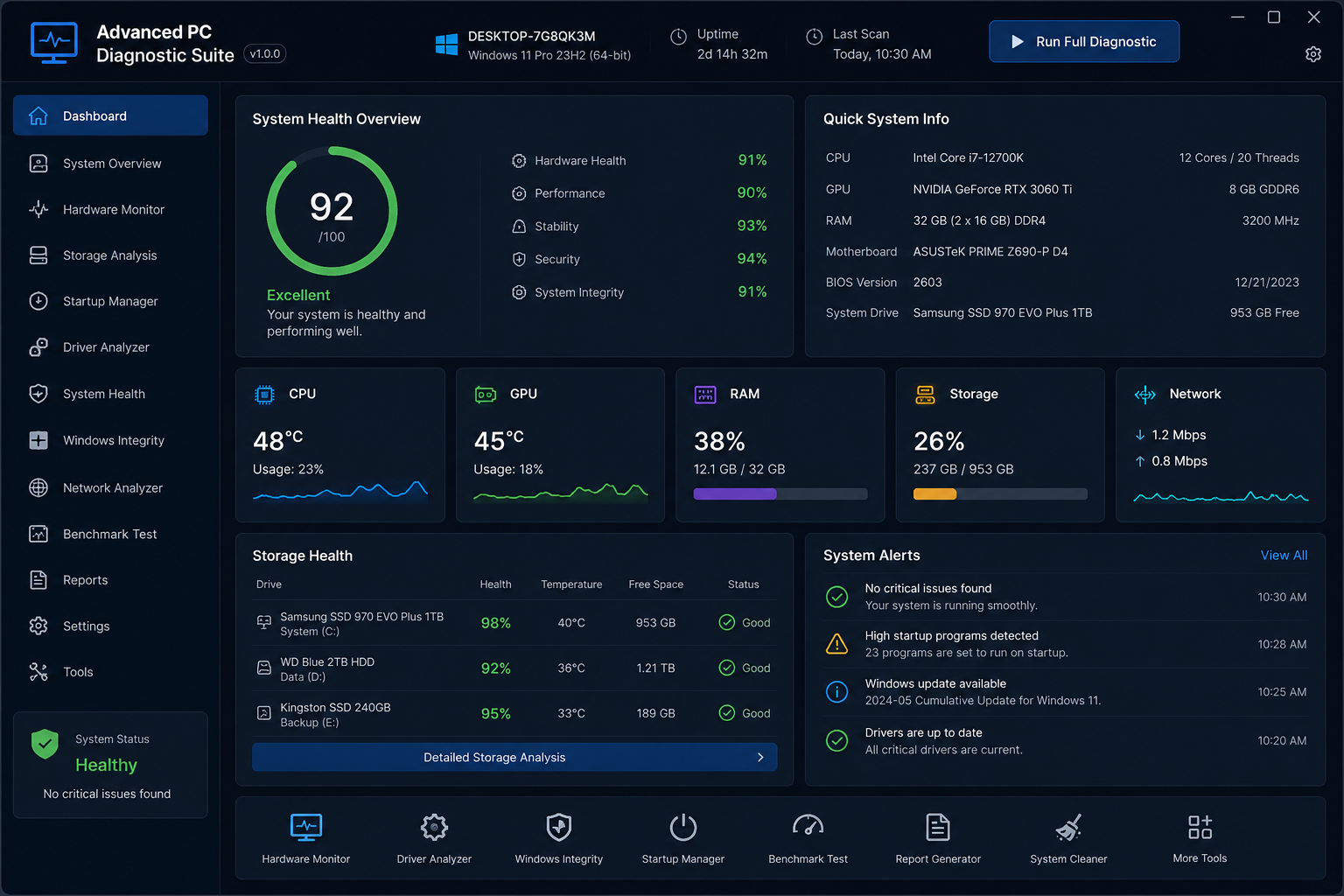
The moment you open it, the Dashboard greets you with a clean overall health score. Not a vague “your PC is fine” message, but an actual number — a real score out of 100, broken down into Hardware Health, Performance, Stability, Security, and System Integrity. You know exactly where you stand before you even click a single button.
And the live stats? They’re genuinely impressive. CPU temperature, RAM usage, GPU load, storage health, network speed — all displayed in real time with mini graphs so you can see trends, not just snapshots. It’s the kind of information that used to require five different tools to piece together.
Your PC gets a score. Like a report card.
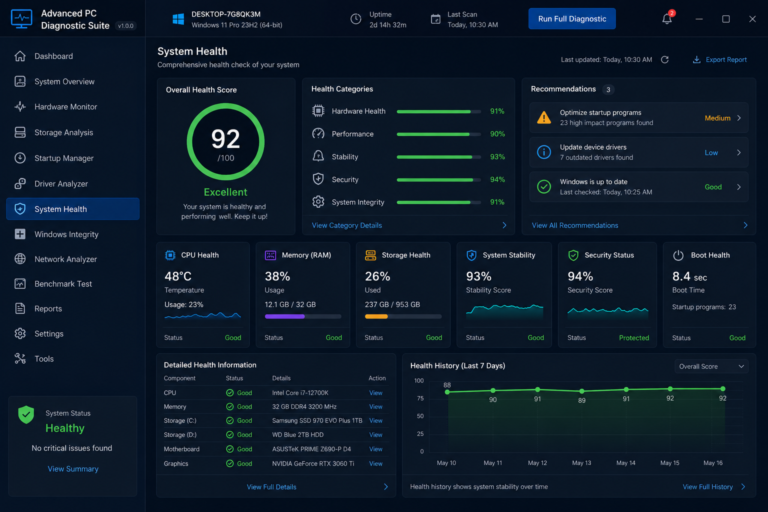
The Overall Health Score is one of those features that just makes sense once you see it. At a glance, a score of 92/100 — rated “Excellent” — tells you your system is in great shape. Drop to the 70s? Something needs attention. It turns the complex world of PC diagnostics into something anyone can understand immediately, without needing a tech background.
It doesn’t just tell you there’s a problem — it tells you what to do about it.
This is where most diagnostic tools fall completely flat. They’ll flag an issue and leave you Googling for answers. Advanced PC Diagnostic Suite actually gives you prioritised recommendations — Medium priority, Low priority, all colour-coded — so you know exactly what to fix first and what can wait. Things like “23 high-impact startup programs found” or “7 outdated drivers detected” — actionable, specific, and right there in front of you.
Every corner of your PC, covered.
The sidebar tells the full story of what this tool can do. Hardware Monitor. Storage Analysis. Startup Manager. Driver Analyzer. Windows Integrity checker. Network Analyzer. Benchmark Test. Reports. Each one is a deep-dive module that would normally require a separate specialist app. Here, they’re all under one roof, one interface, one consistent experience.
The Storage Health section alone is worth the price of admission — it shows you the health percentage, temperature, and free space of every single drive in your system simultaneously. No more wondering whether your old hard drive is quietly dying in the background.
It tracks your PC’s health over time.
The Health History chart shows your overall score for the past 7 days. That’s powerful. Because a PC that scores 92 today but was scoring 75 last week tells a very different story than one that’s been steady at 92 all week. Trends matter, and this is one of the very few tools that actually shows them to you.
Who is this for?
It’s for the person who wants to stay ahead of problems before they become disasters. It’s for the gamer who wants to make sure their rig is performing at its absolute best. It’s for the professional who can’t afford unexpected downtime. It’s for the parent who manages the family computer and wants peace of mind. And honestly, it’s for anyone who’s ever had a PC slow down on them and thought — I wish I’d caught that earlier.
The bottom line:
Advanced PC Diagnostic Suite gives you the kind of complete, real-time visibility into your PC’s health that used to require a professional technician. It’s smart, it’s thorough, it’s beautifully laid out, and it speaks plain English. Stop guessing about your PC’s condition — and start knowing.