Why Workstations Lose Speed Over Time
Every single week you run your computer, invisible digital debris accumulates under the surface. Temporary caches bloat from normal daily usage, system pathways cross directions, and stealth background applications quietly attach themselves to your startup sequence.
The result? Your hardware isn't old—it's simply crowded. The utility safely unburdens your storage blocks to bring back original click responsiveness.
One-Click Simplicity. No Jargon.
Most operating toolkits on the market are intentionally confusing. They scare users with cryptic alerts or swamp you under endless, risky confirmation checklists. Our development blueprint focuses entirely on clean, background automation.
You do not need to be an administrator or understand complex software settings. Simply click the interface activation handle, let the automated sequence clean the targets, and return immediately to a light, responsive system environment.
SmartMix Studio — AI-Powered Music and Vocal Mixing for Everyone
Import your music. Import your vocal. Press one button. Walk away with a professionally mixed track.
The Gap Between Recording and Sounding Professional
There’s a moment every singer, podcaster, content creator, and home musician knows well. You’ve recorded something you’re genuinely proud of — a vocal performance over a backing track, a voice-over over music, a cover song you’ve been working on. But when you listen back to the raw mix, something is off. The voice sits awkwardly on top of the music instead of inside it. The reverb on the vocal doesn’t match the space of the track. The music doesn’t make room when the vocal comes in. The stereo image feels flat. It sounds like two separate recordings placed next to each other — because that’s exactly what it is.
Fixing these problems is what professional mixing engineers do. It takes years of training, expensive software, and an experienced ear to know what needs to happen and how to make it happen. For most people making music or content at home, that expertise simply isn’t available.
SmartMix Studio changes the equation entirely. Its built-in AI engine analyses your music and vocal tracks, understands what they need, and handles the mixing decisions automatically — producing a cohesive, polished, professional-sounding result that would previously have required a professional to achieve.
The Workflow — Simple Enough for Anyone
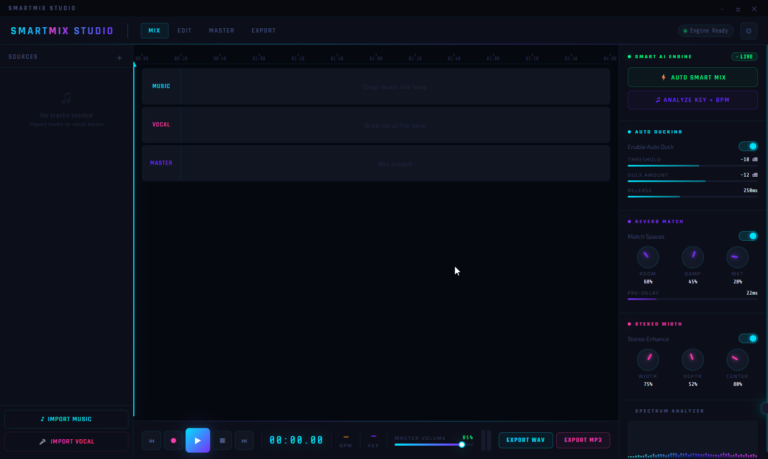
SmartMix Studio’s workflow is deliberately straightforward. There are no complex routing matrices to configure, no plugin chains to build from scratch, no signal flow to understand before you can get started.
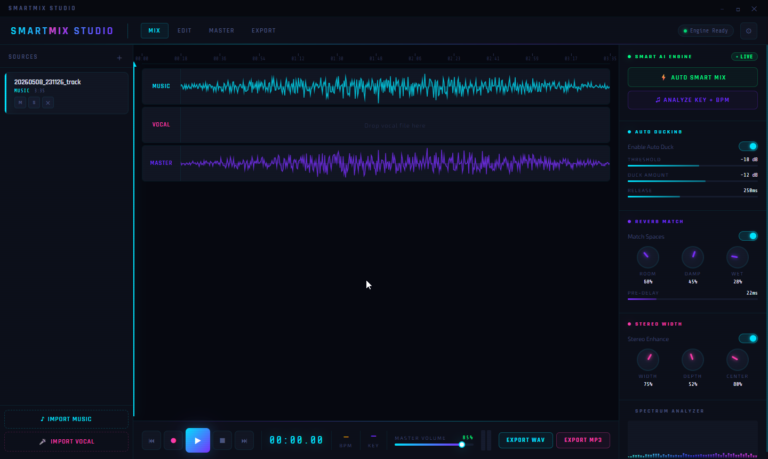
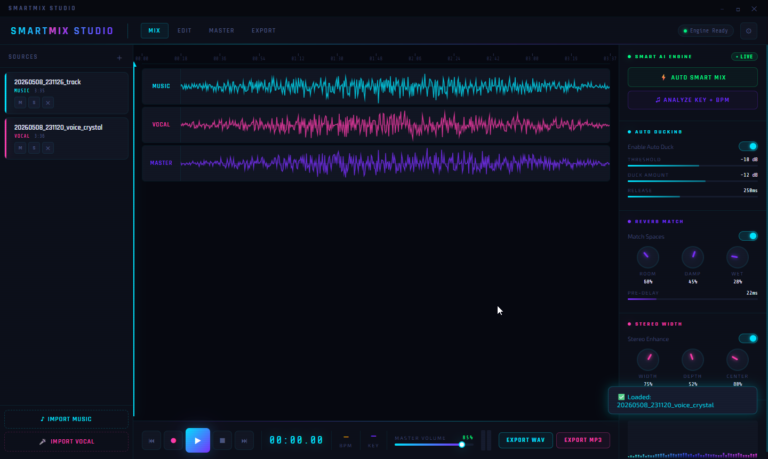
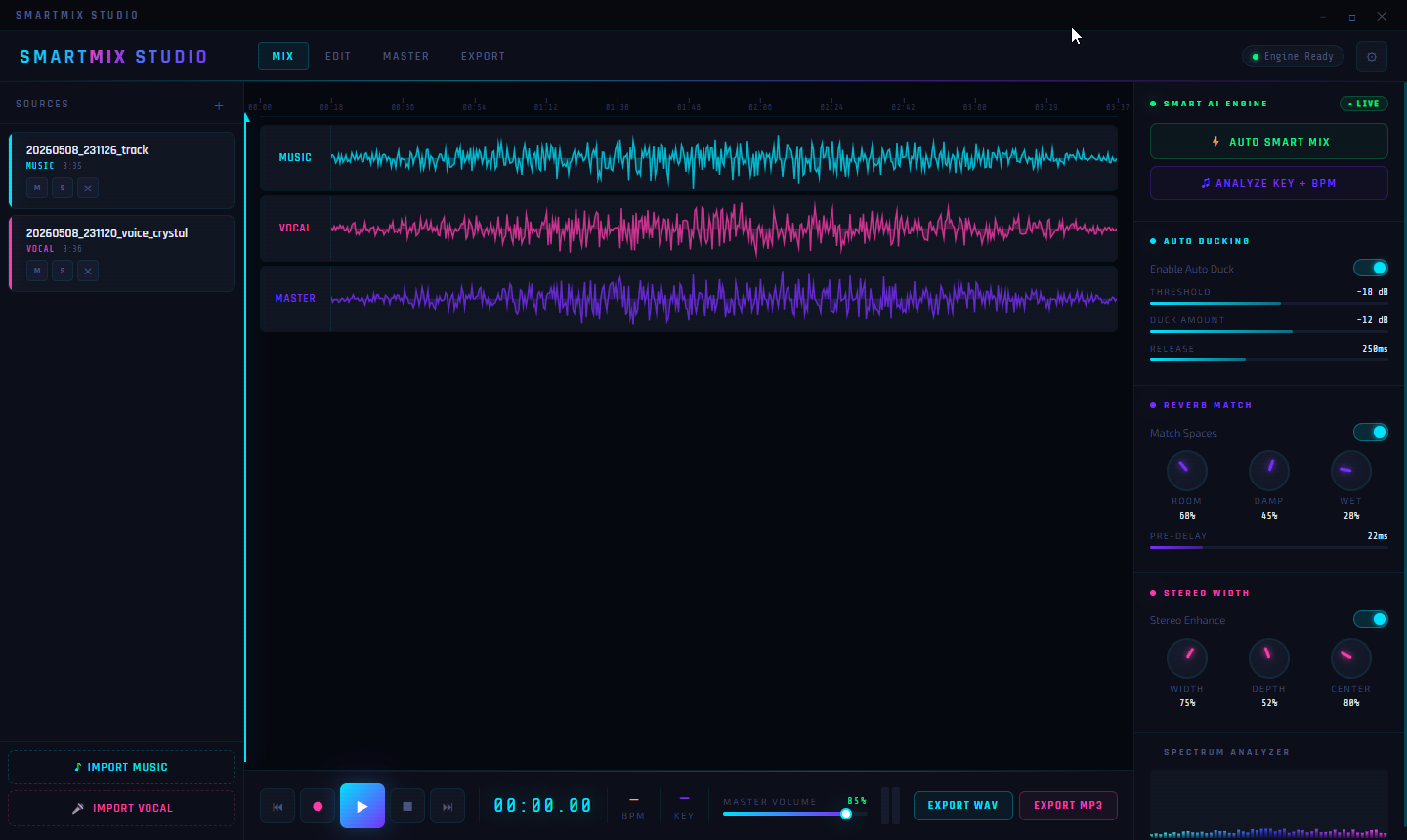
Import your music file. Import your vocal file. Both appear as colour-coded waveform tracks in the timeline — music in cyan, vocal in pink — with a combined Master output track rendered in purple below. The visual waveform display gives you an immediate sense of both tracks’ dynamics and content, and updates in real time as you make changes.
From here, you can press play and hear your mix immediately, adjust the balance manually using mute and solo controls on each track, let the AI handle everything automatically with one click, or do a combination of both — starting with the AI’s mix and fine-tuning from there. The Master Volume control in the transport bar sets your overall output level, and BPM and Key information are displayed alongside the playback controls so you always have your track’s fundamental parameters at hand.
Auto Smart Mix — Professional Results with One Click
The Auto Smart Mix button is the heart of SmartMix Studio, and the feature that makes it genuinely different from any general-purpose audio editor.
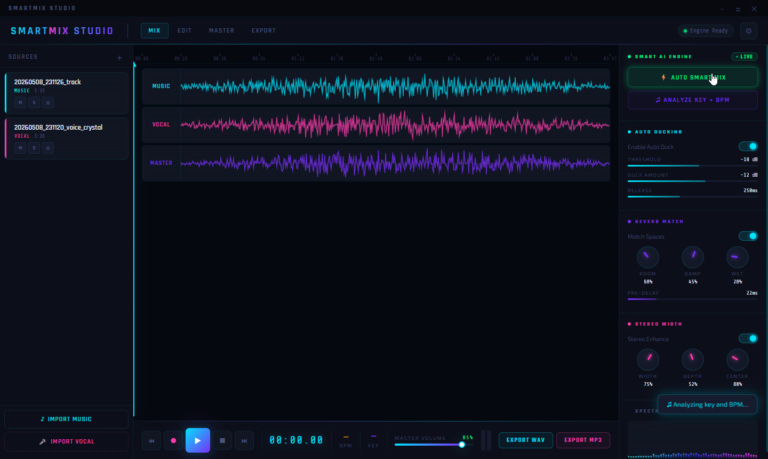
Press it, and the Smart AI Engine — running live, as indicated by the LIVE status indicator — analyses both your music and vocal tracks simultaneously and applies a comprehensive mix across all parameters: levels, ducking, reverb, stereo width, and overall balance. The result is a Master track that sounds like the two elements belong together — because the AI has made all the decisions that an experienced mixing engineer would make, applied them instantly, and rendered the combined output in real time.
This isn’t a simple volume balance. The Auto Smart Mix considers the relationship between the music and the vocal together and applies intelligent processing across multiple dimensions at once. What would take an experienced mixer an hour of careful, iterative work, the AI engine handles in seconds.
For content creators working to a deadline, musicians who want to focus on performance rather than production, and anyone who simply wants a great-sounding result without a learning curve, Auto Smart Mix is transformative.
Analyze Key + BPM — Know Your Track
Before mixing, understanding your track’s musical properties matters. The Analyze Key + BPM function analyses your loaded music file and identifies its tempo and musical key — information that’s valuable for understanding how your vocal and music tracks relate to each other and for making informed processing decisions.
The BPM and Key readouts sit permanently in the transport bar once analysis is complete, giving you a constant reference throughout your session. Watching SmartMix Studio analyse key and BPM in real time — with a live status notification confirming the process — is a small but satisfying illustration of how much intelligence is working in the background on your behalf.
Auto Ducking — Music That Makes Room for Your Voice
One of the most important — and most technically demanding — aspects of mixing voice over music is ducking: the process of automatically reducing the music’s volume when the vocal is present, so the voice can be heard clearly without the music simply being turned down permanently across the whole track.
Done well, ducking is transparent and natural — listeners don’t notice it consciously, they just find the vocal easy to hear. Done poorly or not at all, the voice fights with the music, gets lost in louder passages, or forces you to set the music so low that it loses its impact during sections without vocal.
SmartMix Studio’s Auto Ducking system handles this automatically and with full user control. The threshold determines at what point the music starts to reduce in response to the vocal. The duck amount controls how much the music pulls back. The release time controls how quickly the music returns to full volume after the vocal stops.
All three parameters are adjustable with precision slider controls, and the entire ducking system can be toggled on or off with a single switch. The default settings are carefully chosen to produce natural-sounding results straight away, with the controls available for those who want to dial in a specific character.
Reverb Match — Make Your Voice Belong in the Music
Reverb Match is one of the most musically intelligent features in SmartMix Studio — and one that addresses a problem that trips up even experienced home producers.
When you record a vocal in a dry room and place it over music that was produced in (or processed to sound like) a particular acoustic space, the two elements can feel disconnected — the music sounds like it exists in a real space, while the vocal sounds like it was recorded in a cupboard. The solution is to add reverb to the vocal that matches the character of the music’s space — which requires both knowing what that space sounds like and having the tools to recreate it.
The Reverb Match system does this automatically. With Match Spaces enabled, SmartMix Studio analyses the spatial character of your music and applies corresponding reverb to your vocal — ensuring both tracks feel like they exist in the same acoustic environment.
The reverb is fully adjustable through three rotary controls: Room (the size and character of the simulated space), Damp (how much the high frequencies are absorbed, affecting the brightness and warmth of the reverb tail), and Wet (the mix between the dry vocal and the reverb effect). A Pre-Delay control adds a small time gap before the reverb begins — a subtle touch that helps the vocal remain clear and defined even with reverb applied.
The combination of these controls gives you everything you need to dial in exactly the right spatial character for your mix — from a tight, intimate room to a large, open hall.
Stereo Width — Depth and Dimension in Your Mix
A mix that sounds flat and narrow is immediately less engaging than one with a natural sense of width and space. The Stereo Width section adds genuine depth and dimension to your mix through three controls that work together to create an immersive stereo image.
Width controls the overall breadth of the stereo field — how far the sound extends left and right. Depth adds a sense of front-to-back distance and dimensionality. Center controls the balance and weight of the centre channel — where your vocal and key musical elements typically sit.
The Stereo Enhance toggle activates the enhancement processing, and the three rotary knobs let you shape the result to your preference. The default settings are tuned to add a natural, pleasing sense of space without pushing things into unnaturally wide territory, while the controls are there for anyone who wants a more dramatic effect.
The Timeline — See Your Mix, Not Just Hear It
The three-track timeline at the centre of SmartMix Studio gives you a visual representation of your entire mix at a glance. The music waveform, vocal waveform, and combined master output are each rendered in distinct, clearly distinguishable colours across the full length of the track.
This visual layout makes it immediately obvious where the vocal is active versus where the music plays alone, where the loudest and quietest sections are, and how the master output responds to changes in your mix settings. The playback cursor moves through the timeline in real time as your track plays, giving you a constant visual reference for your position in the song.
Each track has individual Mute and Solo controls directly in the track header, letting you isolate or silence either source for monitoring purposes — essential for checking how each element sounds in isolation before evaluating the combined result.
Export — Your Finished Mix, Ready to Share
When your mix is ready, SmartMix Studio gives you two export options: Export WAV for a full-quality, uncompressed audio file, or Export MP3 for a compressed, universally compatible file ready for streaming, sharing, or uploading.
Both options export your Master track — the fully processed, mixed output of your music and vocal together — as a finished audio file. No additional steps, no rendering queue, no separate mastering pass required. Your mix is done, and it’s ready to go wherever you want to take it.
Four Focused Sections — Mix, Edit, Master, Export
SmartMix Studio’s tabbed navigation organises the production workflow into four logical sections: Mix for track import, AI mixing, and real-time processing; Edit for detailed adjustments to your audio; Master for final-stage output processing; and Export for saving your finished file. Each section is purpose-built for its role in the production chain, keeping the interface clean and focused at every stage of the process.
Who Is SmartMix Studio For?
Singers and vocalists who record at home and want their voice to sound professional over backing tracks, without learning audio production from scratch. Karaoke creators and cover artists who produce content for YouTube, TikTok, or other platforms and need polished audio quickly. Podcasters and voice-over artists who need music and speech to blend naturally and professionally. Independent musicians producing demos or finished tracks who want AI-assisted mixing without the complexity of a full professional DAW. Content creators at any level who want great-sounding audio to be a strength of their work, not a limitation.
Professional Sound, Without the Learning Curve
Audio mixing is genuinely complex. The knowledge required to do it well takes years to develop, and professional tools built for that level of expertise are correspondingly complex to use. For most people making music and content today, that complexity is a barrier — a gap between the quality of what they’ve created and the quality of what they can share.
SmartMix Studio closes that gap. Not by hiding the complexity — but by solving it. The AI engine makes the decisions that matter. The professional-grade processing tools handle the technical work. And you get a finished, polished, professional-sounding mix without needing to become an audio engineer to produce one.
SmartMix Studio — Import. Mix. Sound professional.