Why Workstations Lose Speed Over Time
Every single week you run your computer, invisible digital debris accumulates under the surface. Temporary caches bloat from normal daily usage, system pathways cross directions, and stealth background applications quietly attach themselves to your startup sequence.
The result? Your hardware isn't old—it's simply crowded. The utility safely unburdens your storage blocks to bring back original click responsiveness.
One-Click Simplicity. No Jargon.
Most operating toolkits on the market are intentionally confusing. They scare users with cryptic alerts or swamp you under endless, risky confirmation checklists. Our development blueprint focuses entirely on clean, background automation.
You do not need to be an administrator or understand complex software settings. Simply click the interface activation handle, let the automated sequence clean the targets, and return immediately to a light, responsive system environment.
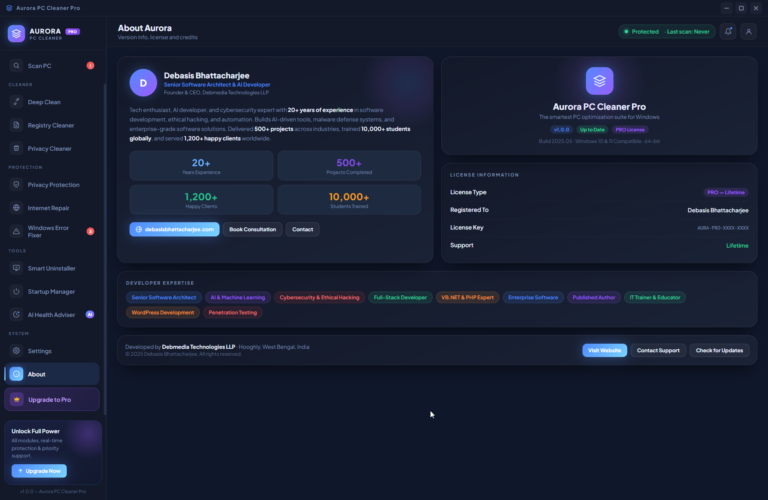
I’ve Been Inside Thousands of PCs. I Know Exactly What Slows Them Down.
Over 20 years of working in software development, cybersecurity, and IT training, I’ve sat across from thousands of users — students, freelancers, business owners, professionals — who all came to me with the same complaint: “My computer is slow and I don’t know why.”
And every single time, when I opened their machine, the answer was the same.
Gigabytes of forgotten temp files. Browser caches bloated from months of use. Registry entries pointing to software that was uninstalled a year ago. Startup programs loading silently in the background before the user had even touched the keyboard. Windows telemetry quietly running, privacy settings wide open, DNS resolving through outdated servers.
The problem was never the hardware. The hardware was fine.
The problem was that no one had ever cleaned it.
What surprised me more was the tools available to fix it. Most were either too technical for everyday users, too aggressive in what they deleted, or too focused on scaring people with fake threat counters to push an upgrade. I never felt comfortable recommending any of them to the people I trained.
So I built my own.
What I Built — and Why It’s Different
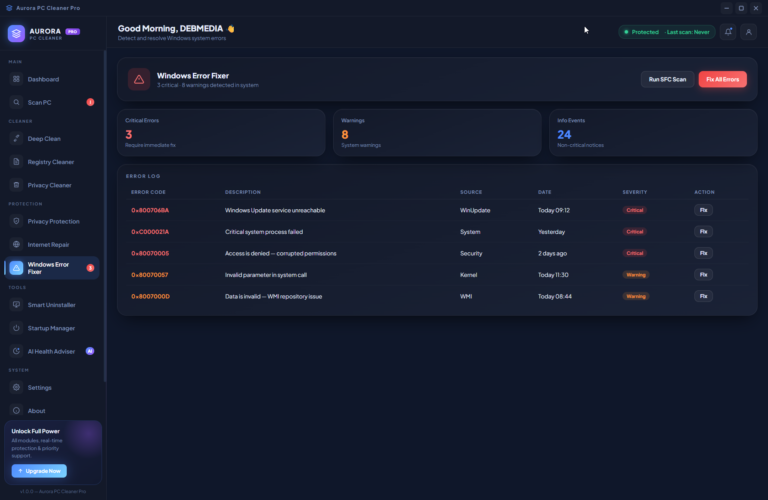
Aurora PC Cleaner Pro is a complete Windows optimization suite I designed and developed from the ground up — built on .NET 6, powered by a modern WebView2 interface, and connected to real Windows system internals through WMI, PDH counters, and the registry.
Every feature in this software exists because I’ve personally diagnosed that exact problem on a real user’s machine.
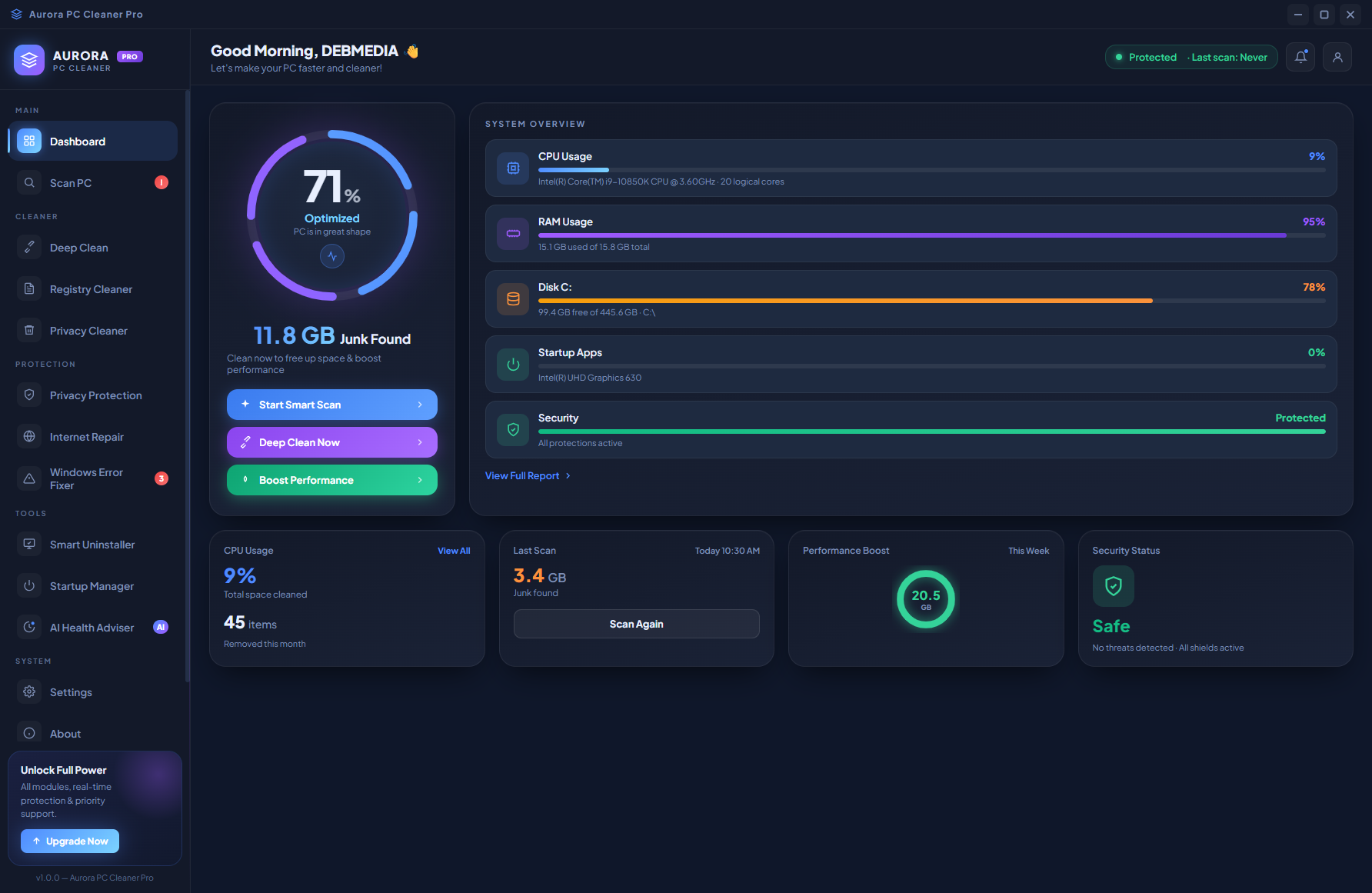
[SCREENSHOT: Dashboard — health ring, real-time CPU/RAM/Disk/GPU overview, action buttons]
The dashboard gives users something they’ve never had before — a real, honest picture of their PC’s health in one place. A live health score calculated from actual CPU load, RAM pressure, and disk usage. Real-time system stats refreshing every 3 seconds. Junk size displayed clearly, without exaggeration. And three action buttons that actually do something meaningful with one click.
No fear tactics. No inflated numbers. Just clarity.
The Features I’m Most Proud Of
Smart Scan & Deep Clean
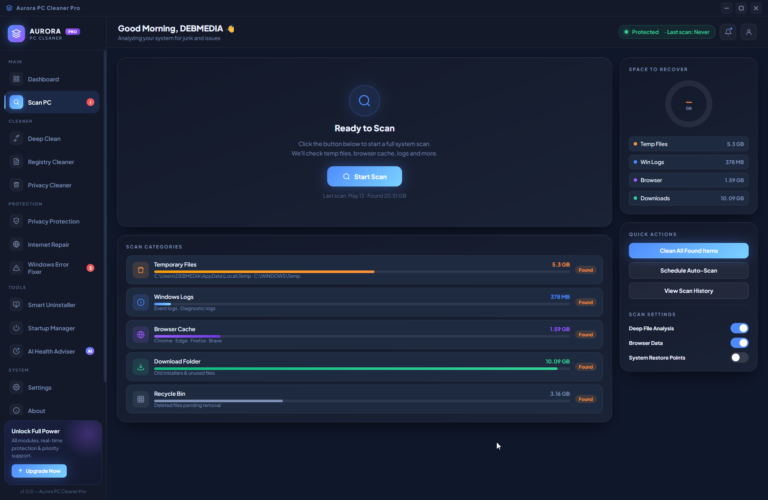
I built the scanner to do real file-system work — not estimates. It walks through Windows temp folders, browser caches across Chrome, Edge and Firefox, system event logs, the download folder, and the recycle bin. Every byte it reports is a byte it actually found.
[SCREENSHOT: Scan PC screen — scanning in progress, category breakdown with progress bars]
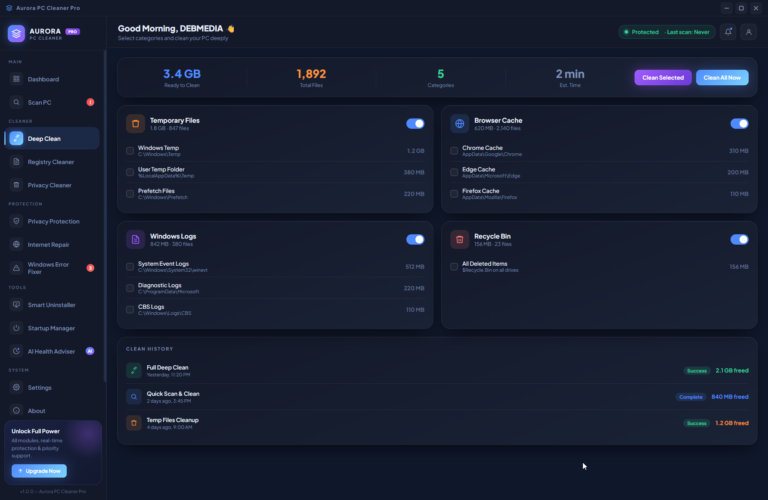
After scanning, Deep Clean lets users choose exactly what to clean by category, with granular checkboxes for every subfolder path. They stay in control. Nothing is deleted without their knowledge.
[SCREENSHOT: Deep Clean screen — category panels with toggle switches and file size breakdown]
Registry Cleaner — with a Safety Net
Registry cleaning is one of the most misunderstood features in PC optimization. Done wrong, it can break things. I built this module with that risk in mind.
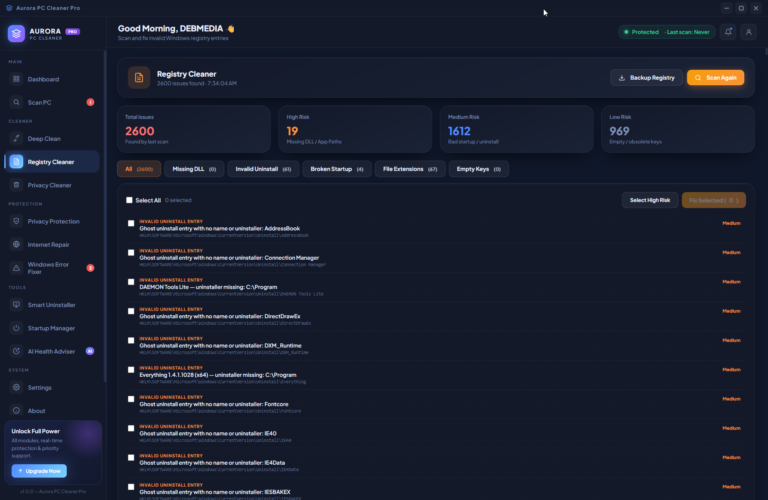
[SCREENSHOT: Registry Cleaner screen — scan results with risk levels, category filter tabs]
Before any cleaning happens, Aurora prompts the user to create a Windows System Restore Point — and can do it automatically in one click. Issues are categorized by risk level: missing DLL references, broken uninstall entries, invalid startup keys, and empty orphaned paths. Users can filter by category, select only high-risk items, or choose everything. The choice is always theirs.
Startup Manager — Because Boot Time Matters
I’ve seen machines that took over 60 seconds to become usable after startup — not because of the hardware, but because 20 background applications were loading simultaneously.
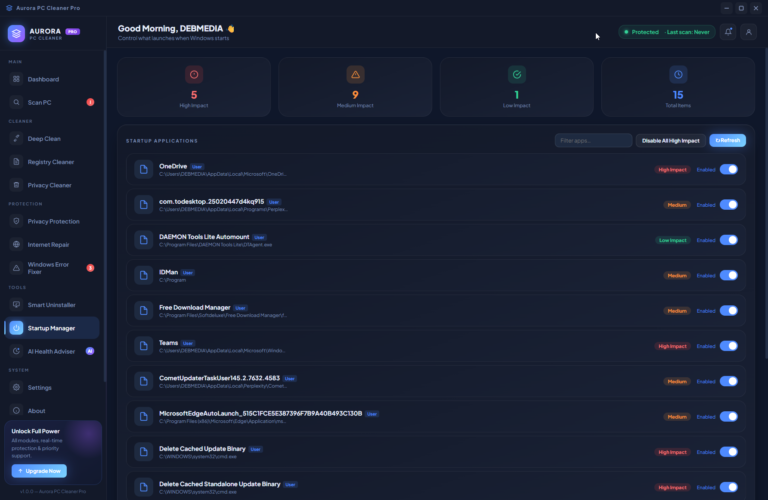
[SCREENSHOT: Startup Manager screen — app list with High/Medium/Low impact badges and toggle switches]
Aurora’s Startup Manager reads directly from the Windows registry — both user and system hives — and shows every startup entry with its real-world performance impact. Users can disable individual items with a toggle or kill all high-impact entries in one click. The difference in boot time is often immediate.
Privacy Protection — Real Visibility, Real Control
As someone with a background in cybersecurity and ethical hacking, privacy protection was non-negotiable for me in this software.
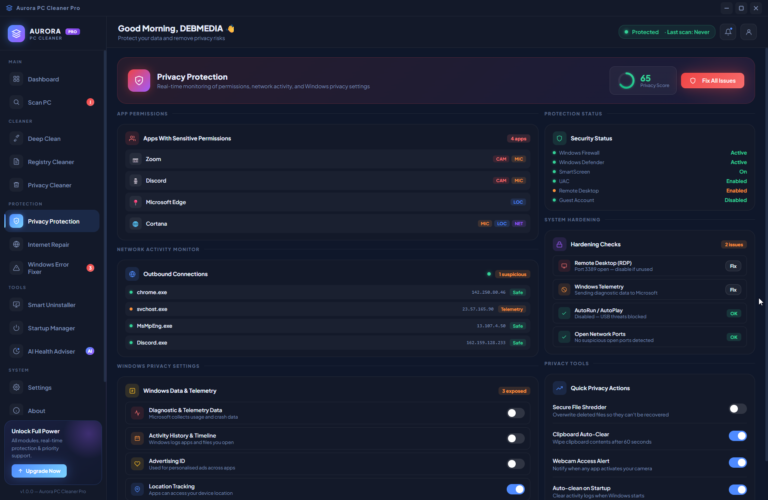
[SCREENSHOT: Privacy Protection screen — privacy score ring, app permissions panel, Windows telemetry toggles]
Aurora scans active app permissions — camera, microphone, location — monitors live outbound network connections, and surfaces Windows privacy settings that are commonly left exposed: telemetry, advertising ID, activity history, location tracking. Each setting can be toggled directly from the interface. The Fix All button resolves every detected issue in one operation, with a detailed confirmation popup before anything is changed.
Internet Repair — Fix What You Can’t Even See
Network problems are invisible until they’re not — and when they happen, most users have no idea where to start. I built this module to be the expert in their corner.
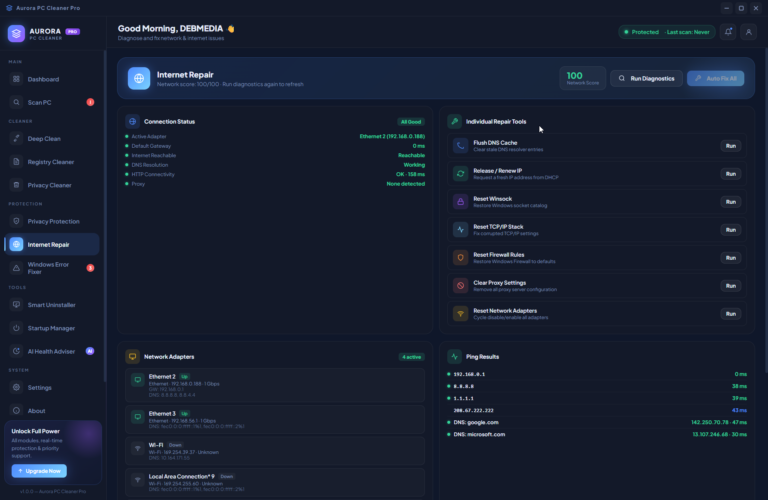
[SCREENSHOT: Internet Repair screen — connectivity status panel, individual repair tools, DNS switcher]
A single click runs a full network diagnostic: gateway reachability, DNS resolution, HTTP connectivity, proxy detection, and active adapter status. If something is wrong, Aurora shows it clearly — and offers individual repair tools for every common issue: DNS flush, IP release/renew, Winsock reset, TCP/IP stack reset, firewall restore, proxy clear. Users can also switch their DNS provider to Google, Cloudflare, or OpenDNS with one click.
AI Health Adviser — The Full Picture
This is the module I spent the most time on, because it does something no basic PC cleaner does: it gives users a complete health report of their entire machine.
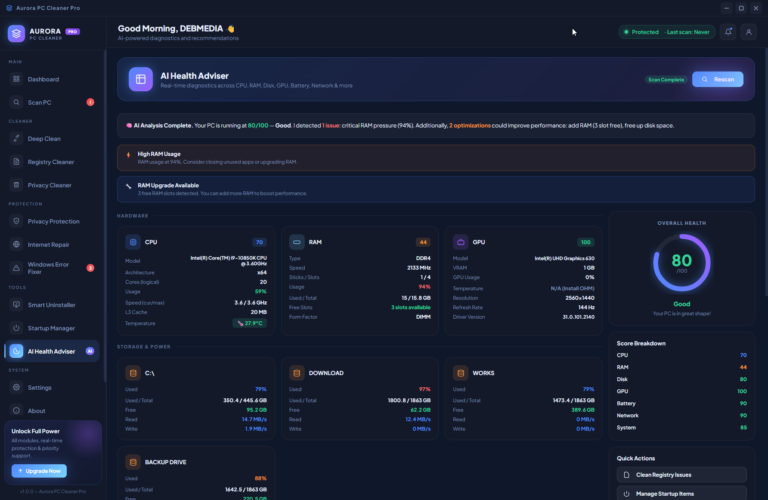
[SCREENSHOT: AI Health Adviser screen — score ring, CPU/RAM/GPU cards, score breakdown, alerts panel]
CPU architecture, speed, temperature, and core count. RAM type, speed, slots used, and upgrade availability. GPU VRAM and driver version. Disk read/write speeds. Battery wear percentage. Network latency. Running processes ranked by CPU and RAM usage. Critical Windows services monitored. Everything scored, everything explained in plain language — with an AI-generated summary at the top that tells users exactly what’s wrong and what to do about it.
Smart Uninstaller & Privacy Cleaner
I also included a full uninstaller that reads installed applications directly from the Windows registry — with publisher info, version, install date, and size — so users can finally see what’s actually taking space on their machine and remove it cleanly.
[SCREENSHOT: Smart Uninstaller screen — app list with size/date info and Uninstall buttons]
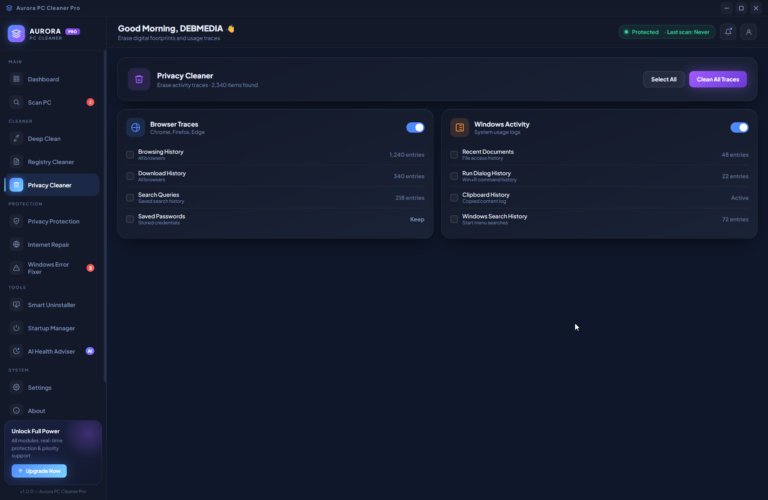
The Privacy Cleaner handles digital footprints: browsing history, download history, search queries, clipboard history, recent documents, and Windows activity logs — across all major browsers and system locations.
What This Project Represents
I didn’t build Aurora PC Cleaner Pro to compete with bloated commercial tools. I built it because I’ve spent 20 years watching good hardware suffer from neglect — and I knew exactly how to fix it.
Every screen, every feature, every line of code in this project comes from real diagnostic experience. The problems it solves are problems I’ve personally seen, on real machines, for real users.
This is what I mean when I say I build software that’s engineered by someone who deeply understands the problem.
Aurora PC Cleaner Pro — Designed for Windows users who deserve better than slow.